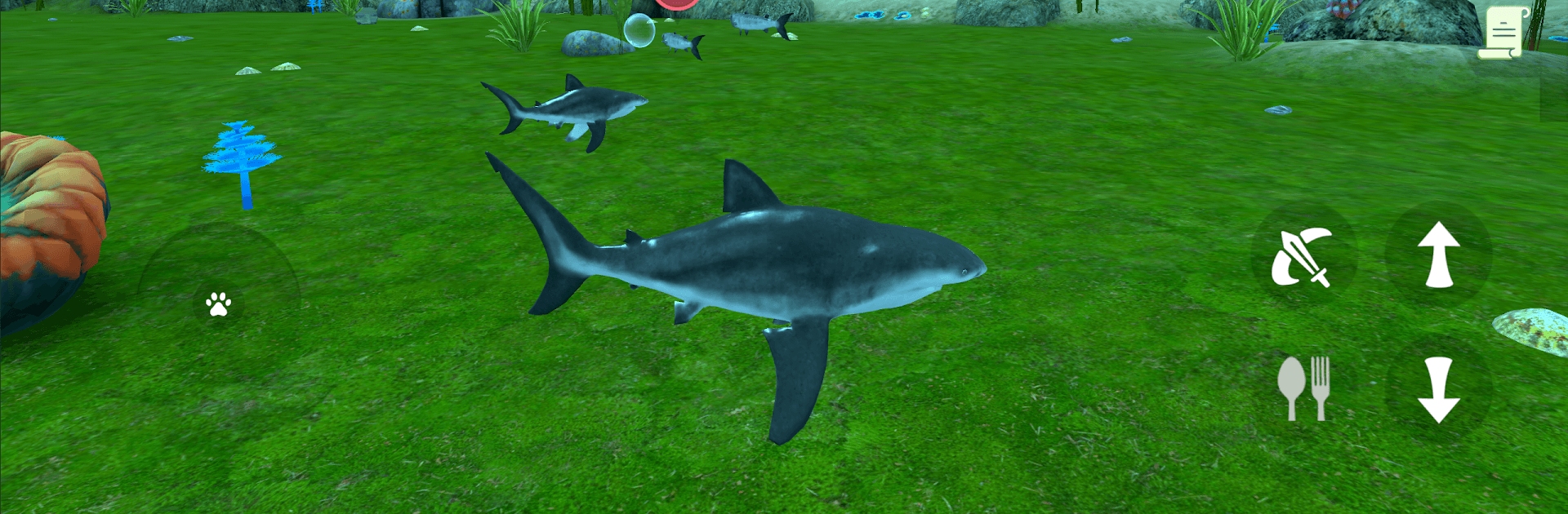
Shark Fish Simulator

Shark Fish Simulator

Simulation

| Avelog Games

Play on PC with BlueStacks or from our cloud

  • Overview
  • Game Features
  • How to Play

Page Modified On: April 07, 2026

Play Shark Fish Simulator on PC or Mac

Step into the World of Shark Fish Simulator, a thrilling Simulation game from the house of Avelog Games. Play this Android game on BlueStacks App Player and experience immersive gaming on PC or Mac.

About the Game

Shark Fish Simulator from Avelog Games drops you into the open ocean as a hungry, fast, and surprisingly strategic predator. It’s a Simulation game about survival: stalking prey, growing stronger, and carving out your territory in a living seascape. Expect tense hunts, flashy chases, and moments where patience and timing matter just as much as raw power.

Game Features

  • Hunt like a pro: Track schools of tuna and barracuda, push through rays and sailfish, and—if you’re bold—go after dolphins, swordfish, and even whales. Eating after a fight brings your health back, so every meal counts.
  • Pack tactics and ambushes: Roll with your crew for intense group-on-group brawls, or slip behind a target for a clean, stealthy strike. Outmaneuvering a rival pack feels incredibly satisfying.
  • Grow your lineage: Build up your shark’s family and keep your bloodline thriving. Stronger generations mean tougher runs and bigger prey on the menu.
  • Skins with real perks: Swap between blue, bull, tiger, hammerhead, great white, whale shark, and the legendary megalodon. Each skin tweaks your playstyle with its own unique effect.
  • A world worth roaming: Swim through vibrant coral gardens, tangled kelp forests, and quiet trenches. The ocean isn’t just scenery—it shapes how you stalk, hide, and escape.
  • Progress and power: Earn experience, unlock talents, and fine-tune your shark into a bruiser, a sprinter, or a sneaky ambusher—whatever fits your style.
  • Flexible play: Go mobile when you want quick hunts, or use BlueStacks on PC for smooth controls and a wider view of the action.

Get ready for a buttery smooth, high-performance gaming action only on BlueStacks.

Game Features

Enhancements

  • Macros
  • Multi Instance
  • Multi Instance Sync
  • Script
  • Enhancements
Macros

Macros

Automate the predictable in Shark Fish Simulator and transform your gameplay with Macros. Get access to inventive Macros in the BlueStacks Macro Community
Multi Instance

Multi Instance

Play Shark Fish Simulator on one window. And chat with your friend on the other. Press CTRL + Shift + 8 to open the Multi-Instance Manager. And start creating fresh instances or clone an existing one.
Multi Instance Sync

Multi Instance Sync

Play Shark Fish Simulator with the power of Multi-Instance Sync. Replicate what you are doing on the main instance on all other instances. Level up faster, play more.
Script

Script

Script your way to gaming glory in Shark Fish Simulator with BlueStacks Script. Write and run a set of commands to automate repeated tasks. Trigger the command by assigning it to any key.
Read More

How to Download and Play Shark Fish Simulator on PC or Mac

  • Download and install BlueStacks on your PC or Mac

  • Complete Google sign-in to access the Play Store, or do it later

  • Look for Shark Fish Simulator in the search bar at the top right corner

  • Click to install Shark Fish Simulator from the search results

  • Complete Google sign-in (if you skipped step 2) to install Shark Fish Simulator

  • Click the Shark Fish Simulator icon on the home screen to start playing

video
Watch Video

Minimum System Requirements

With BlueStacks 5, you can get started on a PC that fulfills the following requirements.

  • Operating System

    Microsoft Windows 7 or above, macOS 11 (Big Sur) or above

  • Processor

    Intel, AMD or Apple Silicon Processor

  • RAM

    at least 4GB

  • HDD

    10GB Free Disk Space

Note:

* You must be an Administrator on your PC. Up to date graphics drivers from Microsoft or the chipset vendor.

Shark Fish Simulator - FAQs

  • How to play Shark Fish Simulator on Windows PC & Mac?

    Play Shark Fish Simulator on your PC or Mac by following these simple steps.

    • Click on 'Play Shark Fish Simulator on PC’ to download BlueStacks
    • Install it and log-in to Google Play Store
    • Launch and play the game.
  • Why is BlueStacks the fastest and safest platform to play games on PC?

    BlueStacks respects your privacy and is always safe and secure to use. It does not carry any malware, spyware, or any sort of additional software that could harm your PC.

    It is engineered to optimize speed and performance for a seamless gaming experience.

  • What are Shark Fish Simulator PC requirements?

    Minimum requirement to run Shark Fish Simulator on your PC

    • OS: Microsoft Windows 7 or above MacOS 11 (Big Sur) or above
    • Processor: Intel, AMD or Apple Silicon Processor
    • RAM: Your PC must have at least 4GB of RAM. (Note that having 4GB or more disk space is not a substitute for RAM)
    • HDD: 10GB Free Disk Space.
    • You must be an Administrator on your PC.