SoftBody Drive : Car Crash

SoftBody Drive : Car Crash

Simulation

| GameTOV

Play on PC with BlueStacks or from our cloud

  • Overview
  • Game Features
  • How to Play

Page Modified On: June 29, 2026

Play SoftBody Drive : Car Crash on PC or Mac

Play SoftBody Drive : Car Crash by GameTOV on PC or Mac with BlueStacks. Use a bigger screen, mouse and keyboard controls, and smoother performance while you play.

About the Game

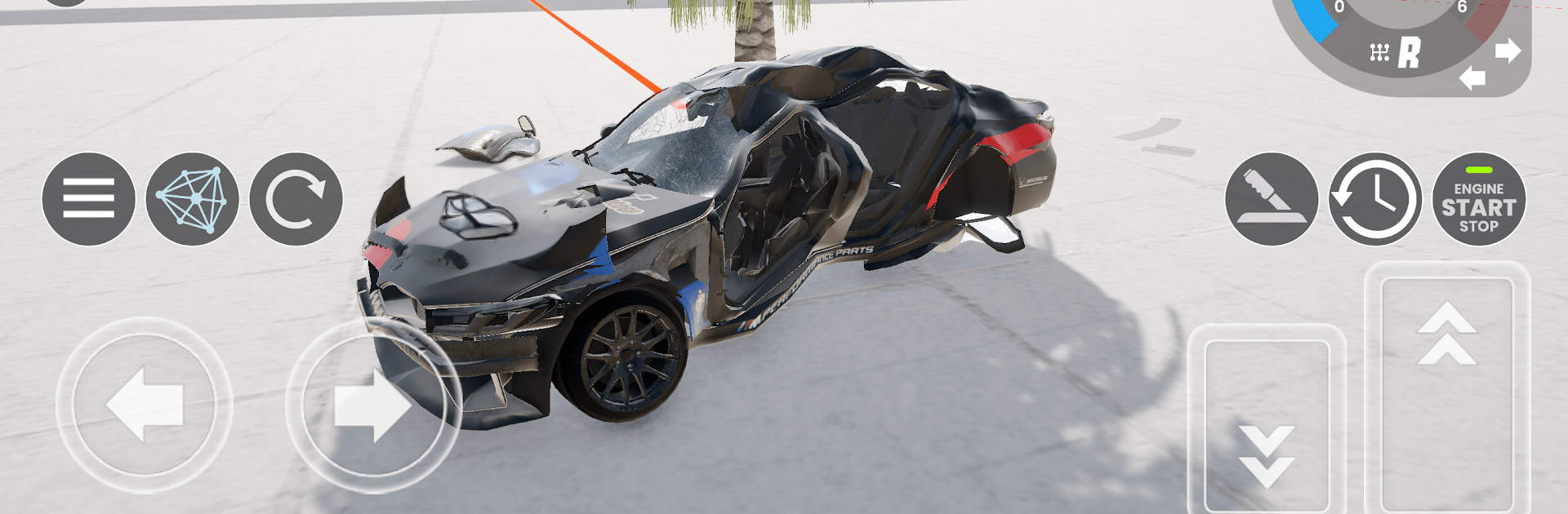
SoftBody Drive : Car Crash is a Simulation sandbox where metal, speed, and physics collide in the best possible way. Rip around open areas, send cars into brutal impacts, and watch bodies and frames bend exactly how you’d expect. It feels great on mobile and also runs smoothly on PC with BlueStacks.

Game Features

  • True soft‑body physics — Impacts don’t just scratch paint; they reshape panels, twist frames, and stress suspensions in real time.
  • Realistic damage modeling — Doors can pop, bumpers tear off, and parts scatter based on how and where you hit.
  • Open sandbox mode — Set up your own experiments, try wild ideas, and see what happens when you really push the limits.
  • Free driving exploration — Cruise through varied, detailed spaces with no timers or rules getting in the way.
  • Diverse vehicle roster — Lightweight, heavy, grippy, sloppy—each ride handles and deforms differently thanks to unique mass and setup.
  • Crash tests with slo‑mo — Line up controlled collisions, slow things down, and study the results from different angles.
  • Drift and stunt challenges — Practice clean slides, chain corners, or fire off ramps when you’re chasing big air.
  • Lifelike driving feel — Weight transfer, traction changes, and body roll make every maneuver feel grounded and responsive.
  • Built for smooth play — Clean visuals, steady performance, and controls that keep up when the chaos starts.

Start playing SoftBody Drive : Car Crash on BlueStacks and get a smoother, more comfortable PC or Mac setup.


Game Features

Enhancements

  • Macros
  • Multi Instance
  • Multi Instance Sync
  • Script
  • Enhancements
Macros

Macros

Automate the predictable in SoftBody Drive : Car Crash and transform your gameplay with Macros. Get access to inventive Macros in the BlueStacks Macro Community
Multi Instance

Multi Instance

Play SoftBody Drive : Car Crash on one window. And chat with your friend on the other. Press CTRL + Shift + 8 to open the Multi-Instance Manager. And start creating fresh instances or clone an existing one.
Multi Instance Sync

Multi Instance Sync

Play SoftBody Drive : Car Crash with the power of Multi-Instance Sync. Replicate what you are doing on the main instance on all other instances. Level up faster, play more.
Script

Script

Script your way to gaming glory in SoftBody Drive : Car Crash with BlueStacks Script. Write and run a set of commands to automate repeated tasks. Trigger the command by assigning it to any key.
Read More

How to Download and Play SoftBody Drive : Car Crash on PC or Mac

  • Download and install BlueStacks on your PC or Mac

  • Complete Google sign-in to access the Play Store, or do it later

  • Look for SoftBody Drive : Car Crash in the search bar at the top right corner

  • Click to install SoftBody Drive : Car Crash from the search results

  • Complete Google sign-in (if you skipped step 2) to install SoftBody Drive : Car Crash

  • Click the SoftBody Drive : Car Crash icon on the home screen to start playing

video
Watch Video

Minimum System Requirements

With BlueStacks 5, you can get started on a PC that fulfills the following requirements.

  • Operating System

    Microsoft Windows 7 or above, macOS 11 (Big Sur) or above

  • Processor

    Intel, AMD or Apple Silicon Processor

  • RAM

    at least 4GB

  • HDD

    10GB Free Disk Space

Note:

* You must be an Administrator on your PC. Up to date graphics drivers from Microsoft or the chipset vendor.

SoftBody Drive : Car Crash - FAQs

  • How to play SoftBody Drive : Car Crash on Windows PC & Mac?

    Play SoftBody Drive : Car Crash on your PC or Mac by following these simple steps.

    • Click on 'Play SoftBody Drive : Car Crash on PC’ to download BlueStacks
    • Install it and log-in to Google Play Store
    • Launch and play the game.
  • Why is BlueStacks the fastest and safest platform to play games on PC?

    BlueStacks respects your privacy and is always safe and secure to use. It does not carry any malware, spyware, or any sort of additional software that could harm your PC.

    It is engineered to optimize speed and performance for a seamless gaming experience.

  • What are SoftBody Drive : Car Crash PC requirements?

    Minimum requirement to run SoftBody Drive : Car Crash on your PC

    • OS: Microsoft Windows 7 or above MacOS 11 (Big Sur) or above
    • Processor: Intel, AMD or Apple Silicon Processor
    • RAM: Your PC must have at least 4GB of RAM. (Note that having 4GB or more disk space is not a substitute for RAM)
    • HDD: 10GB Free Disk Space.
    • You must be an Administrator on your PC.