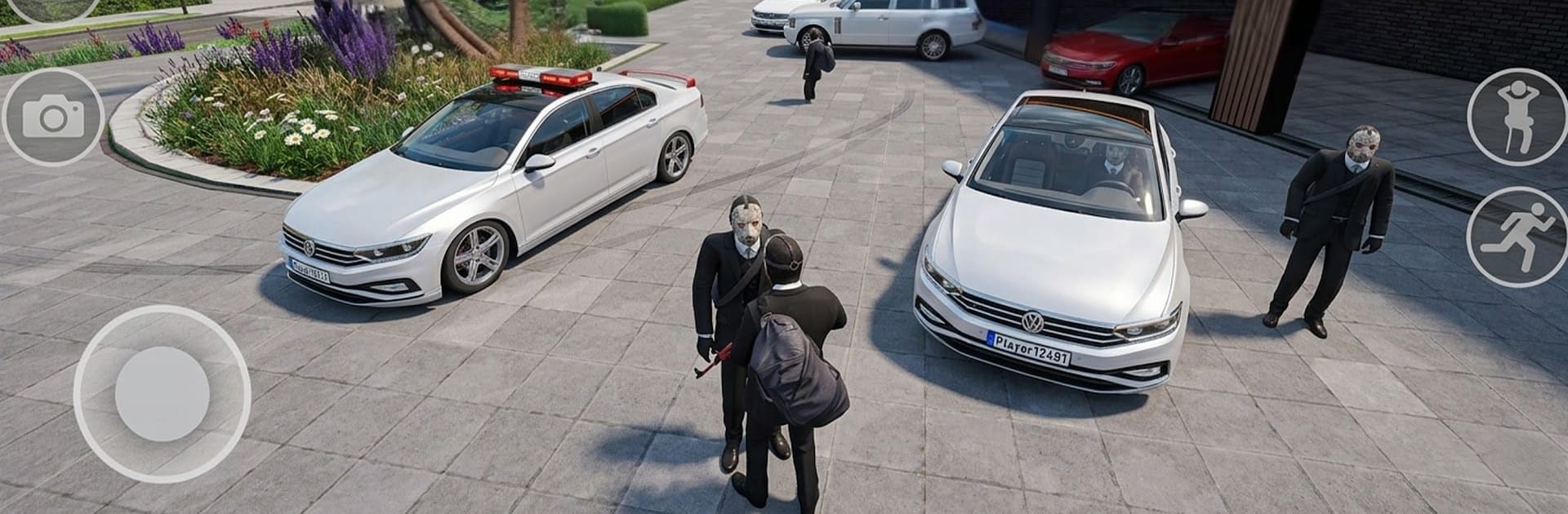
Street Mafia ONLİNE
Street Mafia ONLİNE

Street Mafia ONLİNE

Simulation

| Anakon Play

Play on PC with BlueStacks or from our cloud

  • Overview
  • Game Features
  • How to Play

Page Modified On: August 20, 2026

Play Street Mafia ONLİNE on PC or Mac

Street Mafia ONLİNE brings the Simulation genre to life, and throws up exciting challenges for gamers. Developed by Anakon Play, this Android game is best experienced on BlueStacks, the World’s #1 app player for PC and Mac users.

About the Game

Street Mafia ONLİNE drops you into a flashy shared city where style matters and horsepower talks. This street-life Simulation is all about cruising with friends, meeting new players, and soaking up a high-end urban vibe. Prefer a bigger view and tighter controls? It plays great on BlueStacks if that’s your thing.

Game Features

  • Premium Rides, Real Handling: Slide behind the wheel of luxury cars that feel responsive and grounded, with smooth cornering and punchy acceleration that makes every meetup and cruise actually fun.
  • Huge Urban Playground: Roam a sprawling city at your own pace—from wide, gleaming boulevards to tucked-away backstreets—and pick your own route without anyone rushing you.
  • Luxury Living Everywhere: Roll past modern neighborhoods, upscale mansions, and exclusive hangouts that make late-night drives feel a little more glamorous.
  • Cruise Together, Effortlessly: Link up with friends, form convoys, and line up for casual meetups or photo ops—because sharing the streets is half the experience.
  • Global Crowd, Always Active: Jump into an always-on scene and run into players from around the world, whether you’re swapping car tips, planning a ride-out, or just chatting at a scenic spot.
  • Show Your Taste: Pull up in your best rides and park with pride—flex what you’ve got, compare garages, and catch the glow of headlights across the city.

Ready to top the leaderboard? We bet you do. Let precise controls and sharp visuals optimized on BlueStacks lead you to victory.


Game Features

Enhancements

  • Macros
  • Multi Instance
  • Multi Instance Sync
  • Script
  • Enhancements
Macros

Macros

Automate the predictable in Street Mafia ONLİNE and transform your gameplay with Macros. Get access to inventive Macros in the BlueStacks Macro Community
Multi Instance

Multi Instance

Play Street Mafia ONLİNE on one window. And chat with your friend on the other. Press CTRL + Shift + 8 to open the Multi-Instance Manager. And start creating fresh instances or clone an existing one.
Multi Instance Sync

Multi Instance Sync

Play Street Mafia ONLİNE with the power of Multi-Instance Sync. Replicate what you are doing on the main instance on all other instances. Level up faster, play more.
Script

Script

Script your way to gaming glory in Street Mafia ONLİNE with BlueStacks Script. Write and run a set of commands to automate repeated tasks. Trigger the command by assigning it to any key.
Read More

How to Download and Play Street Mafia ONLİNE on PC or Mac

  • Download and install BlueStacks on your PC or Mac

  • Complete Google sign-in to access the Play Store, or do it later

  • Look for Street Mafia ONLİNE in the search bar at the top right corner

  • Click to install Street Mafia ONLİNE from the search results

  • Complete Google sign-in (if you skipped step 2) to install Street Mafia ONLİNE

  • Click the Street Mafia ONLİNE icon on the home screen to start playing

video
Watch Video

Minimum System Requirements

With BlueStacks 5, you can get started on a PC that fulfills the following requirements.

  • Operating System

    Microsoft Windows 7 or above, macOS 11 (Big Sur) or above

  • Processor

    Intel, AMD or Apple Silicon Processor

  • RAM

    at least 4GB

  • HDD

    10GB Free Disk Space

Note:

* You must be an Administrator on your PC. Up to date graphics drivers from Microsoft or the chipset vendor.

Street Mafia ONLİNE - FAQs

  • How to play Street Mafia ONLİNE on Windows PC & Mac?

    Play Street Mafia ONLİNE on your PC or Mac by following these simple steps.

    • Click on 'Play Street Mafia ONLİNE on PC’ to download BlueStacks
    • Install it and log-in to Google Play Store
    • Launch and play the game.
  • Why is BlueStacks the fastest and safest platform to play games on PC?

    BlueStacks respects your privacy and is always safe and secure to use. It does not carry any malware, spyware, or any sort of additional software that could harm your PC.

    It is engineered to optimize speed and performance for a seamless gaming experience.

  • What are Street Mafia ONLİNE PC requirements?

    Minimum requirement to run Street Mafia ONLİNE on your PC

    • OS: Microsoft Windows 7 or above MacOS 11 (Big Sur) or above
    • Processor: Intel, AMD or Apple Silicon Processor
    • RAM: Your PC must have at least 4GB of RAM. (Note that having 4GB or more disk space is not a substitute for RAM)
    • HDD: 10GB Free Disk Space.
    • You must be an Administrator on your PC.