Sunkenland: Ocean Survival

Sunkenland: Ocean Survival

Simulation

| VADE

Play on PC with BlueStacks or from our cloud

  • Overview
  • Game Features
  • How to Play

Page Modified On: September 12, 2025

Play Sunkenland: Ocean Survival on PC or Mac

Bring your A-game to Sunkenland: Ocean Survival, the Simulation game sensation from VADE. Give your gameplay the much-needed boost with precise game controls, high FPS graphics, and top-tier features on your PC or Mac with BlueStacks.

About the Game

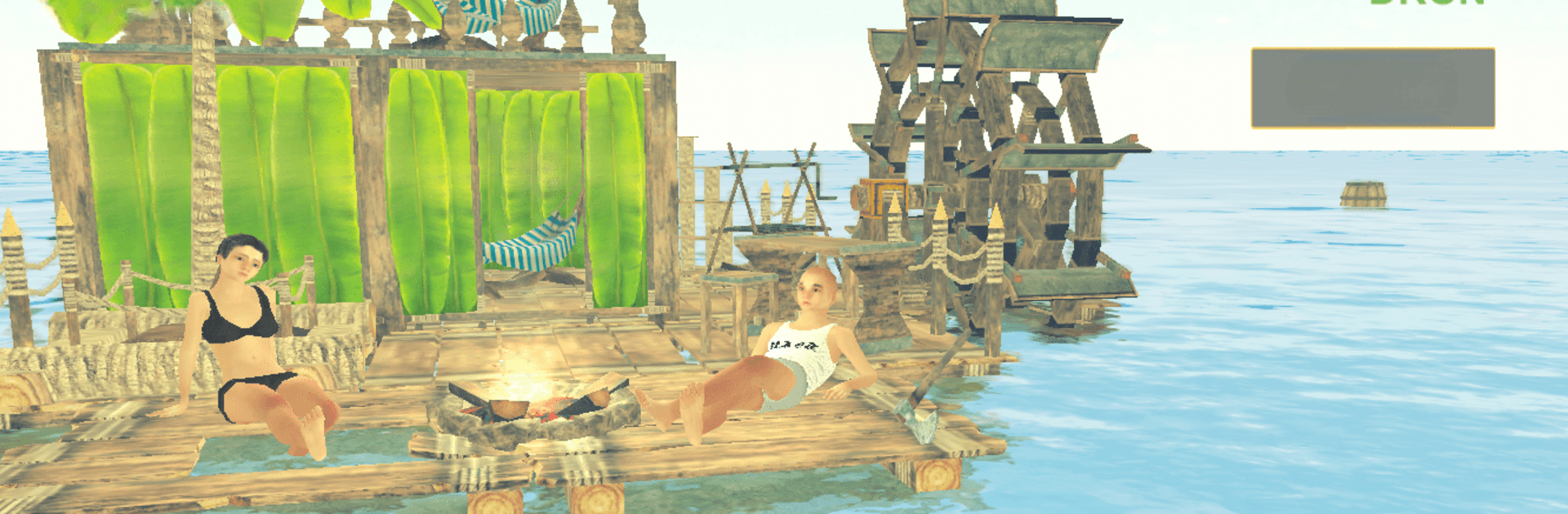
Sunkenland: Ocean Survival throws you into the open ocean after a rough crash, with nothing but a scrap of raft and whatever you can fish out of the waves. Your job? Keep everyone breathing, drinking, eating, and not getting chewed on while you turn a wobbly platform into something you can actually call home. Prefer a keyboard and mouse? It runs smoothly on BlueStacks if you like playing on PC.

Game Features

  • Online Co-op Rafting: Team up with friends, split duties, and build a shared floating base. One person gathers, another crafts, someone keeps an eye out for those teeth circling below.

  • Scavenge the Seas: Hook floating debris, salvage parts, and stash every last plank and bolt. The ocean’s your resource pile—if you can grab it before it drifts away.

  • Craft Tools and Gear: Start simple, then upgrade. Make tools that speed up gathering, set up workbenches, and put together weapons for when things get… bitey.

  • Build a Floating Fortress: Expand from a tiny raft to a multi-section stronghold with platforms, walls, storage, and more. Patch damage, reinforce weak spots, and keep your base afloat.

  • Survive the Elements: Manage thirst and hunger while keeping health in the green. Purify water, cook better meals, and stay ready for surprise attacks.

  • Character Customization: Tailor your survivor’s look and loadout. Clothing isn’t just cosmetic here—gear can boost your stats and make tough jobs easier.

  • Progress Your Way: Unlock new recipes, improve efficiency, and refine your setup as you learn the ropes and push farther from the crash site.

Developer: VADE | Genre: Simulation

Start your journey now. Download the game on BlueStacks, invite your friends, and march on a new adventure.


Game Features

Enhancements

  • Macros
  • Multi Instance
  • Multi Instance Sync
  • Script
  • Enhancements
Macros

Macros

Automate the predictable in Sunkenland: Ocean Survival and transform your gameplay with Macros. Get access to inventive Macros in the BlueStacks Macro Community
Multi Instance

Multi Instance

Play Sunkenland: Ocean Survival on one window. And chat with your friend on the other. Press CTRL + Shift + 8 to open the Multi-Instance Manager. And start creating fresh instances or clone an existing one.
Multi Instance Sync

Multi Instance Sync

Play Sunkenland: Ocean Survival with the power of Multi-Instance Sync. Replicate what you are doing on the main instance on all other instances. Level up faster, play more.
Script

Script

Script your way to gaming glory in Sunkenland: Ocean Survival with BlueStacks Script. Write and run a set of commands to automate repeated tasks. Trigger the command by assigning it to any key.
Read More

How to Download and Play Sunkenland: Ocean Survival on PC or Mac

  • Download and install BlueStacks on your PC or Mac

  • Complete Google sign-in to access the Play Store, or do it later

  • Look for Sunkenland: Ocean Survival in the search bar at the top right corner

  • Click to install Sunkenland: Ocean Survival from the search results

  • Complete Google sign-in (if you skipped step 2) to install Sunkenland: Ocean Survival

  • Click the Sunkenland: Ocean Survival icon on the home screen to start playing

video
Watch Video

Minimum System Requirements

With BlueStacks 5, you can get started on a PC that fulfills the following requirements.

  • Operating System

    Microsoft Windows 7 or above, macOS 11 (Big Sur) or above

  • Processor

    Intel, AMD or Apple Silicon Processor

  • RAM

    at least 4GB

  • HDD

    10GB Free Disk Space

Note:

* You must be an Administrator on your PC. Up to date graphics drivers from Microsoft or the chipset vendor.

Sunkenland: Ocean Survival - FAQs

  • How to play Sunkenland: Ocean Survival on Windows PC & Mac?

    Play Sunkenland: Ocean Survival on your PC or Mac by following these simple steps.

    • Click on 'Play Sunkenland: Ocean Survival on PC’ to download BlueStacks
    • Install it and log-in to Google Play Store
    • Launch and play the game.
  • Why is BlueStacks the fastest and safest platform to play games on PC?

    BlueStacks respects your privacy and is always safe and secure to use. It does not carry any malware, spyware, or any sort of additional software that could harm your PC.

    It is engineered to optimize speed and performance for a seamless gaming experience.

  • What are Sunkenland: Ocean Survival PC requirements?

    Minimum requirement to run Sunkenland: Ocean Survival on your PC

    • OS: Microsoft Windows 7 or above MacOS 11 (Big Sur) or above
    • Processor: Intel, AMD or Apple Silicon Processor
    • RAM: Your PC must have at least 4GB of RAM. (Note that having 4GB or more disk space is not a substitute for RAM)
    • HDD: 10GB Free Disk Space.
    • You must be an Administrator on your PC.