Supercar i8
Supercar i8

Supercar i8

Simulation

| Oppana Games

Play on PC with BlueStacks or from our cloud

  • Overview
  • Game Features
  • How to Play

Page Modified On: August 10, 2026

Play Supercar i8 on PC or Mac

Play Supercar i8 by Oppana Games on PC or Mac with BlueStacks. Use a bigger screen, mouse and keyboard controls, and smoother performance while you play.

About the Game

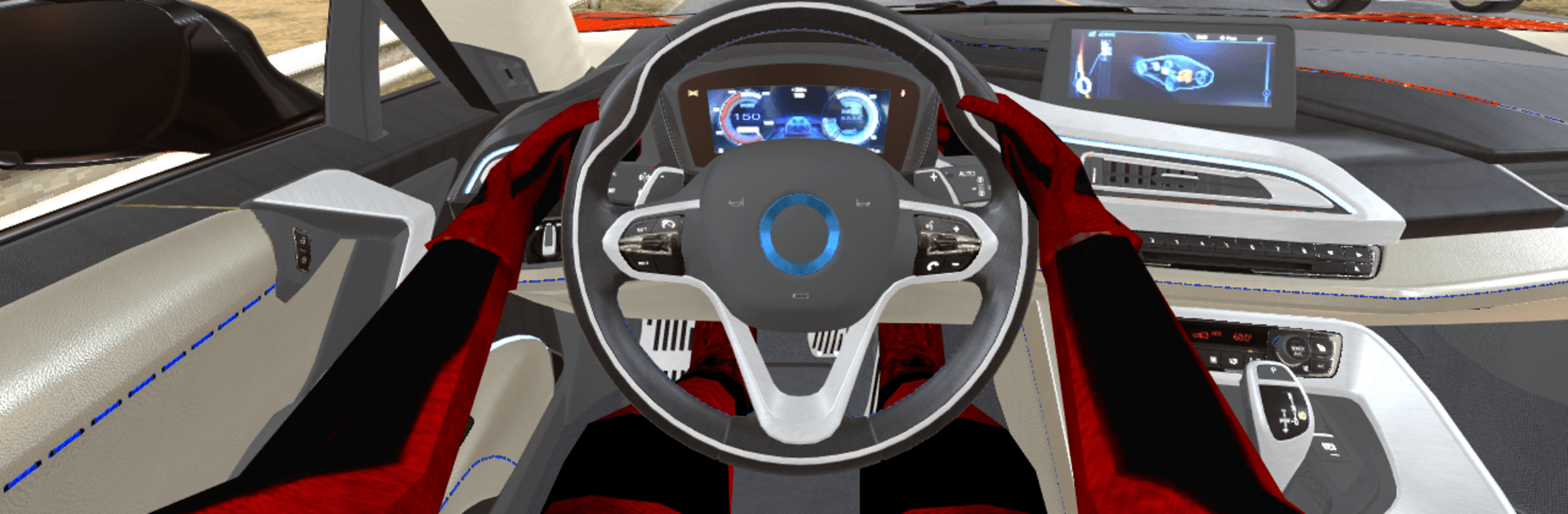
Supercar i8 is a Simulation built for anyone who loves the feeling of a powerful car coming to life under their fingertips. You’re set loose in a modern city with physics that make the car actually behave like it should—weight shifts, grip changes, and that punchy pull when you floor it. Want to just cruise, kick the tail out for a drift, or test straight-line speed? Go for it. It also plays smoothly on BlueStacks if you’d rather drive on a bigger screen.

Game Features

  • Authentic handling: A physics-based model makes the car feel planted and responsive, so every turn, slide, and throttle tap matters.
  • City to explore: Wide roads, tight corners, and long stretches give you room to cruise, practice drifts, and push top speed.
  • Drift made easy: The car’s balance encourages controlled slides—hold angles, catch the grip, and link corners without fighting the controls.
  • Realistic acceleration: Feel the surge off the line and the gradual build as you climb through speed, not just instant arcade bursts.
  • Simple controls: Intuitive inputs get you driving fast, whether you’re a casual player or a wheel-to-wheel tinkerer.
  • Polished visuals: Clean car models, sharp lighting, and a bright city backdrop make every screenshot look track-day ready.
  • Constant motion: Quick restarts and seamless flow keep you behind the wheel with no fuss—just drive, tweak, and try again.

Start your journey now. Download the game on BlueStacks, invite your friends, and march on a new adventure.


Game Features

Enhancements

  • Macros
  • Multi Instance
  • Multi Instance Sync
  • Script
  • Enhancements
Macros

Macros

Automate the predictable in Supercar i8 and transform your gameplay with Macros. Get access to inventive Macros in the BlueStacks Macro Community
Multi Instance

Multi Instance

Play Supercar i8 on one window. And chat with your friend on the other. Press CTRL + Shift + 8 to open the Multi-Instance Manager. And start creating fresh instances or clone an existing one.
Multi Instance Sync

Multi Instance Sync

Play Supercar i8 with the power of Multi-Instance Sync. Replicate what you are doing on the main instance on all other instances. Level up faster, play more.
Script

Script

Script your way to gaming glory in Supercar i8 with BlueStacks Script. Write and run a set of commands to automate repeated tasks. Trigger the command by assigning it to any key.
Read More

How to Download and Play Supercar i8 on PC or Mac

  • Download and install BlueStacks on your PC or Mac

  • Complete Google sign-in to access the Play Store, or do it later

  • Look for Supercar i8 in the search bar at the top right corner

  • Click to install Supercar i8 from the search results

  • Complete Google sign-in (if you skipped step 2) to install Supercar i8

  • Click the Supercar i8 icon on the home screen to start playing

video
Watch Video

Minimum System Requirements

With BlueStacks 5, you can get started on a PC that fulfills the following requirements.

  • Operating System

    Microsoft Windows 7 or above, macOS 11 (Big Sur) or above

  • Processor

    Intel, AMD or Apple Silicon Processor

  • RAM

    at least 4GB

  • HDD

    10GB Free Disk Space

Note:

* You must be an Administrator on your PC. Up to date graphics drivers from Microsoft or the chipset vendor.

Supercar i8 - FAQs

  • How to play Supercar i8 on Windows PC & Mac?

    Play Supercar i8 on your PC or Mac by following these simple steps.

    • Click on 'Play Supercar i8 on PC’ to download BlueStacks
    • Install it and log-in to Google Play Store
    • Launch and play the game.
  • Why is BlueStacks the fastest and safest platform to play games on PC?

    BlueStacks respects your privacy and is always safe and secure to use. It does not carry any malware, spyware, or any sort of additional software that could harm your PC.

    It is engineered to optimize speed and performance for a seamless gaming experience.

  • What are Supercar i8 PC requirements?

    Minimum requirement to run Supercar i8 on your PC

    • OS: Microsoft Windows 7 or above MacOS 11 (Big Sur) or above
    • Processor: Intel, AMD or Apple Silicon Processor
    • RAM: Your PC must have at least 4GB of RAM. (Note that having 4GB or more disk space is not a substitute for RAM)
    • HDD: 10GB Free Disk Space.
    • You must be an Administrator on your PC.