Muscle Car Simulator

Muscle Car Simulator

Simulation

| Oppana Games

Play on PC with BlueStacks or from our cloud

  • Overview
  • Game Features
  • How to Play

Page Modified On: June 17, 2026

Play Muscle Car Simulator on PC or Mac

Muscle Car Simulator brings the Simulation genre to life, and throws up exciting challenges for gamers. Developed by Oppana Games, this Android game is best experienced on BlueStacks, the World’s #1 app player for PC and Mac users.

About the Game

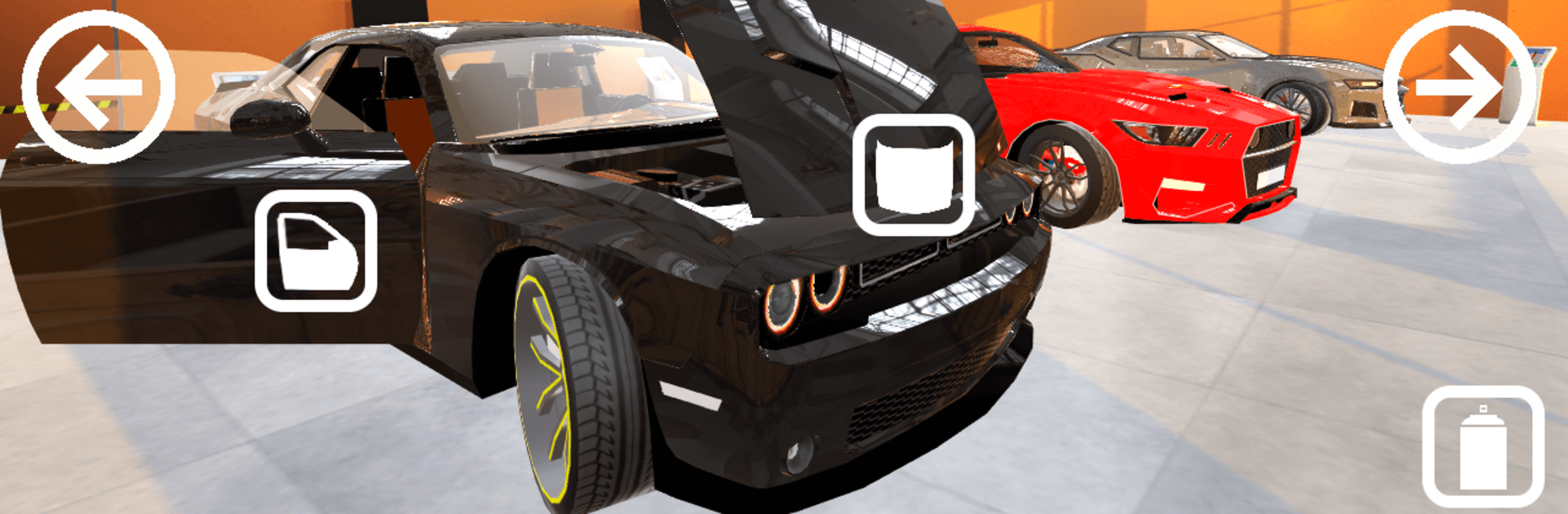
Muscle Car Simulator is a laid-back, open-world Simulation game that lets you feel the weight, rumble, and attitude of classic muscle. Cruise through a lively city, poke around side streets, and mess with every switch and dial in a fully modeled cockpit. Want to race? Set your own rules, roll out with friends, and see who can keep it clean when the police are watching. It also runs nicely on BlueStacks if you’d rather drive with a keyboard on a bigger screen.

Game Features

  • Immersive cockpit view: Sit in the driver’s seat with a full 360-degree interior. Check mirrors, watch the gauges, and soak in that old-school dash.
  • Open-city cruising: Roam a detailed city and its outskirts at your own pace. Find new hangouts, shortcuts, and spots worth returning to.
  • Traffic and police presence: Speed if you want, but tickets are a thing. Drive smart, obey signals, or risk a run-in with the law.
  • Make-your-own races: No rigid bracket. Pick the route, set the vibe, and challenge friends on the fly.
  • Deep car customization: Tints, stance/low ride, fresh paint, license plates, body repairs, and a wide range of rims—build it your way.
  • Interactive car systems: Lock doors, flip switches, and fiddle with in-cabin components. Turn up the music and make it feel like your real ride.
  • Fuel and service gameplay: Pull into working gas stations to refuel and hit the service bay for fixes or cosmetic work.
  • Arcade-style missions: Quick, punchy tasks that are easy to jump into and replay when you’re chasing a cleaner run.
  • Multiplayer side jobs: Team up or compete in extra missions with friends and keep the city lively.
  • Car showroom and bonuses: Browse new models, unlock additional muscle cars, and snag daily bonuses as you play.

Get ready for a buttery smooth, high-performance gaming action only on BlueStacks.

Game Features

Enhancements

  • Macros
  • Multi Instance
  • Multi Instance Sync
  • Script
  • Enhancements
Macros

Macros

Automate the predictable in Muscle Car Simulator and transform your gameplay with Macros. Get access to inventive Macros in the BlueStacks Macro Community
Multi Instance

Multi Instance

Play Muscle Car Simulator on one window. And chat with your friend on the other. Press CTRL + Shift + 8 to open the Multi-Instance Manager. And start creating fresh instances or clone an existing one.
Multi Instance Sync

Multi Instance Sync

Play Muscle Car Simulator with the power of Multi-Instance Sync. Replicate what you are doing on the main instance on all other instances. Level up faster, play more.
Script

Script

Script your way to gaming glory in Muscle Car Simulator with BlueStacks Script. Write and run a set of commands to automate repeated tasks. Trigger the command by assigning it to any key.
Read More

How to Download and Play Muscle Car Simulator on PC or Mac

  • Download and install BlueStacks on your PC or Mac

  • Complete Google sign-in to access the Play Store, or do it later

  • Look for Muscle Car Simulator in the search bar at the top right corner

  • Click to install Muscle Car Simulator from the search results

  • Complete Google sign-in (if you skipped step 2) to install Muscle Car Simulator

  • Click the Muscle Car Simulator icon on the home screen to start playing

video
Watch Video

Minimum System Requirements

With BlueStacks 5, you can get started on a PC that fulfills the following requirements.

  • Operating System

    Microsoft Windows 7 or above, macOS 11 (Big Sur) or above

  • Processor

    Intel, AMD or Apple Silicon Processor

  • RAM

    at least 4GB

  • HDD

    10GB Free Disk Space

Note:

* You must be an Administrator on your PC. Up to date graphics drivers from Microsoft or the chipset vendor.

Muscle Car Simulator - FAQs

  • How to play Muscle Car Simulator on Windows PC & Mac?

    Play Muscle Car Simulator on your PC or Mac by following these simple steps.

    • Click on 'Play Muscle Car Simulator on PC’ to download BlueStacks
    • Install it and log-in to Google Play Store
    • Launch and play the game.
  • Why is BlueStacks the fastest and safest platform to play games on PC?

    BlueStacks respects your privacy and is always safe and secure to use. It does not carry any malware, spyware, or any sort of additional software that could harm your PC.

    It is engineered to optimize speed and performance for a seamless gaming experience.

  • What are Muscle Car Simulator PC requirements?

    Minimum requirement to run Muscle Car Simulator on your PC

    • OS: Microsoft Windows 7 or above MacOS 11 (Big Sur) or above
    • Processor: Intel, AMD or Apple Silicon Processor
    • RAM: Your PC must have at least 4GB of RAM. (Note that having 4GB or more disk space is not a substitute for RAM)
    • HDD: 10GB Free Disk Space.
    • You must be an Administrator on your PC.