Taxiway Madness
Taxiway Madness

Taxiway Madness

Simulation

| Big Fat Simulations Inc.

Play on PC with BlueStacks or from our cloud

  • Overview
  • Game Features
  • How to Play

Page Modified On: August 20, 2026

Play Taxiway Madness on PC or Mac

Step into the World of Taxiway Madness, a thrilling Simulation game from the house of Big Fat Simulations Inc.. Play this Android game on BlueStacks App Player and experience immersive gaming on PC or Mac.

About the Game

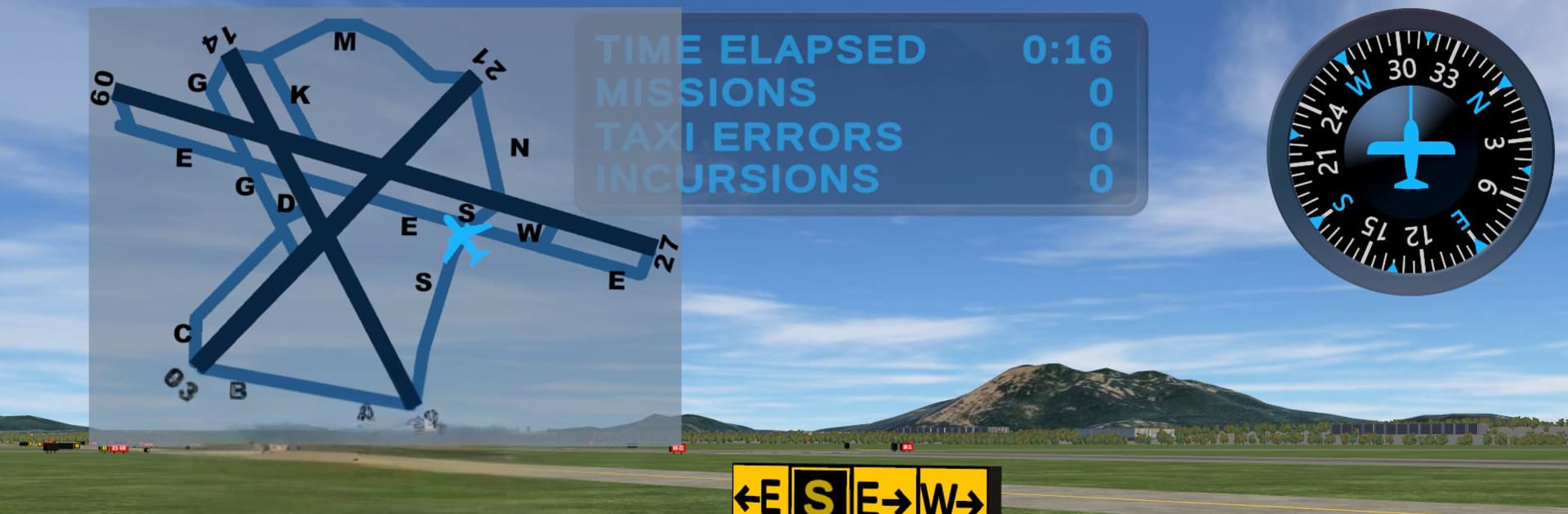
Taxiway Madness is a focused Simulation experience that turns airport signage into a hands-on challenge. Designed with input from real controllers and instructors, it gives pilots-in-training—and seasoned flyers who want a refresher—a safe place to practice smart taxi decisions at real fields. Prefer a bigger screen and mouse precision? It runs smoothly with BlueStacks, too.

Game Features

  • Real-airport practice: Navigate two authentic airport layouts with accurate markings, signage, and intersections.
  • 40 taxi assignments: Tackle forty curated routes that start easy and steadily add complexity as your confidence grows.
  • Sign-reading focus: Learn to quickly read direction, location, and mandatory signs so you stay on the correct pavement every time.
  • Built by the pros: Content shaped with guidance from working air traffic controllers, flight instructors, and airport authorities.
  • Incursion awareness: Sharpen your eye for runway hold lines, hotspots, and proper crossing points to reduce taxi mistakes.
  • Clear objectives: Each scenario lays out a precise clearance so you can focus on making the right turns at the right times.
  • Short, replayable sessions: Run quick drills, retry tricky spots, and cement good habits without committing to long playtimes.
  • Gradual difficulty curve: Move from straightforward stand-to-runway routes to multi-runway junctions and complex intersections.

BlueStacks gives you more room to focus on the game and less time adjusting around mobile limitations.


Game Features

Enhancements

  • Macros
  • Multi Instance
  • Multi Instance Sync
  • Script
  • Enhancements
Macros

Macros

Automate the predictable in Taxiway Madness and transform your gameplay with Macros. Get access to inventive Macros in the BlueStacks Macro Community
Multi Instance

Multi Instance

Play Taxiway Madness on one window. And chat with your friend on the other. Press CTRL + Shift + 8 to open the Multi-Instance Manager. And start creating fresh instances or clone an existing one.
Multi Instance Sync

Multi Instance Sync

Play Taxiway Madness with the power of Multi-Instance Sync. Replicate what you are doing on the main instance on all other instances. Level up faster, play more.
Script

Script

Script your way to gaming glory in Taxiway Madness with BlueStacks Script. Write and run a set of commands to automate repeated tasks. Trigger the command by assigning it to any key.
Read More

How to Download and Play Taxiway Madness on PC or Mac

  • Download and install BlueStacks on your PC or Mac

  • Complete Google sign-in to access the Play Store, or do it later

  • Look for Taxiway Madness in the search bar at the top right corner

  • Click to install Taxiway Madness from the search results

  • Complete Google sign-in (if you skipped step 2) to install Taxiway Madness

  • Click the Taxiway Madness icon on the home screen to start playing

video
Watch Video

Minimum System Requirements

With BlueStacks 5, you can get started on a PC that fulfills the following requirements.

  • Operating System

    Microsoft Windows 7 or above, macOS 11 (Big Sur) or above

  • Processor

    Intel, AMD or Apple Silicon Processor

  • RAM

    at least 4GB

  • HDD

    10GB Free Disk Space

Note:

* You must be an Administrator on your PC. Up to date graphics drivers from Microsoft or the chipset vendor.

Taxiway Madness - FAQs

  • How to play Taxiway Madness on Windows PC & Mac?

    Play Taxiway Madness on your PC or Mac by following these simple steps.

    • Click on 'Play Taxiway Madness on PC’ to download BlueStacks
    • Install it and log-in to Google Play Store
    • Launch and play the game.
  • Why is BlueStacks the fastest and safest platform to play games on PC?

    BlueStacks respects your privacy and is always safe and secure to use. It does not carry any malware, spyware, or any sort of additional software that could harm your PC.

    It is engineered to optimize speed and performance for a seamless gaming experience.

  • What are Taxiway Madness PC requirements?

    Minimum requirement to run Taxiway Madness on your PC

    • OS: Microsoft Windows 7 or above MacOS 11 (Big Sur) or above
    • Processor: Intel, AMD or Apple Silicon Processor
    • RAM: Your PC must have at least 4GB of RAM. (Note that having 4GB or more disk space is not a substitute for RAM)
    • HDD: 10GB Free Disk Space.
    • You must be an Administrator on your PC.