The Long Road
The Long Road

The Long Road

Simulation

| InGameDev Mobile

Play on PC with BlueStacks or from our cloud

  • Overview
  • Game Features
  • How to Play

Page Modified On: June 17, 2026

Play The Long Road on PC or Mac

The Long Road by InGameDev Mobile has plenty to keep you busy. BlueStacks lets you play it on PC or Mac with more screen space, better control, and fewer mobile limits.

About the Game

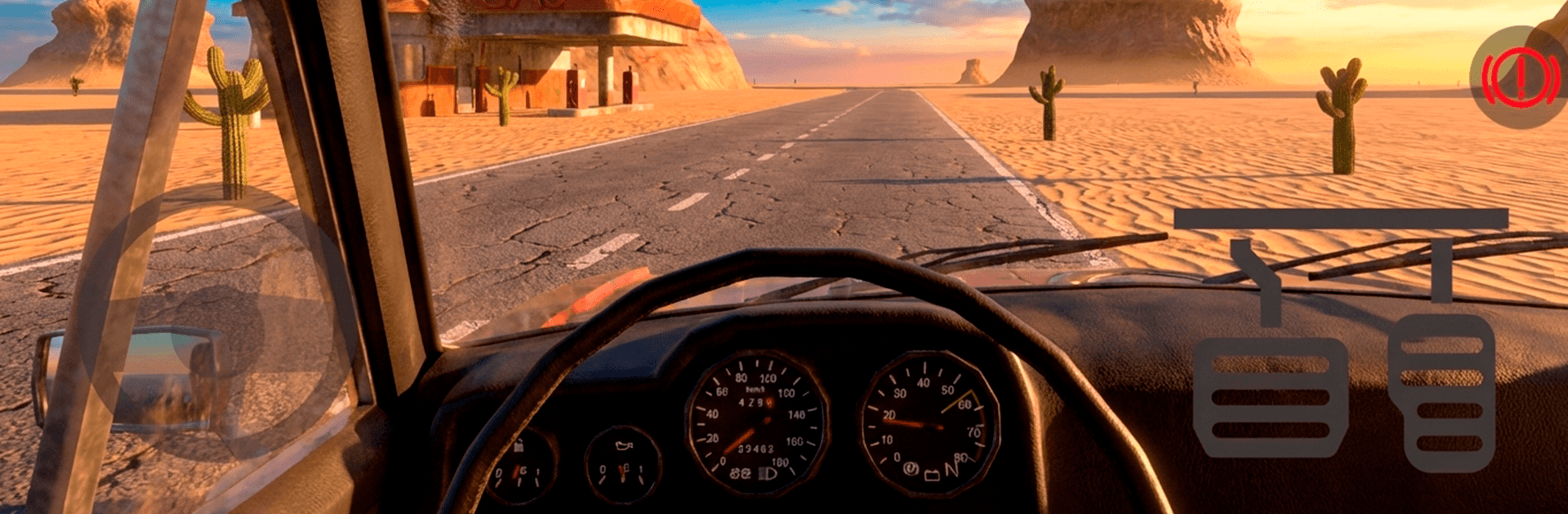
The Long Road is a gritty, survival-focused Simulation about hauling yourself across a sunburned horizon in a beat-up ride. It’s you, your car, and a desert that seems to go on forever, changing just enough to keep you guessing. Expect long stretches of quiet, sudden scares, and a constant tug-of-war between curiosity and common sense.

Game Features

  • Boundless desert — Cruise an ever-changing wasteland with no handholding and no neat little fences. Pick a direction, follow the asphalt (or don’t), and see what the sand is hiding.
  • Survival on wheels — Days scorch, nights bite. Manage thirst and warmth, plan stops, and stay alert. The desert doesn’t forgive sloppy planning.
  • Real car care — Watch fuel, oil, and wear like a hawk. Carry jerrycans, spare parts, and tools in your trunk or on a trailer, then fix things when they inevitably go wrong.
  • Scavenge and upgrade — Strip wrecks, rummage through abandoned shacks, and bolt together upgrades. When your clunker can’t keep up, build something better from the pieces you find.
  • Consequences matter — Run dry on gas or oil and you’re walking, and walking out here is slow, scary, and often a bad idea.
  • Open-ended goals — Make your own road trip rules. Chase personal records and see if you can push past that daunting 5,000 km milestone.
  • Tense encounters — Unfriendly wildlife and other hazards lurk out there. Every stretch of road has its own brand of trouble.
  • Play your way — No scripted routes, no invisible walls, just the hum of the engine and miles of possibility.
  • PC-friendly option — Prefer a bigger screen and steady controls? You can play it on BlueStacks without changing how the game feels.

BlueStacks gives you more room to focus on the game and less time adjusting around mobile limitations.


Game Features

Enhancements

  • Macros
  • Multi Instance
  • Multi Instance Sync
  • Script
  • Enhancements
Macros

Macros

Automate the predictable in The Long Road and transform your gameplay with Macros. Get access to inventive Macros in the BlueStacks Macro Community
Multi Instance

Multi Instance

Play The Long Road on one window. And chat with your friend on the other. Press CTRL + Shift + 8 to open the Multi-Instance Manager. And start creating fresh instances or clone an existing one.
Multi Instance Sync

Multi Instance Sync

Play The Long Road with the power of Multi-Instance Sync. Replicate what you are doing on the main instance on all other instances. Level up faster, play more.
Script

Script

Script your way to gaming glory in The Long Road with BlueStacks Script. Write and run a set of commands to automate repeated tasks. Trigger the command by assigning it to any key.
Read More

How to Download and Play The Long Road on PC or Mac

  • Download and install BlueStacks on your PC or Mac

  • Complete Google sign-in to access the Play Store, or do it later

  • Look for The Long Road in the search bar at the top right corner

  • Click to install The Long Road from the search results

  • Complete Google sign-in (if you skipped step 2) to install The Long Road

  • Click the The Long Road icon on the home screen to start playing

video
Watch Video

Minimum System Requirements

With BlueStacks 5, you can get started on a PC that fulfills the following requirements.

  • Operating System

    Microsoft Windows 7 or above, macOS 11 (Big Sur) or above

  • Processor

    Intel, AMD or Apple Silicon Processor

  • RAM

    at least 4GB

  • HDD

    10GB Free Disk Space

Note:

* You must be an Administrator on your PC. Up to date graphics drivers from Microsoft or the chipset vendor.

The Long Road - FAQs

  • How to play The Long Road on Windows PC & Mac?

    Play The Long Road on your PC or Mac by following these simple steps.

    • Click on 'Play The Long Road on PC’ to download BlueStacks
    • Install it and log-in to Google Play Store
    • Launch and play the game.
  • Why is BlueStacks the fastest and safest platform to play games on PC?

    BlueStacks respects your privacy and is always safe and secure to use. It does not carry any malware, spyware, or any sort of additional software that could harm your PC.

    It is engineered to optimize speed and performance for a seamless gaming experience.

  • What are The Long Road PC requirements?

    Minimum requirement to run The Long Road on your PC

    • OS: Microsoft Windows 7 or above MacOS 11 (Big Sur) or above
    • Processor: Intel, AMD or Apple Silicon Processor
    • RAM: Your PC must have at least 4GB of RAM. (Note that having 4GB or more disk space is not a substitute for RAM)
    • HDD: 10GB Free Disk Space.
    • You must be an Administrator on your PC.