Van Simulator Dubai Car Games

Van Simulator Dubai Car Games

Simulation

| Hyper Gaming Studio

Play on PC with BlueStacks or from our cloud

  • Overview
  • Game Features
  • How to Play

Page Modified On: December 05, 2025

Play Van Simulator Dubai Car Games on PC or Mac

Explore a whole new adventure with Van Simulator Dubai Car Games, a Simulation game created by Hyper Gaming Studio. Experience great gameplay with BlueStacks, the most popular gaming platform to play Android games on your PC or Mac.

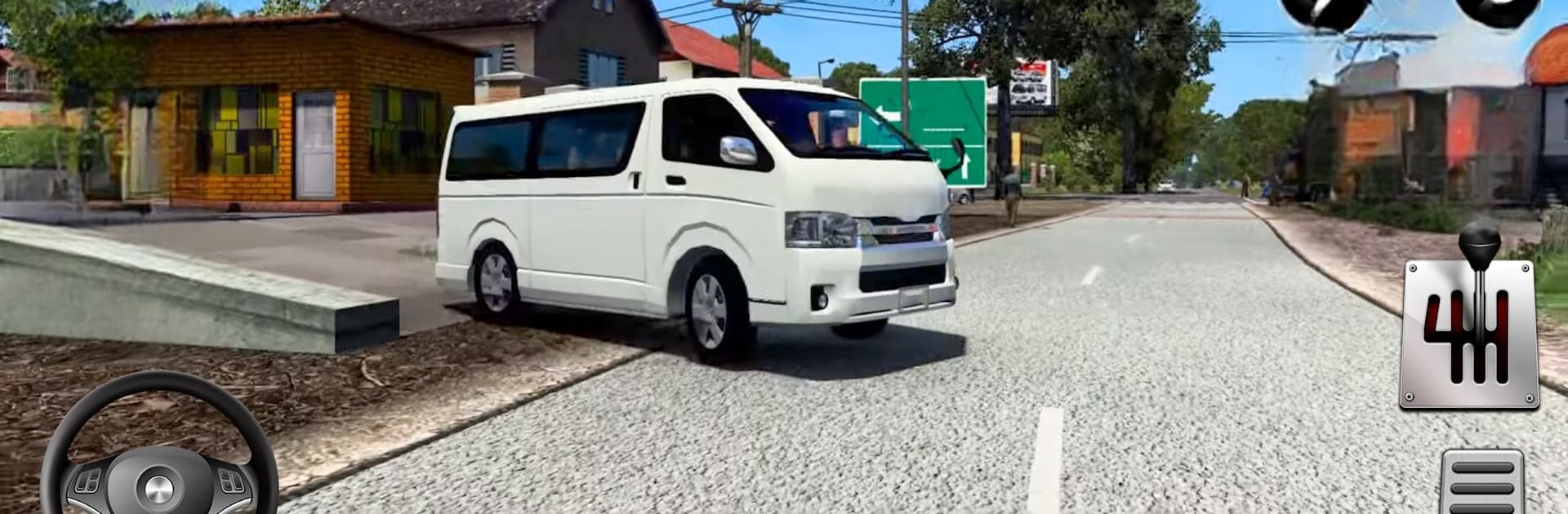
This is a laid‑back driving sim about hauling passengers around Dubai and out into the hills in a bunch of boxy vans. The loop is simple but kind of cozy. Pick folks up, keep the ride smooth, and get them from the city to villages or up mountain roads without sliding off a hairpin. It leans more on careful driving than speed. There are a bunch of short, level based missions with changing weather and terrain, from sunny streets to snowy uphill tracks, so it is not just flat highways the whole time. Vans unlock as missions get cleared, so there is always a slightly bigger, heavier ride to try next.

Handling has some weight to it, especially on climbs, so braking early and taking corners wide actually matters. The game offers different control options and camera angles, and on PC with BlueStacks the keyboard steering feels steadier than swiping on a phone. Visuals are simple but bright, with clear road edges and traffic that makes sense, and the engine sounds are basic but do the job. It runs offline, shows ads between bits, and it throws in a few parking style challenges along with the transport runs. Anyone who likes bus sims and wants that same chill pace with smaller vans and tighter roads will get alot out of it.

Start your journey now. Download the game on BlueStacks, invite your friends, and march on a new adventure.


Game Features

Enhancements

  • Macros
  • Multi Instance
  • Multi Instance Sync
  • Script
  • Enhancements
Macros

Macros

Automate the predictable in Van Simulator Dubai Car Games and transform your gameplay with Macros. Get access to inventive Macros in the BlueStacks Macro Community
Multi Instance

Multi Instance

Play Van Simulator Dubai Car Games on one window. And chat with your friend on the other. Press CTRL + Shift + 8 to open the Multi-Instance Manager. And start creating fresh instances or clone an existing one.
Multi Instance Sync

Multi Instance Sync

Play Van Simulator Dubai Car Games with the power of Multi-Instance Sync. Replicate what you are doing on the main instance on all other instances. Level up faster, play more.
Script

Script

Script your way to gaming glory in Van Simulator Dubai Car Games with BlueStacks Script. Write and run a set of commands to automate repeated tasks. Trigger the command by assigning it to any key.
Read More

How to Download and Play Van Simulator Dubai Car Games on PC or Mac

  • Download and install BlueStacks on your PC or Mac

  • Complete Google sign-in to access the Play Store, or do it later

  • Look for Van Simulator Dubai Car Games in the search bar at the top right corner

  • Click to install Van Simulator Dubai Car Games from the search results

  • Complete Google sign-in (if you skipped step 2) to install Van Simulator Dubai Car Games

  • Click the Van Simulator Dubai Car Games icon on the home screen to start playing

video
Watch Video

Minimum System Requirements

With BlueStacks 5, you can get started on a PC that fulfills the following requirements.

  • Operating System

    Microsoft Windows 7 or above, macOS 11 (Big Sur) or above

  • Processor

    Intel, AMD or Apple Silicon Processor

  • RAM

    at least 4GB

  • HDD

    10GB Free Disk Space

Note:

* You must be an Administrator on your PC. Up to date graphics drivers from Microsoft or the chipset vendor.

Van Simulator Dubai Car Games - FAQs

  • How to play Van Simulator Dubai Car Games on Windows PC & Mac?

    Play Van Simulator Dubai Car Games on your PC or Mac by following these simple steps.

    • Click on 'Play Van Simulator Dubai Car Games on PC’ to download BlueStacks
    • Install it and log-in to Google Play Store
    • Launch and play the game.
  • Why is BlueStacks the fastest and safest platform to play games on PC?

    BlueStacks respects your privacy and is always safe and secure to use. It does not carry any malware, spyware, or any sort of additional software that could harm your PC.

    It is engineered to optimize speed and performance for a seamless gaming experience.

  • What are Van Simulator Dubai Car Games PC requirements?

    Minimum requirement to run Van Simulator Dubai Car Games on your PC

    • OS: Microsoft Windows 7 or above MacOS 11 (Big Sur) or above
    • Processor: Intel, AMD or Apple Silicon Processor
    • RAM: Your PC must have at least 4GB of RAM. (Note that having 4GB or more disk space is not a substitute for RAM)
    • HDD: 10GB Free Disk Space.
    • You must be an Administrator on your PC.