Voyage 4
Voyage 4

Voyage 4

Simulation

| Existage Official

Play on PC with BlueStacks or from our cloud

  • Overview
  • Game Features
  • How to Play

Page Modified On: November 10, 2025

Play Voyage 4 on PC or Mac

From the innovators and creators at Existage Official, Voyage 4 is another fun addition to the World of Simulation games. Go beyond your mobile screen and play it bigger and better on your PC or Mac. An immersive experience awaits you.

About the Game

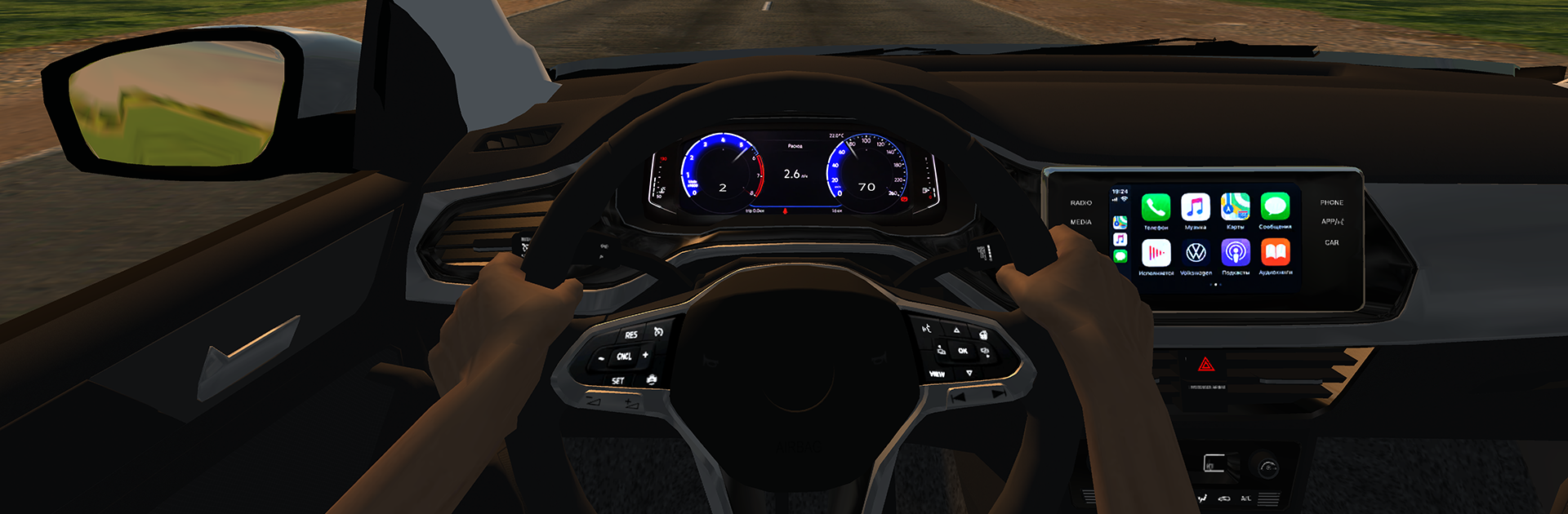
Voyage 4 is a Simulation from Existage Official that turns a cross-country road trip into a full-on driving sandbox. You’ll head from Russia’s Far East to the West in 45 cars, soaking up real routes, real signs, and seriously believable handling. It’s equal parts relaxing cruise and deep tinkering—roll the miles, wrench on the setup, repeat.

Game Features

  • Real Russian routes: Follow actual highways like P504 “Kolyma,” M7 “Volga,” M5 “Ural,” and M51 “Baikal,” with familiar signs, hometowns, and cities like Chelyabinsk along the way.
  • 45 cars, all distinct: From classics to modern icons, each car feels different—and the garage keeps growing with new additions.
  • Physics you can feel: Accurate torque curves, gear ratios, and working gauges make every drive feel authentic. Mirrors, headlights, and even the driver’s hands and steering-wheel rotation are animated the way they should be.
  • Deep tuning and dyno: Tweak 20–30 parts per car (a bit fewer on imports). Build power on the dyno, save setups, and tune everything from wheels to xenon lighting and useful add-ons.
  • Sounds and style: Engines bark and burble with detailed audio. Dress your ride in bold paint effects and external upgrades that actually change its look.
  • Stickers and your own art: Apply ready-made decals or upload custom stickers to make your car unmistakably yours.
  • Lively Russian traffic: Share the road with local traffic sporting regional plates—different numbers, different drivers, the whole vibe.
  • Weather and time that change: Cruise through shifting clouds, rain, day, and night for a road trip that never feels the same twice.
  • Play together online: Meet up and drive with others in 10 carefully recreated locations inspired by real places.
  • Performance controls: Use extensive settings and a special console to fine-tune visuals and performance to your liking.
  • PC-friendly via BlueStacks: Prefer the big screen and keyboard or gamepad controls? Running Voyage 4 on BlueStacks is a smooth way to go.

Start your journey now. Download the game on BlueStacks, invite your friends, and march on a new adventure.


Game Features

Enhancements

  • Macros
  • Multi Instance
  • Multi Instance Sync
  • Script
  • Enhancements
Macros

Macros

Automate the predictable in Voyage 4 and transform your gameplay with Macros. Get access to inventive Macros in the BlueStacks Macro Community
Multi Instance

Multi Instance

Play Voyage 4 on one window. And chat with your friend on the other. Press CTRL + Shift + 8 to open the Multi-Instance Manager. And start creating fresh instances or clone an existing one.
Multi Instance Sync

Multi Instance Sync

Play Voyage 4 with the power of Multi-Instance Sync. Replicate what you are doing on the main instance on all other instances. Level up faster, play more.
Script

Script

Script your way to gaming glory in Voyage 4 with BlueStacks Script. Write and run a set of commands to automate repeated tasks. Trigger the command by assigning it to any key.
Read More

How to Download and Play Voyage 4 on PC or Mac

  • Download and install BlueStacks on your PC or Mac

  • Complete Google sign-in to access the Play Store, or do it later

  • Look for Voyage 4 in the search bar at the top right corner

  • Click to install Voyage 4 from the search results

  • Complete Google sign-in (if you skipped step 2) to install Voyage 4

  • Click the Voyage 4 icon on the home screen to start playing

video
Watch Video

Minimum System Requirements

With BlueStacks 5, you can get started on a PC that fulfills the following requirements.

  • Operating System

    Microsoft Windows 7 or above, macOS 11 (Big Sur) or above

  • Processor

    Intel, AMD or Apple Silicon Processor

  • RAM

    at least 4GB

  • HDD

    10GB Free Disk Space

Note:

* You must be an Administrator on your PC. Up to date graphics drivers from Microsoft or the chipset vendor.

Voyage 4 - FAQs

  • How to play Voyage 4 on Windows PC & Mac?

    Play Voyage 4 on your PC or Mac by following these simple steps.

    • Click on 'Play Voyage 4 on PC’ to download BlueStacks
    • Install it and log-in to Google Play Store
    • Launch and play the game.
  • Why is BlueStacks the fastest and safest platform to play games on PC?

    BlueStacks respects your privacy and is always safe and secure to use. It does not carry any malware, spyware, or any sort of additional software that could harm your PC.

    It is engineered to optimize speed and performance for a seamless gaming experience.

  • What are Voyage 4 PC requirements?

    Minimum requirement to run Voyage 4 on your PC

    • OS: Microsoft Windows 7 or above MacOS 11 (Big Sur) or above
    • Processor: Intel, AMD or Apple Silicon Processor
    • RAM: Your PC must have at least 4GB of RAM. (Note that having 4GB or more disk space is not a substitute for RAM)
    • HDD: 10GB Free Disk Space.
    • You must be an Administrator on your PC.