World of Bugs
World of Bugs

World of Bugs

Simulation

| Naxeex LLC

Play on PC with BlueStacks or from our cloud

  • Overview
  • Game Features
  • How to Play

Page Modified On: August 15, 2026

Play World of Bugs on PC or Mac

World of Bugs brings the Simulation genre to life, and throws up exciting challenges for gamers. Developed by Naxeex LLC, this Android game is best experienced on BlueStacks, the World’s #1 app player for PC and Mac users.

About the Game

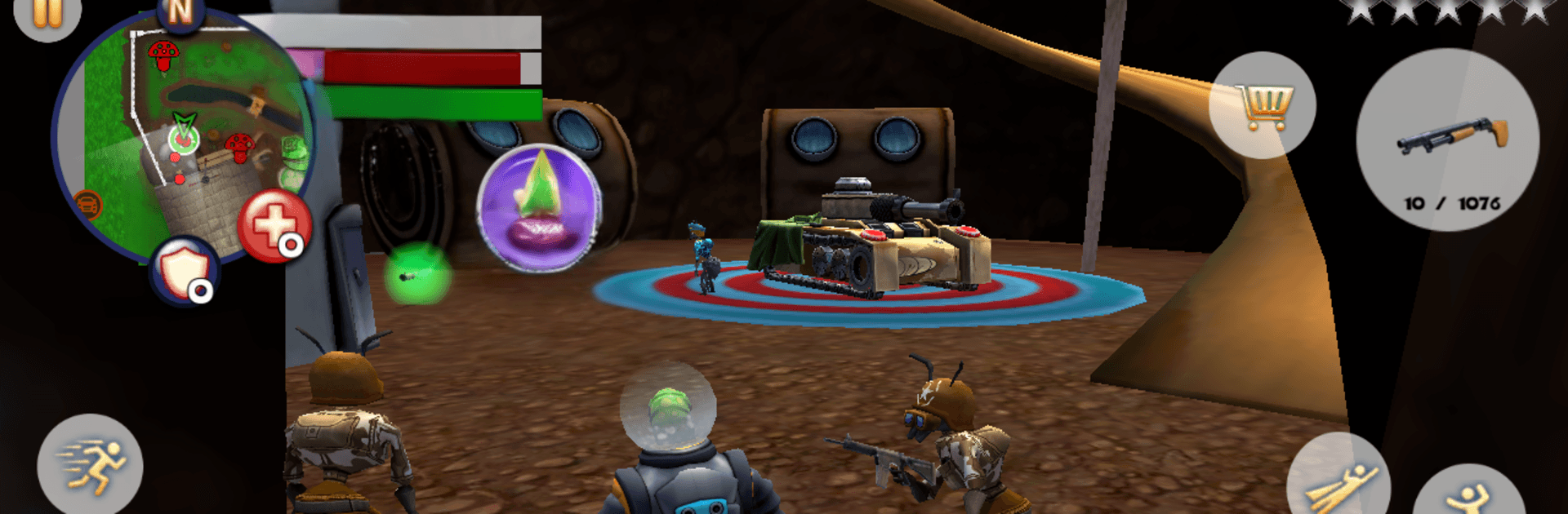
World of Bugs is a quirky Simulation that turns a backyard into a buzzing little city with big problems. You’re a tiny troublemaker (or hero, your call) exploring streets built from flowerpots, toy cars, and leaf-covered alleys while insect gangs feud and a giant frog stirs chaos. It’s open-ended, packed with odd jobs, quick brawls, and silly surprises—and it also runs smoothly on BlueStacks if you prefer kicking back on a bigger screen.

Game Features

  • A Backyard City: Wander a colorful, cartoony town scaled to bug life—flower beds for plazas, twigs for bridges, bottle caps for décor.
  • Free-Roam Fun: Roam at your own pace, poke around hidden corners, and meet ants, wasps, stick insects, stag beetles, cockroaches, and more.
  • Pick Your Battles: Throw hands (or mandibles) in close combat or switch to ranged weapons when things get hairy.
  • Odd Jobs & Quests: Tackle bite-sized missions—help neighbors, stop petty thugs, or clean up messes only a bug could make.
  • High-Speed Races: Burn rubber on tiny racetracks and chase best times for bragging rights.
  • Take to the Skies: Hop into a toy chopper and buzz over rooftops to reach shortcuts, loot, and mission spots.
  • Claim the Mushrooms: Snag those fly agaric caps for quick cash—just be ready to defend your haul.
  • Gear Up: Buy weapons, gadgets, and a jet suit that gives you serious “space ranger” energy; sip stat-boosting drinks to toughen up.
  • Clans & Crime: Rival factions, bug mobsters, and street scuffles keep the town lively—pick sides or clean house.
  • Giant Frog Threat: A hulking amphibian crashes the party now and then; surviving it takes grit, gear, and a plan.

Get ready for a buttery smooth, high-performance gaming action only on BlueStacks.

Game Features

Enhancements

  • Macros
  • Multi Instance
  • Multi Instance Sync
  • Script
  • Enhancements
Macros

Macros

Automate the predictable in World of Bugs and transform your gameplay with Macros. Get access to inventive Macros in the BlueStacks Macro Community
Multi Instance

Multi Instance

Play World of Bugs on one window. And chat with your friend on the other. Press CTRL + Shift + 8 to open the Multi-Instance Manager. And start creating fresh instances or clone an existing one.
Multi Instance Sync

Multi Instance Sync

Play World of Bugs with the power of Multi-Instance Sync. Replicate what you are doing on the main instance on all other instances. Level up faster, play more.
Script

Script

Script your way to gaming glory in World of Bugs with BlueStacks Script. Write and run a set of commands to automate repeated tasks. Trigger the command by assigning it to any key.
Read More

How to Download and Play World of Bugs on PC or Mac

  • Download and install BlueStacks on your PC or Mac

  • Complete Google sign-in to access the Play Store, or do it later

  • Look for World of Bugs in the search bar at the top right corner

  • Click to install World of Bugs from the search results

  • Complete Google sign-in (if you skipped step 2) to install World of Bugs

  • Click the World of Bugs icon on the home screen to start playing

video
Watch Video

Minimum System Requirements

With BlueStacks 5, you can get started on a PC that fulfills the following requirements.

  • Operating System

    Microsoft Windows 7 or above, macOS 11 (Big Sur) or above

  • Processor

    Intel, AMD or Apple Silicon Processor

  • RAM

    at least 4GB

  • HDD

    10GB Free Disk Space

Note:

* You must be an Administrator on your PC. Up to date graphics drivers from Microsoft or the chipset vendor.

World of Bugs - FAQs

  • How to play World of Bugs on Windows PC & Mac?

    Play World of Bugs on your PC or Mac by following these simple steps.

    • Click on 'Play World of Bugs on PC’ to download BlueStacks
    • Install it and log-in to Google Play Store
    • Launch and play the game.
  • Why is BlueStacks the fastest and safest platform to play games on PC?

    BlueStacks respects your privacy and is always safe and secure to use. It does not carry any malware, spyware, or any sort of additional software that could harm your PC.

    It is engineered to optimize speed and performance for a seamless gaming experience.

  • What are World of Bugs PC requirements?

    Minimum requirement to run World of Bugs on your PC

    • OS: Microsoft Windows 7 or above MacOS 11 (Big Sur) or above
    • Processor: Intel, AMD or Apple Silicon Processor
    • RAM: Your PC must have at least 4GB of RAM. (Note that having 4GB or more disk space is not a substitute for RAM)
    • HDD: 10GB Free Disk Space.
    • You must be an Administrator on your PC.