3D GYM - FB CURVES
3D GYM - FB CURVES

3D GYM - FB CURVES

Sports

| FB CURVES 3D GYM LIMITED

Play on PC with BlueStacks or from our cloud

  • Overview
  • Game Features
  • How to Play

Page Modified On: August 25, 2025

Play 3D GYM - FB CURVES on PC or Mac

3D GYM – FB CURVES brings the Sports genre to life, and throws up exciting challenges for gamers. Developed by FB CURVES 3D GYM LIMITED, this Android game is best experienced on BlueStacks, the World’s #1 app player for PC and Mac users.

About the Game

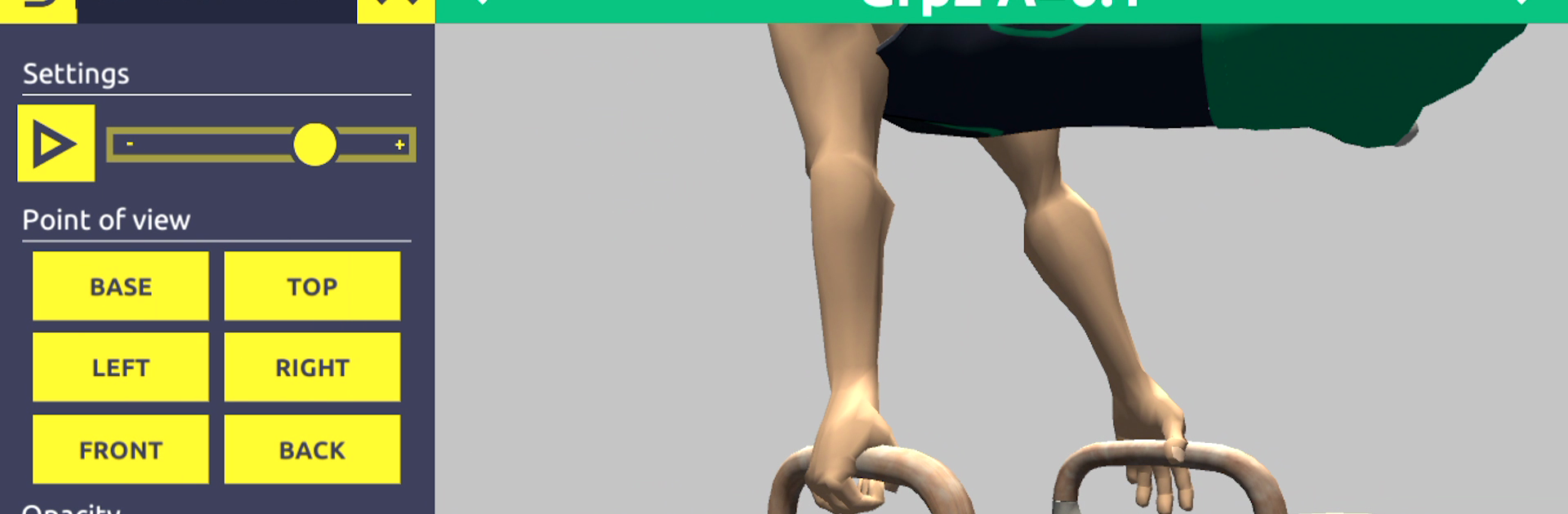
3D GYM – FB CURVES is all about bringing gymnastics to life in the most interactive way you can imagine. Whether you’re a coach looking to break down new skills, a gymnast working on perfecting your technique, or just someone curious about the sport, this game lets you explore gymnastics elements from every possible angle. Expect an experience where learning, teaching, and discovering moves feels a lot more hands-on—and, honestly, pretty fun.

Game Features

  • Massive Skill Library
    Start off with 45 different skills, and if you want more, you can expand your collection up to over 800 men’s gymnastics elements (organized by difficulty and style).

  • Detailed 3D Animations
    Every move is brought to life with crisp 3D visuals that you can control—swipe, spin, zoom, and really take a closer look at how each element works.

  • 360° Rotation
    Ever wanted to see a skill from above, below, or any weird angle? Go for it. Rotate each move all the way around to study the technique from every side.

  • Zoom Features
    Get in close to check out body positioning or zoom out for a full view of the movement. Perfect for folks who need to see the finer details, like how a hand or foot is placed.

  • Multiple Camera Angles
    Switch it up between different points of view. Want a front row seat? Prefer a side perspective? You decide how to watch each element.

  • Powerful Search & Filters
    Looking for something specific? Use the built-in search engine to find skills by name, difficulty, or even by movement type (like twisting or rotations). It’s a huge help when designing routines or brainstorming new combos.

  • Adjustable Playback Speed
    Slow things down or speed them up—watch any element in motion at the pace that works best for you. Great for breaking down those tricky steps.

  • Touch Controls
    All the action is at your fingertips—swipe and tap your way through elements, zoom features, or camera controls for total flexibility.

If you prefer using your PC, 3D GYM – FB CURVES runs smoothly on BlueStacks, letting you see every flip and twist on a bigger screen.

Make your gaming sessions memorable with precise controls that give you an edge in close combats and visuals that pop up, bringing every character to life.


Game Features

Enhancements

  • Macros
  • Multi Instance
  • Multi Instance Sync
  • Script
  • Enhancements
Macros

Macros

Automate the predictable in 3D GYM - FB CURVES and transform your gameplay with Macros. Get access to inventive Macros in the BlueStacks Macro Community
Multi Instance

Multi Instance

Play 3D GYM - FB CURVES on one window. And chat with your friend on the other. Press CTRL + Shift + 8 to open the Multi-Instance Manager. And start creating fresh instances or clone an existing one.
Multi Instance Sync

Multi Instance Sync

Play 3D GYM - FB CURVES with the power of Multi-Instance Sync. Replicate what you are doing on the main instance on all other instances. Level up faster, play more.
Script

Script

Script your way to gaming glory in 3D GYM - FB CURVES with BlueStacks Script. Write and run a set of commands to automate repeated tasks. Trigger the command by assigning it to any key.
Read More

How to Download and Play 3D GYM - FB CURVES on PC or Mac

  • Download and install BlueStacks on your PC or Mac

  • Complete Google sign-in to access the Play Store, or do it later

  • Look for 3D GYM - FB CURVES in the search bar at the top right corner

  • Click to install 3D GYM - FB CURVES from the search results

  • Complete Google sign-in (if you skipped step 2) to install 3D GYM - FB CURVES

  • Click the 3D GYM - FB CURVES icon on the home screen to start playing

video
Watch Video

Minimum System Requirements

With BlueStacks 5, you can get started on a PC that fulfills the following requirements.

  • Operating System

    Microsoft Windows 7 or above, macOS 11 (Big Sur) or above

  • Processor

    Intel, AMD or Apple Silicon Processor

  • RAM

    at least 4GB

  • HDD

    10GB Free Disk Space

Note:

* You must be an Administrator on your PC. Up to date graphics drivers from Microsoft or the chipset vendor.

3D GYM - FB CURVES - FAQs

  • How to play 3D GYM - FB CURVES on Windows PC & Mac?

    Play 3D GYM - FB CURVES on your PC or Mac by following these simple steps.

    • Click on 'Play 3D GYM - FB CURVES on PC’ to download BlueStacks
    • Install it and log-in to Google Play Store
    • Launch and play the game.
  • Why is BlueStacks the fastest and safest platform to play games on PC?

    BlueStacks respects your privacy and is always safe and secure to use. It does not carry any malware, spyware, or any sort of additional software that could harm your PC.

    It is engineered to optimize speed and performance for a seamless gaming experience.

  • What are 3D GYM - FB CURVES PC requirements?

    Minimum requirement to run 3D GYM - FB CURVES on your PC

    • OS: Microsoft Windows 7 or above MacOS 11 (Big Sur) or above
    • Processor: Intel, AMD or Apple Silicon Processor
    • RAM: Your PC must have at least 4GB of RAM. (Note that having 4GB or more disk space is not a substitute for RAM)
    • HDD: 10GB Free Disk Space.
    • You must be an Administrator on your PC.