Kuroko's Basketball SR

Kuroko's Basketball SR

Sports

| Quick Magic AI

BlueStacks Verified

Play on PC with BlueStacks or from our cloud

  • Overview
  • Game Features
  • How to Play

Page Modified On: March 12, 2026

Play Kuroko's Basketball SR on PC or Mac

Step into the World of Kuroko’s Basketball SR, a thrilling Sports game from the house of Quick Magic AI. Play this Android game on BlueStacks App Player and experience immersive gaming on PC or Mac.

About the Game

Kuroko’s Basketball SR is a fast, competitive Sports title that brings the anime’s high-energy hoops to your phone. Train a roster of recognizable stars—yes, Kuroko and Kagami included—then jump into quick matches where timing, teamwork, and a bit of flash make all the difference. Prefer a bigger screen or keyboard controls? You can also play on PC with BlueStacks.

Game Features

  • Signature Moves, Nailed
    Pull off Kuroko’s tricky misdirection, Kagami’s gravity-defying slams, and other trademark skills with slick, character-specific animations that feel straight out of the show.
  • Real-Time Matchups
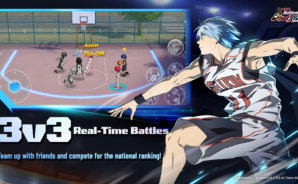
    Queue for fast 3v3 showdowns or switch it up with tight 1v1 and 2v2 games. Ranked play is there when you’re ready to test your skills against serious competition online.
  • Build Your Dream Lineup
    Scout players from Seirin, Kaijo, and other powerhouse schools. Train and upgrade your favorites, then mix lineups to match your style—power in the paint or precision on the perimeter.
  • Story Mode with the Original Voices
    Play through key moments from the anime with the voice cast you know. It’s a playable season of high-stakes basketball, complete with dramatic cut-ins and clutch finishes.
  • Smooth Controls, Flashy Combos
    Easy-to-learn controls make room for skillful play. Chain abilities, thread impossible passes, and set up alley-oops when your timing’s on point.
  • Authentic Anime Look
    Bold art, sharp effects, and clean UI keep the action readable and stylish, whether you’re breaking ankles on defense or throwing down in traffic.
  • Made for Quick Sessions
    Matches are short, punchy, and perfect for on-the-go play—hop in, grab a win, and keep your streak alive.

Slay your opponents with your epic moves. Play it your way on BlueStacks and dominate the battlefield.

Game Features

Enhancements

  • Macros
  • Multi Instance
  • Multi Instance Sync
  • Script
  • Enhancements
Macros

Macros

Automate the predictable in Kuroko's Basketball SR and transform your gameplay with Macros. Get access to inventive Macros in the BlueStacks Macro Community
Multi Instance

Multi Instance

Play Kuroko's Basketball SR on one window. And chat with your friend on the other. Press CTRL + Shift + 8 to open the Multi-Instance Manager. And start creating fresh instances or clone an existing one.
Multi Instance Sync

Multi Instance Sync

Play Kuroko's Basketball SR with the power of Multi-Instance Sync. Replicate what you are doing on the main instance on all other instances. Level up faster, play more.
Script

Script

Script your way to gaming glory in Kuroko's Basketball SR with BlueStacks Script. Write and run a set of commands to automate repeated tasks. Trigger the command by assigning it to any key.
Read More

How to Download and Play Kuroko's Basketball SR on PC or Mac

  • Download and install BlueStacks on your PC or Mac

  • Complete Google sign-in to access the Play Store, or do it later

  • Look for Kuroko's Basketball SR in the search bar at the top right corner

  • Click to install Kuroko's Basketball SR from the search results

  • Complete Google sign-in (if you skipped step 2) to install Kuroko's Basketball SR

  • Click the Kuroko's Basketball SR icon on the home screen to start playing

video
Watch Video

Minimum System Requirements

With BlueStacks 5, you can get started on a PC that fulfills the following requirements.

  • Operating System

    Microsoft Windows 7 or above, macOS 11 (Big Sur) or above

  • Processor

    Intel, AMD or Apple Silicon Processor

  • RAM

    at least 4GB

  • HDD

    10GB Free Disk Space

Note:

* You must be an Administrator on your PC. Up to date graphics drivers from Microsoft or the chipset vendor.

Kuroko's Basketball SR - FAQs

  • How to play Kuroko's Basketball SR on Windows PC & Mac?

    Play Kuroko's Basketball SR on your PC or Mac by following these simple steps.

    • Click on 'Play Kuroko's Basketball SR on PC’ to download BlueStacks
    • Install it and log-in to Google Play Store
    • Launch and play the game.
  • Why is BlueStacks the fastest and safest platform to play games on PC?

    BlueStacks respects your privacy and is always safe and secure to use. It does not carry any malware, spyware, or any sort of additional software that could harm your PC.

    It is engineered to optimize speed and performance for a seamless gaming experience.

  • What are Kuroko's Basketball SR PC requirements?

    Minimum requirement to run Kuroko's Basketball SR on your PC

    • OS: Microsoft Windows 7 or above MacOS 11 (Big Sur) or above
    • Processor: Intel, AMD or Apple Silicon Processor
    • RAM: Your PC must have at least 4GB of RAM. (Note that having 4GB or more disk space is not a substitute for RAM)
    • HDD: 10GB Free Disk Space.
    • You must be an Administrator on your PC.