99Managers Futsal Edition

99Managers Futsal Edition

Sports

| Simon Dalvai

Play on PC with BlueStacks or from our cloud

  • Overview
  • Game Features
  • How to Play

Page Modified On: September 18, 2026

Play 99Managers Futsal Edition on PC or Mac

99Managers Futsal Edition by Simon Dalvai has plenty to keep you busy. BlueStacks lets you play it on PC or Mac with more screen space, better control, and fewer mobile limits.

About the Game

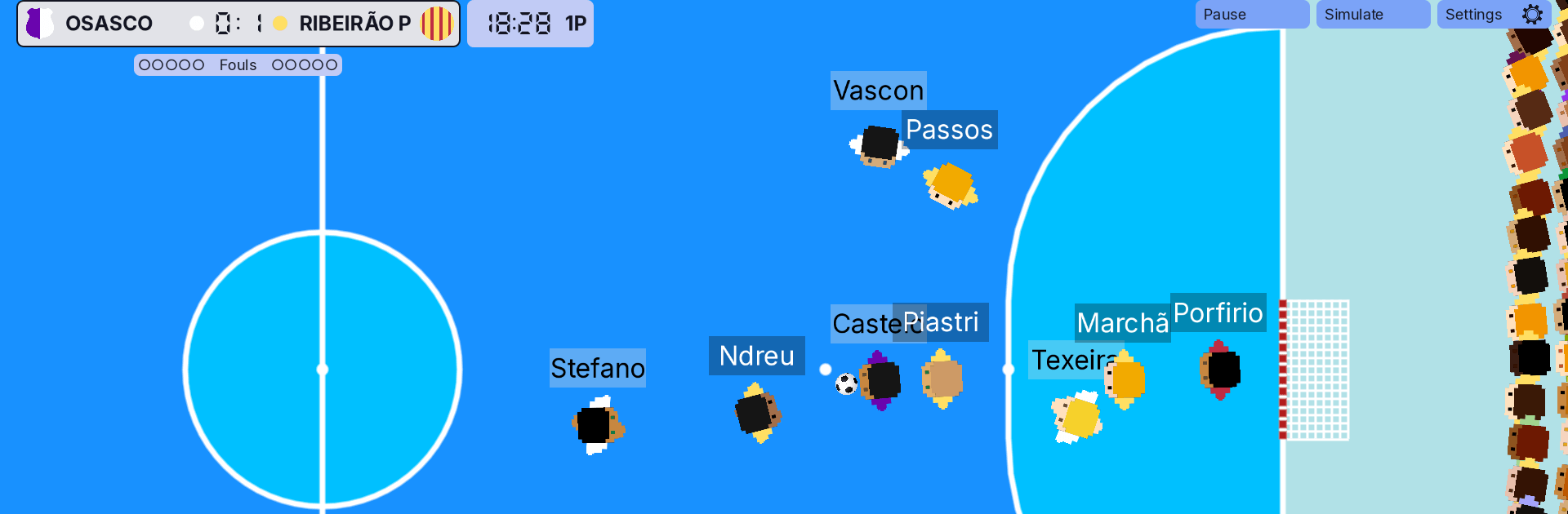
Meet 99Managers Futsal Edition, a focused manager’s take on five-a-side where you call the shots from kickoff to the final whistle. It blends a real-time, top-down match view with deep editing tools so you can build teams, design competitions, and test tactics your way; it’s a Sports management game built around futsal’s fast rhythm and plays great on BlueStacks if you like a bigger screen.

Game Features

  • Real-time 2D Matches: Watch every pass and shot unfold or skip to quick highlights while the engine keeps the action flowing.
  • On-the-Fly Coaching: Swap players, tweak roles, and adjust formations mid-game to swing momentum in your favor.
  • Instant Result Sim: Short on time? Sim a fixture and jump straight to the final score with the essentials.
  • Data Pack Editor: Build your own leagues and cups, create teams with logos, and fine-tune player attributes from top to bottom.
  • Share What You Build: Export custom data packs and let others step into the world you’ve created.
  • Full Customization: Rename clubs, set colors, organize schedules—shape a futsal ecosystem that feels uniquely yours.
  • Community-Driven Development: Report issues, suggest ideas, and help polish translations to influence future updates.
  • Mod-Friendly Foundation: Open-source roots invite tinkerers to extend features, tweak rules, and personalize the experience.

Start playing 99Managers Futsal Edition on BlueStacks and get a smoother, more comfortable PC or Mac setup.


Game Features

Enhancements

  • Macros
  • Multi Instance
  • Multi Instance Sync
  • Script
  • Enhancements
Macros

Macros

Automate the predictable in 99Managers Futsal Edition and transform your gameplay with Macros. Get access to inventive Macros in the BlueStacks Macro Community
Multi Instance

Multi Instance

Play 99Managers Futsal Edition on one window. And chat with your friend on the other. Press CTRL + Shift + 8 to open the Multi-Instance Manager. And start creating fresh instances or clone an existing one.
Multi Instance Sync

Multi Instance Sync

Play 99Managers Futsal Edition with the power of Multi-Instance Sync. Replicate what you are doing on the main instance on all other instances. Level up faster, play more.
Script

Script

Script your way to gaming glory in 99Managers Futsal Edition with BlueStacks Script. Write and run a set of commands to automate repeated tasks. Trigger the command by assigning it to any key.
Read More

How to Download and Play 99Managers Futsal Edition on PC or Mac

  • Download and install BlueStacks on your PC or Mac

  • Complete Google sign-in to access the Play Store, or do it later

  • Look for 99Managers Futsal Edition in the search bar at the top right corner

  • Click to install 99Managers Futsal Edition from the search results

  • Complete Google sign-in (if you skipped step 2) to install 99Managers Futsal Edition

  • Click the 99Managers Futsal Edition icon on the home screen to start playing

video
Watch Video

Minimum System Requirements

With BlueStacks 5, you can get started on a PC that fulfills the following requirements.

  • Operating System

    Microsoft Windows 7 or above, macOS 11 (Big Sur) or above

  • Processor

    Intel, AMD or Apple Silicon Processor

  • RAM

    at least 4GB

  • HDD

    10GB Free Disk Space

Note:

* You must be an Administrator on your PC. Up to date graphics drivers from Microsoft or the chipset vendor.

99Managers Futsal Edition - FAQs

  • How to play 99Managers Futsal Edition on Windows PC & Mac?

    Play 99Managers Futsal Edition on your PC or Mac by following these simple steps.

    • Click on 'Play 99Managers Futsal Edition on PC’ to download BlueStacks
    • Install it and log-in to Google Play Store
    • Launch and play the game.
  • Why is BlueStacks the fastest and safest platform to play games on PC?

    BlueStacks respects your privacy and is always safe and secure to use. It does not carry any malware, spyware, or any sort of additional software that could harm your PC.

    It is engineered to optimize speed and performance for a seamless gaming experience.

  • What are 99Managers Futsal Edition PC requirements?

    Minimum requirement to run 99Managers Futsal Edition on your PC

    • OS: Microsoft Windows 7 or above MacOS 11 (Big Sur) or above
    • Processor: Intel, AMD or Apple Silicon Processor
    • RAM: Your PC must have at least 4GB of RAM. (Note that having 4GB or more disk space is not a substitute for RAM)
    • HDD: 10GB Free Disk Space.
    • You must be an Administrator on your PC.