Bull Riding Challenge 4

Bull Riding Challenge 4

Sports

| Darie Productions

Play on PC with BlueStacks or from our cloud

  • Overview
  • Game Features
  • How to Play

Page Modified On: November 10, 2025

Play Bull Riding Challenge 4 on PC or Mac

Bring your A-game to Bull Riding Challenge 4, the Sports game sensation from Darie Productions. Give your gameplay the much-needed boost with precise game controls, high FPS graphics, and top-tier features on your PC or Mac with BlueStacks.

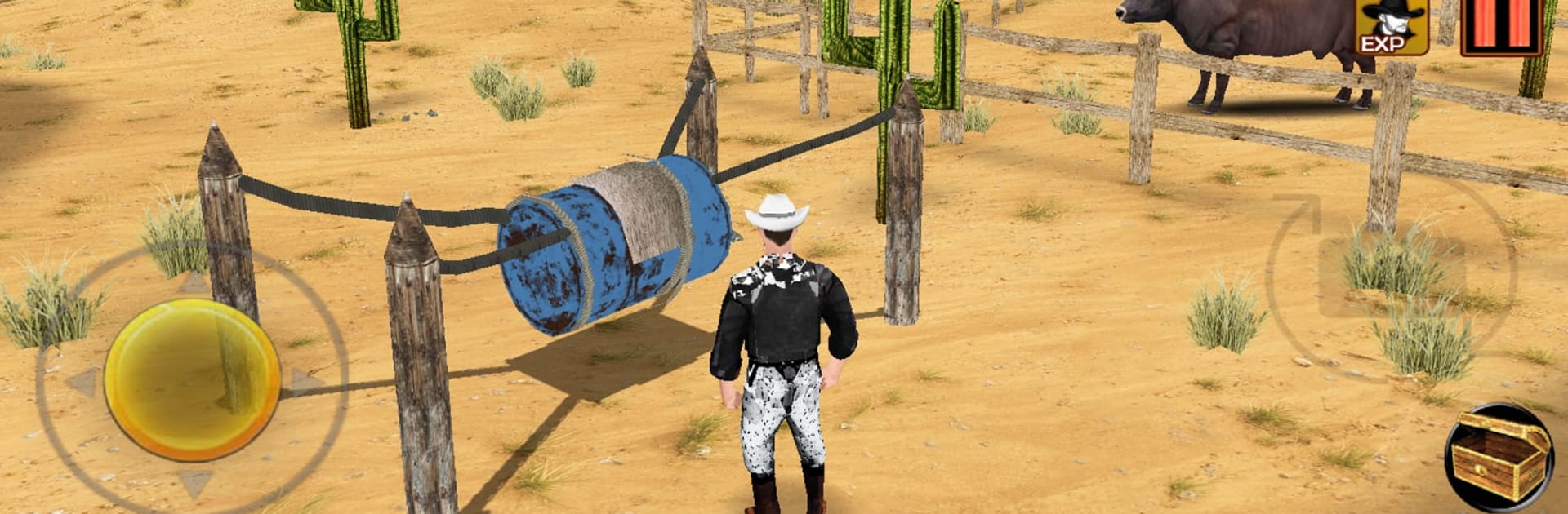
Bull Riding Challenge 4 plays like a tight little rodeo story wrapped around quick, timing-heavy rides. A player steps into the boots of a young cowboy chasing twelve golden buckles, trying to live up to a father who was a legend. The core riding feels snappy and tense. Hit inputs at the right moment, shift balance when the bull snaps, avoid the ugly toss that sends the rider to the dirt. Miss a beat and the round ends fast, but patterns are readable and the restart is quick, so it naturally pulls someone into another try. On PC through BlueStacks, the bigger screen helps with tells and key mapping makes the rhythm feel clean.

There is more than the arena, too. Between rides, the player can wander a small Western town on foot or horseback, pick up short side jobs, chase scenes, and skill-based minigames that feed Bullgolds for gear tweaks and bonus perks. The story leans warm and sincere rather than flashy, with respectful nods to real rodeo culture. Arenas are fictional but clearly inspired by well-known venues, and the soundtrack goes for heartfelt, dusty-road energy. Global rankings are there for anyone who wants to prove a score, but it also works if someone just wants a sports game with a Western mood, a bit of exploration, and a final mean bull waiting if they earn it.

Make your gaming sessions memorable with precise controls that give you an edge in close combats and visuals that pop up, bringing every character to life.


Game Features

Enhancements

  • Macros
  • Multi Instance
  • Multi Instance Sync
  • Script
  • Enhancements
Macros

Macros

Automate the predictable in Bull Riding Challenge 4 and transform your gameplay with Macros. Get access to inventive Macros in the BlueStacks Macro Community
Multi Instance

Multi Instance

Play Bull Riding Challenge 4 on one window. And chat with your friend on the other. Press CTRL + Shift + 8 to open the Multi-Instance Manager. And start creating fresh instances or clone an existing one.
Multi Instance Sync

Multi Instance Sync

Play Bull Riding Challenge 4 with the power of Multi-Instance Sync. Replicate what you are doing on the main instance on all other instances. Level up faster, play more.
Script

Script

Script your way to gaming glory in Bull Riding Challenge 4 with BlueStacks Script. Write and run a set of commands to automate repeated tasks. Trigger the command by assigning it to any key.
Read More

How to Download and Play Bull Riding Challenge 4 on PC or Mac

  • Download and install BlueStacks on your PC or Mac

  • Complete Google sign-in to access the Play Store, or do it later

  • Look for Bull Riding Challenge 4 in the search bar at the top right corner

  • Click to install Bull Riding Challenge 4 from the search results

  • Complete Google sign-in (if you skipped step 2) to install Bull Riding Challenge 4

  • Click the Bull Riding Challenge 4 icon on the home screen to start playing

video
Watch Video

Minimum System Requirements

With BlueStacks 5, you can get started on a PC that fulfills the following requirements.

  • Operating System

    Microsoft Windows 7 or above, macOS 11 (Big Sur) or above

  • Processor

    Intel, AMD or Apple Silicon Processor

  • RAM

    at least 4GB

  • HDD

    10GB Free Disk Space

Note:

* You must be an Administrator on your PC. Up to date graphics drivers from Microsoft or the chipset vendor.

Bull Riding Challenge 4 - FAQs

  • How to play Bull Riding Challenge 4 on Windows PC & Mac?

    Play Bull Riding Challenge 4 on your PC or Mac by following these simple steps.

    • Click on 'Play Bull Riding Challenge 4 on PC’ to download BlueStacks
    • Install it and log-in to Google Play Store
    • Launch and play the game.
  • Why is BlueStacks the fastest and safest platform to play games on PC?

    BlueStacks respects your privacy and is always safe and secure to use. It does not carry any malware, spyware, or any sort of additional software that could harm your PC.

    It is engineered to optimize speed and performance for a seamless gaming experience.

  • What are Bull Riding Challenge 4 PC requirements?

    Minimum requirement to run Bull Riding Challenge 4 on your PC

    • OS: Microsoft Windows 7 or above MacOS 11 (Big Sur) or above
    • Processor: Intel, AMD or Apple Silicon Processor
    • RAM: Your PC must have at least 4GB of RAM. (Note that having 4GB or more disk space is not a substitute for RAM)
    • HDD: 10GB Free Disk Space.
    • You must be an Administrator on your PC.