Goofball Goals Soccer Game 3D

Goofball Goals Soccer Game 3D

Sports

| Gravitysensation

Play on PC with BlueStacks or from our cloud

  • Overview
  • Game Features
  • How to Play

Page Modified On: August 15, 2026

Play Goofball Goals Soccer Game 3D on PC or Mac

Play Goofball Goals Soccer Game 3D by Gravitysensation on PC or Mac with BlueStacks. Use a bigger screen, mouse and keyboard controls, and smoother performance while you play.

About the Game

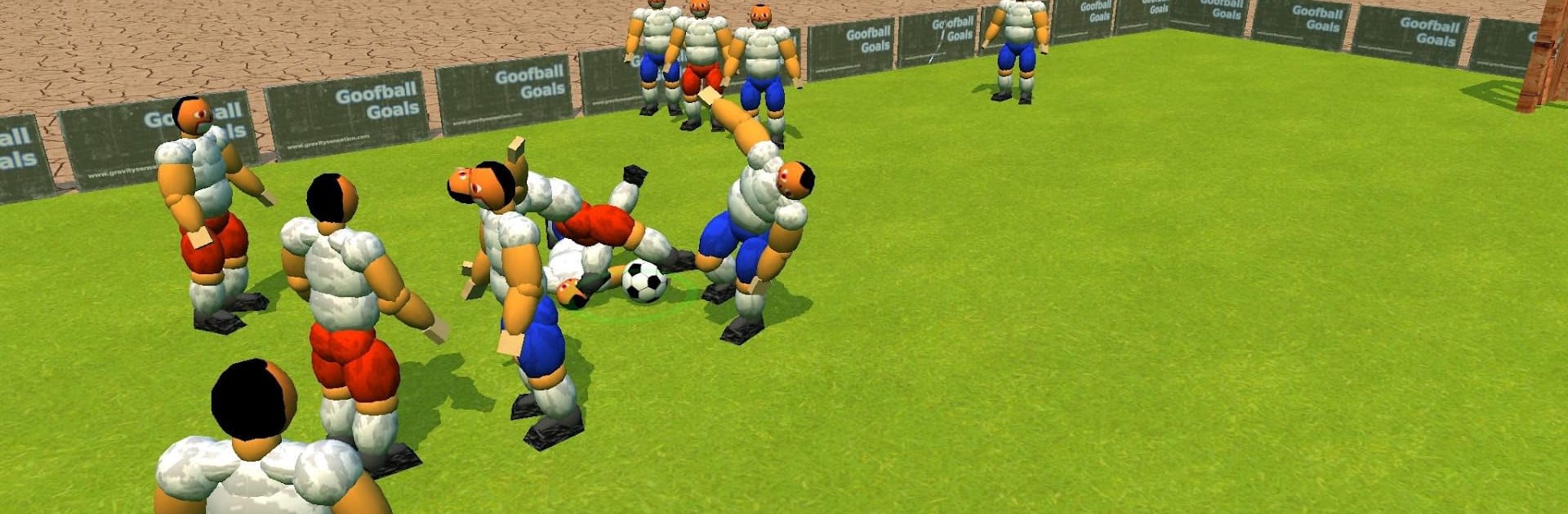
Goofball Goals Soccer Game 3D turns every match into a slapstick brawl with a ball. This Sports send-up mixes soccer with wobbly ragdoll physics, so your team stumbles, balances, and sometimes smashes in the most unlikely rockets. Expect goofy chaos, quick matches, and physics-driven mini-games—perfect for short bursts or a laid-back session on BlueStacks.

Game Features

  • Ragdoll Mayhem: Players sway, trip, and body-bump each other in a full 3D physics playground where every shove and slide matters.
  • Master the Wobble: Dual-stick controls reward patience—walking stays steady, running gets wild. Learn to line up that sweet spot before you swing.
  • Real “Oops” Moments: Characters try to keep their feet, topple into a heap, then scramble back up for another crack at the ball.
  • Mini-Games That Pop: Two bite-sized modes highlight the physics engine with compact challenges and quick laughs.
  • Ball Barrage: Want instant chaos? Tap to fling extra balls onto the field and watch the goofy crowd react in unpredictable ways.
  • Big Boots, Big Shots: Get in position, time your kick, and send the ball flying—it feels great when everything finally clicks.
  • Optional Tweaks: An in-app purchase removes timeouts and opens extra settings, including the option to spawn more balls.

BlueStacks gives you more room to focus on the game and less time adjusting around mobile limitations.


Game Features

Enhancements

  • Macros
  • Multi Instance
  • Multi Instance Sync
  • Script
  • Enhancements
Macros

Macros

Automate the predictable in Goofball Goals Soccer Game 3D and transform your gameplay with Macros. Get access to inventive Macros in the BlueStacks Macro Community
Multi Instance

Multi Instance

Play Goofball Goals Soccer Game 3D on one window. And chat with your friend on the other. Press CTRL + Shift + 8 to open the Multi-Instance Manager. And start creating fresh instances or clone an existing one.
Multi Instance Sync

Multi Instance Sync

Play Goofball Goals Soccer Game 3D with the power of Multi-Instance Sync. Replicate what you are doing on the main instance on all other instances. Level up faster, play more.
Script

Script

Script your way to gaming glory in Goofball Goals Soccer Game 3D with BlueStacks Script. Write and run a set of commands to automate repeated tasks. Trigger the command by assigning it to any key.
Read More

How to Download and Play Goofball Goals Soccer Game 3D on PC or Mac

  • Download and install BlueStacks on your PC or Mac

  • Complete Google sign-in to access the Play Store, or do it later

  • Look for Goofball Goals Soccer Game 3D in the search bar at the top right corner

  • Click to install Goofball Goals Soccer Game 3D from the search results

  • Complete Google sign-in (if you skipped step 2) to install Goofball Goals Soccer Game 3D

  • Click the Goofball Goals Soccer Game 3D icon on the home screen to start playing

video
Watch Video

Minimum System Requirements

With BlueStacks 5, you can get started on a PC that fulfills the following requirements.

  • Operating System

    Microsoft Windows 7 or above, macOS 11 (Big Sur) or above

  • Processor

    Intel, AMD or Apple Silicon Processor

  • RAM

    at least 4GB

  • HDD

    10GB Free Disk Space

Note:

* You must be an Administrator on your PC. Up to date graphics drivers from Microsoft or the chipset vendor.

Goofball Goals Soccer Game 3D - FAQs

  • How to play Goofball Goals Soccer Game 3D on Windows PC & Mac?

    Play Goofball Goals Soccer Game 3D on your PC or Mac by following these simple steps.

    • Click on 'Play Goofball Goals Soccer Game 3D on PC’ to download BlueStacks
    • Install it and log-in to Google Play Store
    • Launch and play the game.
  • Why is BlueStacks the fastest and safest platform to play games on PC?

    BlueStacks respects your privacy and is always safe and secure to use. It does not carry any malware, spyware, or any sort of additional software that could harm your PC.

    It is engineered to optimize speed and performance for a seamless gaming experience.

  • What are Goofball Goals Soccer Game 3D PC requirements?

    Minimum requirement to run Goofball Goals Soccer Game 3D on your PC

    • OS: Microsoft Windows 7 or above MacOS 11 (Big Sur) or above
    • Processor: Intel, AMD or Apple Silicon Processor
    • RAM: Your PC must have at least 4GB of RAM. (Note that having 4GB or more disk space is not a substitute for RAM)
    • HDD: 10GB Free Disk Space.
    • You must be an Administrator on your PC.