Guess Football Teams Quiz

Guess Football Teams Quiz

Sports

| Rock 'N Honey Apps

Play on PC with BlueStacks or from our cloud

  • Overview
  • Game Features
  • How to Play

Page Modified On: October 21, 2026

Play Guess Football Teams Quiz on PC or Mac

Play Guess Football Teams Quiz by Rock ‘N Honey Apps on PC or Mac with BlueStacks. Use a bigger screen, mouse and keyboard controls, and smoother performance while you play.

About the Game

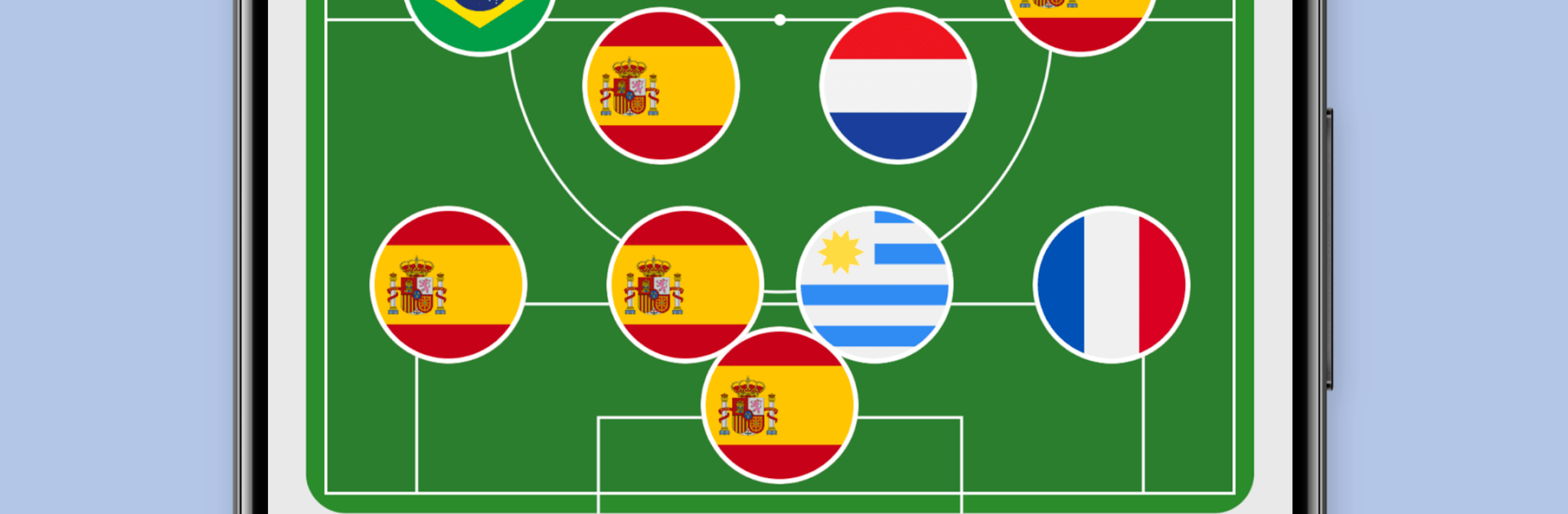
Guess Football Teams Quiz is a quick, brainy Sports trivia game that puts your club knowledge front and center. Instead of badges or kits, you’ll see a spread of national flags tied to a club’s roster—your job is to connect the dots and name the team. It’s the kind of challenge that flips between “easy win” and “how did I miss that?” fast, and it runs smoothly on BlueStacks if you prefer playing on a larger screen.

Game Features

  • Flag-first challenges: Identify clubs using a lineup of player nationalities shown as flags—no crests or jerseys to lean on.
  • The big five, all here: Work through Premier League, La Liga, Bundesliga, Serie A, and Ligue 1 with steadily tougher puzzles.
  • Bonus league twist: Tackle the Turkish Super League for an extra layer of variety and a fresh set of clubs to guess.
  • Legends included: Take on heavyweights like AC Milan, Real Madrid, FC Barcelona, Manchester United, and Bayern Munich, plus many more.
  • Loads of content: With hundreds of clubs to uncover, there’s always another “just one more round” waiting.
  • Difficulty your way: Pick a level that fits—start casual, then bump it up as your memory gets sharper.
  • Clean, no-fuss design: A simple, uncluttered layout keeps the focus on thinking, not hunting through menus.
  • Made for trivia lovers: If you enjoy connecting players, countries, and clubs in your head, this scratches that itch nicely.
  • Free to play: Jump in and start guessing—what you know matters more than what you spend.

Ready to top the leaderboard? We bet you do. Let precise controls and sharp visuals optimized on BlueStacks lead you to victory.


Game Features

Enhancements

  • Macros
  • Multi Instance
  • Multi Instance Sync
  • Script
  • Enhancements
Macros

Macros

Automate the predictable in Guess Football Teams Quiz and transform your gameplay with Macros. Get access to inventive Macros in the BlueStacks Macro Community
Multi Instance

Multi Instance

Play Guess Football Teams Quiz on one window. And chat with your friend on the other. Press CTRL + Shift + 8 to open the Multi-Instance Manager. And start creating fresh instances or clone an existing one.
Multi Instance Sync

Multi Instance Sync

Play Guess Football Teams Quiz with the power of Multi-Instance Sync. Replicate what you are doing on the main instance on all other instances. Level up faster, play more.
Script

Script

Script your way to gaming glory in Guess Football Teams Quiz with BlueStacks Script. Write and run a set of commands to automate repeated tasks. Trigger the command by assigning it to any key.
Read More

How to Download and Play Guess Football Teams Quiz on PC or Mac

  • Download and install BlueStacks on your PC or Mac

  • Complete Google sign-in to access the Play Store, or do it later

  • Look for Guess Football Teams Quiz in the search bar at the top right corner

  • Click to install Guess Football Teams Quiz from the search results

  • Complete Google sign-in (if you skipped step 2) to install Guess Football Teams Quiz

  • Click the Guess Football Teams Quiz icon on the home screen to start playing

video
Watch Video

Minimum System Requirements

With BlueStacks 5, you can get started on a PC that fulfills the following requirements.

  • Operating System

    Microsoft Windows 7 or above, macOS 11 (Big Sur) or above

  • Processor

    Intel, AMD or Apple Silicon Processor

  • RAM

    at least 4GB

  • HDD

    10GB Free Disk Space

Note:

* You must be an Administrator on your PC. Up to date graphics drivers from Microsoft or the chipset vendor.

Guess Football Teams Quiz - FAQs

  • How to play Guess Football Teams Quiz on Windows PC & Mac?

    Play Guess Football Teams Quiz on your PC or Mac by following these simple steps.

    • Click on 'Play Guess Football Teams Quiz on PC’ to download BlueStacks
    • Install it and log-in to Google Play Store
    • Launch and play the game.
  • Why is BlueStacks the fastest and safest platform to play games on PC?

    BlueStacks respects your privacy and is always safe and secure to use. It does not carry any malware, spyware, or any sort of additional software that could harm your PC.

    It is engineered to optimize speed and performance for a seamless gaming experience.

  • What are Guess Football Teams Quiz PC requirements?

    Minimum requirement to run Guess Football Teams Quiz on your PC

    • OS: Microsoft Windows 7 or above MacOS 11 (Big Sur) or above
    • Processor: Intel, AMD or Apple Silicon Processor
    • RAM: Your PC must have at least 4GB of RAM. (Note that having 4GB or more disk space is not a substitute for RAM)
    • HDD: 10GB Free Disk Space.
    • You must be an Administrator on your PC.