
Limits Lock
Limits Lock

Limits Lock

Sports

| Stark Dev.

Play on PC with BlueStacks or from our cloud

  • Overview
  • Game Features
  • How to Play

Page Modified On: July 27, 2026

Play Limits Lock on PC or Mac

Play Limits Lock by Stark Dev. on PC or Mac with BlueStacks. Use a bigger screen, mouse and keyboard controls, and smoother performance while you play.

About the Game

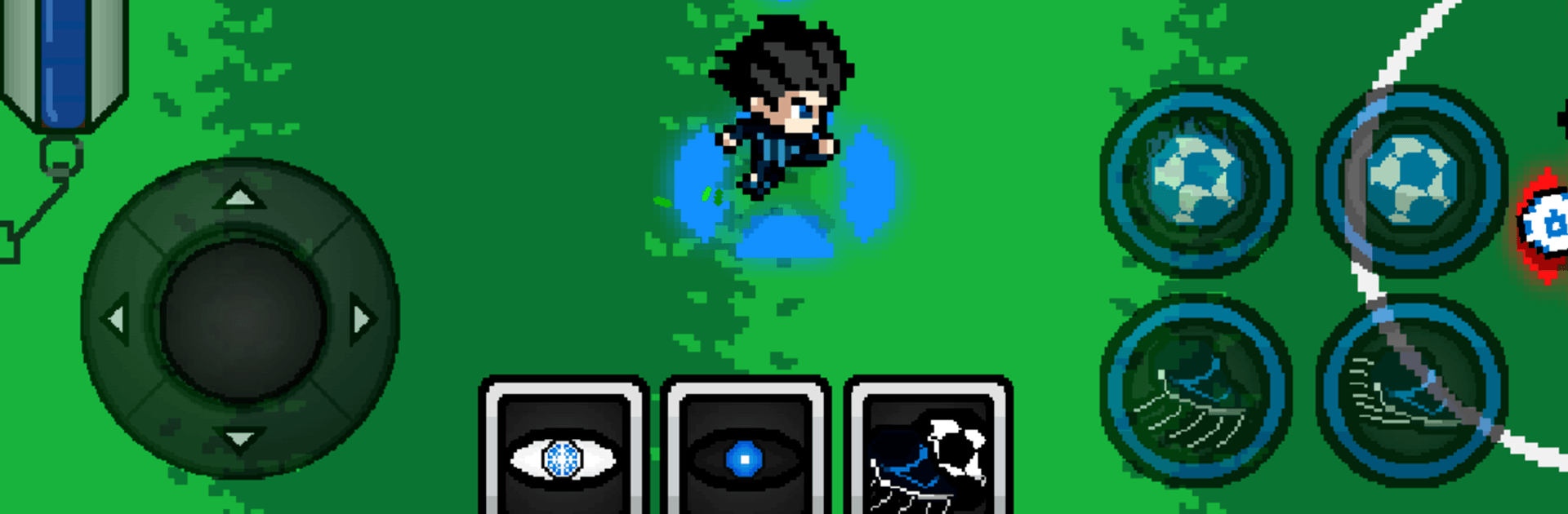
Limits Lock is a sharp, high-pressure Sports experience where soccer turns into a one-against-all proving ground. You’re dropped into a futuristic training complex with one goal: outthink, outrun, and outshoot everyone else. It’s fast, stylish, and relentless—every decision you make on the pitch has weight.

Game Features

  • Ego-Drive Focus: Trigger a razor-sharp state of concentration to trace wild shooting lines, read defenders in advance, and slip through gaps that barely exist.
  • Evolve Mid-Season: Absorb your rivals’ play styles to unlock passive perks, then boost core stats like shooting power, sprint speed, and field awareness.
  • 300 Strikers, One Seat: Work your way through a brutal queue of contenders, each with their own tricks, as you claw toward that single elite roster spot.
  • Physics That Matter: Shots bend, rebounds bite, and collisions have consequences—matches feel physical, risky, and alive from kickoff to final whistle.
  • Pick Your Contender: Choose a character that fits your vibe, then shape their growth with the abilities you steal and the upgrades you favor.
  • VR Drill Sessions: Hit virtual simulators to polish timing, refine angles, and practice those audacious curves before testing them under real pressure.
  • Decisions Under Fire: Greedy shot or safe pass? Cut inside or burn down the wing? Your choices on the grass define your rise—or your collapse.
  • Punchy Pixel Style: Clean, expressive pixel art paired with fluid animation makes every sprint, feint, and strike feel crisp and readable.
  • Play Your Way: Smooth on touch, snappy in motion—prefer a bigger screen and keyboard? It also feels right at home on BlueStacks.

Ready to top the leaderboard? We bet you do. Let precise controls and sharp visuals optimized on BlueStacks lead you to victory.


Game Features

Enhancements

  • Macros
  • Multi Instance
  • Multi Instance Sync
  • Script
  • Enhancements
Macros

Macros

Automate the predictable in Limits Lock and transform your gameplay with Macros. Get access to inventive Macros in the BlueStacks Macro Community
Multi Instance

Multi Instance

Play Limits Lock on one window. And chat with your friend on the other. Press CTRL + Shift + 8 to open the Multi-Instance Manager. And start creating fresh instances or clone an existing one.
Multi Instance Sync

Multi Instance Sync

Play Limits Lock with the power of Multi-Instance Sync. Replicate what you are doing on the main instance on all other instances. Level up faster, play more.
Script

Script

Script your way to gaming glory in Limits Lock with BlueStacks Script. Write and run a set of commands to automate repeated tasks. Trigger the command by assigning it to any key.
Read More

How to Download and Play Limits Lock on PC or Mac

  • Download and install BlueStacks on your PC or Mac

  • Complete Google sign-in to access the Play Store, or do it later

  • Look for Limits Lock in the search bar at the top right corner

  • Click to install Limits Lock from the search results

  • Complete Google sign-in (if you skipped step 2) to install Limits Lock

  • Click the Limits Lock icon on the home screen to start playing

video
Watch Video

Minimum System Requirements

With BlueStacks 5, you can get started on a PC that fulfills the following requirements.

  • Operating System

    Microsoft Windows 7 or above, macOS 11 (Big Sur) or above

  • Processor

    Intel, AMD or Apple Silicon Processor

  • RAM

    at least 4GB

  • HDD

    10GB Free Disk Space

Note:

* You must be an Administrator on your PC. Up to date graphics drivers from Microsoft or the chipset vendor.

Limits Lock - FAQs

  • How to play Limits Lock on Windows PC & Mac?

    Play Limits Lock on your PC or Mac by following these simple steps.

    • Click on 'Play Limits Lock on PC’ to download BlueStacks
    • Install it and log-in to Google Play Store
    • Launch and play the game.
  • Why is BlueStacks the fastest and safest platform to play games on PC?

    BlueStacks respects your privacy and is always safe and secure to use. It does not carry any malware, spyware, or any sort of additional software that could harm your PC.

    It is engineered to optimize speed and performance for a seamless gaming experience.

  • What are Limits Lock PC requirements?

    Minimum requirement to run Limits Lock on your PC

    • OS: Microsoft Windows 7 or above MacOS 11 (Big Sur) or above
    • Processor: Intel, AMD or Apple Silicon Processor
    • RAM: Your PC must have at least 4GB of RAM. (Note that having 4GB or more disk space is not a substitute for RAM)
    • HDD: 10GB Free Disk Space.
    • You must be an Administrator on your PC.







