Mini Golf 1000: Putt Putt Star

Mini Golf 1000: Putt Putt Star

Sports

| Wasabi Applications (わさびアプリ)

Play on PC with BlueStacks or from our cloud

  • Overview
  • Game Features
  • How to Play

Page Modified On: December 22, 2025

Play Mini Golf 1000: Putt Putt Star on PC or Mac

Mini Golf 1000: Putt Putt Star brings the Sports genre to life, and throws up exciting challenges for gamers. Developed by Wasabi Applications (わさびアプリ), this Android game is best experienced on BlueStacks, the World’s #1 app player for PC and Mac users.

About the Game

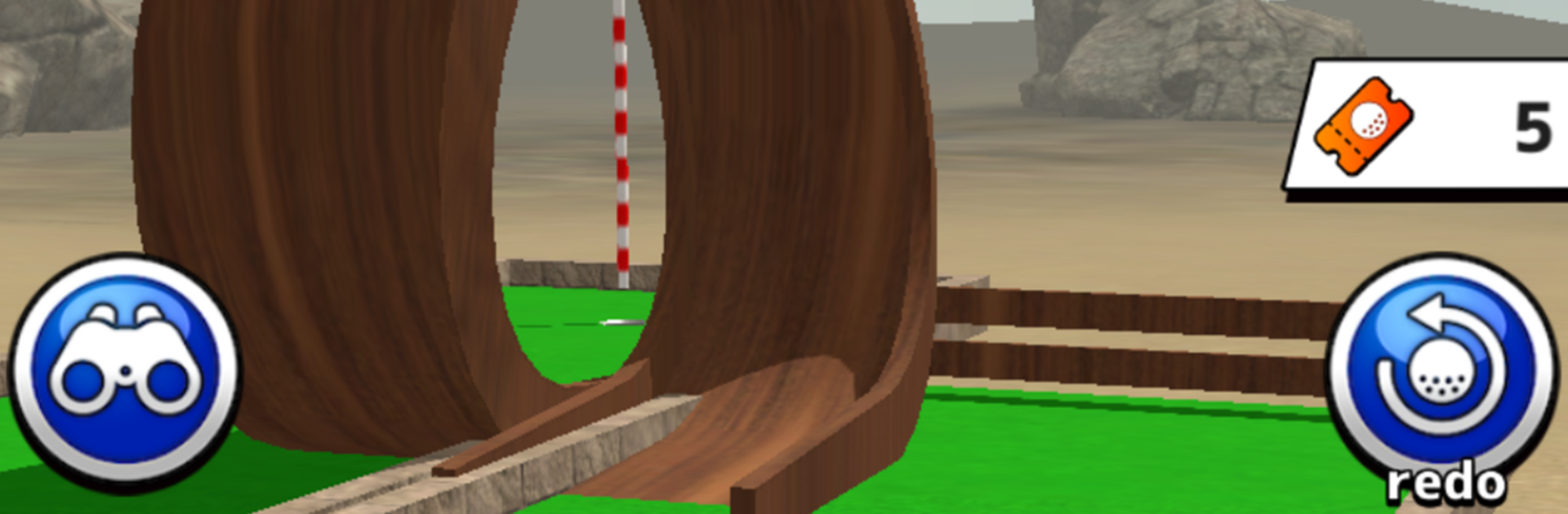
Mini Golf 1000: Putt Putt Star is a Sports take on mini golf where every stroke counts and smart angles win the day. It’s all about the putt—clean, simple controls with courses that play like bite-sized puzzles. Expect creative 3D tracks, clever shortcuts, and just enough challenge to keep you saying “one more shot.” Prefer a bigger screen? It plays nicely on PC with BlueStacks.

Game Features

  • Pure putting only: No drives, no chips—just precise putts across compact, tricky courses that reward control and planning.
  • Star scoring system: Finish in fewer strokes to earn up to three stars; push your luck too far and you’ll wipe the stage.
  • Inventive hazards: Loops, bouncy tiles, and speed pads change how each hole plays, so you’re always adjusting your line and power.
  • Puzzles that scale: Start with 100 beginner-friendly stages, then take on tougher layouts that test timing, slopes, and ball behavior.
  • Pull-and-release controls: Easy to learn, surprisingly deep to master. Reading surfaces and angles is half the fun.
  • Collectible balls: Unlock balls from treasure chests or clutch hole-in-ones. Each has its own feel and physics—picking the right one can shave a stroke.
  • Crisp 3D and offline play: Play single-player stages anywhere, no connection required.
  • Progress that pays: Fill a bonus gauge, chase achievements, and use redo tickets to refine tough runs without losing momentum.
  • Competitive modes: Climb global leaderboards and jump into online tournaments, each with its own course and sneaky shortcuts to discover.
  • Daily goals: Knock out missions for extra rewards and steady progression.
  • Smart strategies: Every course is beatable with the default ball, but switching balls often reveals faster routes.
  • Ad-free option: Remove ads with an in-app purchase if you want a cleaner experience.

Start your journey now. Download the game on BlueStacks, invite your friends, and march on a new adventure.


Game Features

Enhancements

  • Macros
  • Multi Instance
  • Multi Instance Sync
  • Script
  • Enhancements
Macros

Macros

Automate the predictable in Mini Golf 1000: Putt Putt Star and transform your gameplay with Macros. Get access to inventive Macros in the BlueStacks Macro Community
Multi Instance

Multi Instance

Play Mini Golf 1000: Putt Putt Star on one window. And chat with your friend on the other. Press CTRL + Shift + 8 to open the Multi-Instance Manager. And start creating fresh instances or clone an existing one.
Multi Instance Sync

Multi Instance Sync

Play Mini Golf 1000: Putt Putt Star with the power of Multi-Instance Sync. Replicate what you are doing on the main instance on all other instances. Level up faster, play more.
Script

Script

Script your way to gaming glory in Mini Golf 1000: Putt Putt Star with BlueStacks Script. Write and run a set of commands to automate repeated tasks. Trigger the command by assigning it to any key.
Read More

How to Download and Play Mini Golf 1000: Putt Putt Star on PC or Mac

  • Download and install BlueStacks on your PC or Mac

  • Complete Google sign-in to access the Play Store, or do it later

  • Look for Mini Golf 1000: Putt Putt Star in the search bar at the top right corner

  • Click to install Mini Golf 1000: Putt Putt Star from the search results

  • Complete Google sign-in (if you skipped step 2) to install Mini Golf 1000: Putt Putt Star

  • Click the Mini Golf 1000: Putt Putt Star icon on the home screen to start playing

video
Watch Video

Minimum System Requirements

With BlueStacks 5, you can get started on a PC that fulfills the following requirements.

  • Operating System

    Microsoft Windows 7 or above, macOS 11 (Big Sur) or above

  • Processor

    Intel, AMD or Apple Silicon Processor

  • RAM

    at least 4GB

  • HDD

    10GB Free Disk Space

Note:

* You must be an Administrator on your PC. Up to date graphics drivers from Microsoft or the chipset vendor.

Mini Golf 1000: Putt Putt Star - FAQs

  • How to play Mini Golf 1000: Putt Putt Star on Windows PC & Mac?

    Play Mini Golf 1000: Putt Putt Star on your PC or Mac by following these simple steps.

    • Click on 'Play Mini Golf 1000: Putt Putt Star on PC’ to download BlueStacks
    • Install it and log-in to Google Play Store
    • Launch and play the game.
  • Why is BlueStacks the fastest and safest platform to play games on PC?

    BlueStacks respects your privacy and is always safe and secure to use. It does not carry any malware, spyware, or any sort of additional software that could harm your PC.

    It is engineered to optimize speed and performance for a seamless gaming experience.

  • What are Mini Golf 1000: Putt Putt Star PC requirements?

    Minimum requirement to run Mini Golf 1000: Putt Putt Star on your PC

    • OS: Microsoft Windows 7 or above MacOS 11 (Big Sur) or above
    • Processor: Intel, AMD or Apple Silicon Processor
    • RAM: Your PC must have at least 4GB of RAM. (Note that having 4GB or more disk space is not a substitute for RAM)
    • HDD: 10GB Free Disk Space.
    • You must be an Administrator on your PC.