Beachhead Defense
Beachhead Defense

Beachhead Defense

Strategy

| MIRACLE GAMES SG PTE. LTD.

Play on PC with BlueStacks or from our cloud

  • Overview
  • Game Features
  • How to Play

Page Modified On: November 20, 2025

Play Beachhead Defense on PC or Mac

Beachhead Defense brings the Strategy genre to life, and throws up exciting challenges for gamers. Developed by MIRACLE GAMES SG PTE. LTD., this Android game is best experienced on BlueStacks, the World’s #1 app player for PC and Mac users.

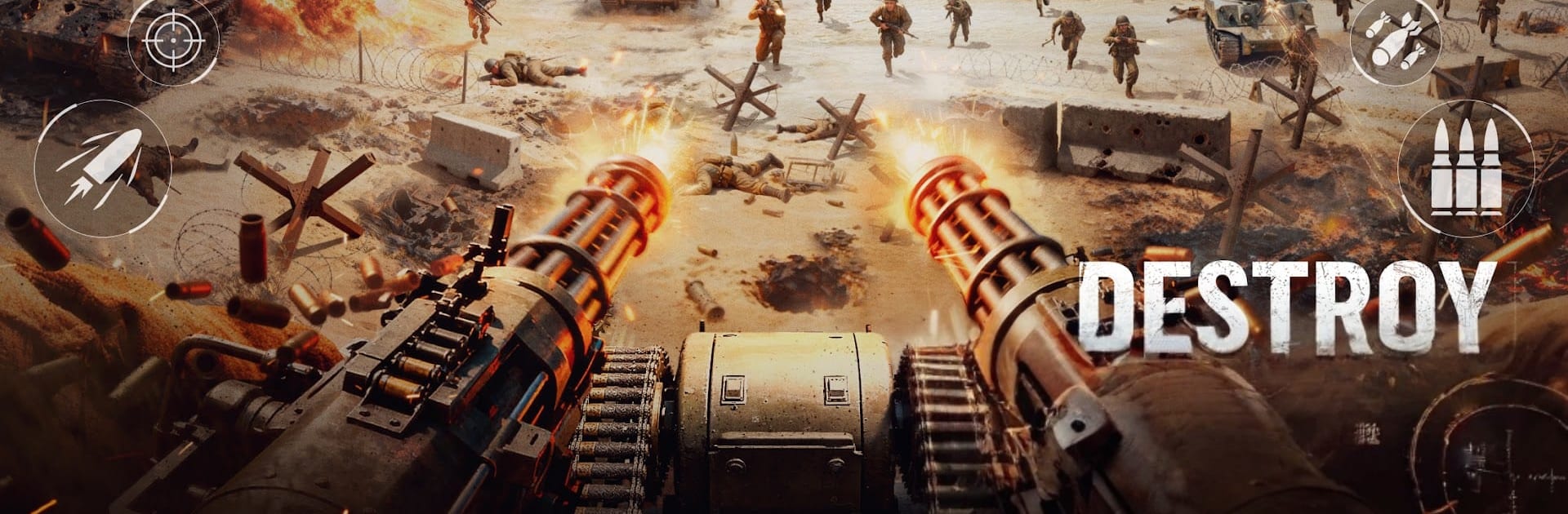
Beachhead Defense is that classic turret holdout game where the screen fills with enemies and the player has to keep cool while everything explodes. It plays from a first person view, so the whole job is to swivel the gun, pick targets fast, and stop anything from getting past the sandbags. Infantry rush in zigzags, boats creep up and drop squads, and then a helicopter cruises in at the worst time. There is a nice rhythm to swapping between the main machine gun for crowds, a heavier cannon for armor, and missiles for the stuff that really should not reach shore. Heat and reloads matter, so spraying nonstop is not smart. On PC with BlueStacks, mouse aim makes tracking jets and tiny runners way easier, and having hotkeys for weapon swaps helps when the wave gets messy.

It is not just endless beach after beach either. Maps change the pace. Open coastlines push long sightlines, rocky coves hide landings, and some stages toss in fog or night so spotting becomes part of the fight. Between rounds there is a chunky upgrade tree to tune damage, reloads, blast radius, and unlock things like artillery calls or defensive gadgets. New guns and missiles feel like a real bump, not just number creep. Enemies scale up with shields, faster boats, and bigger gunships, so prioritizing targets matters more the further it goes. There is a light meta layer with growing a roster and joining alliances, so there is a world map to clear and some cooperative perks without turning it into a builder. It leans arcade, hits quick, and scratches that hold-the-line itch where every second is either satisfying headshots or a small panic when the missile is still on cooldown and a gunboat will not stop inching forward.

Start your journey now. Download the game on BlueStacks, invite your friends, and march on a new adventure.


Game Features

Enhancements

  • Macros
  • Multi Instance
  • Multi Instance Sync
  • Eco Mode
  • Enhancements
Macros

Macros

Skip the boring parts of a game. Play Beachhead Defense with Macros and get the edge. Simply record a sequence of commands and execute them at any moment.
Multi Instance

Multi Instance

Why limit to one game on your phone when you can play many on your PC? Open multiple instances of Beachhead Defense at once with Multi-Instance. Leverage the power of different accounts by doing more.
Multi Instance Sync

Multi Instance Sync

Get the best out of Beachhead Defense with Multi-Instance Sync. Play the game from different accounts and build your own empire. Use Multi-instance sync to repeat the action in the main BlueStacks instance on all other instances.
Eco Mode

Eco Mode

Find the rarest heroes by making multiple summons in Beachhead Defense. And while you are at it, reduce your PC’s resource consumption with the Eco Mode. Farm efficiently. Get the best results.
Read More

How to Download and Play Beachhead Defense on PC or Mac

  • Download and install BlueStacks on your PC or Mac

  • Complete Google sign-in to access the Play Store, or do it later

  • Look for Beachhead Defense in the search bar at the top right corner

  • Click to install Beachhead Defense from the search results

  • Complete Google sign-in (if you skipped step 2) to install Beachhead Defense

  • Click the Beachhead Defense icon on the home screen to start playing

video
Watch Video

Minimum System Requirements

With BlueStacks 5, you can get started on a PC that fulfills the following requirements.

  • Operating System

    Microsoft Windows 7 or above, macOS 11 (Big Sur) or above

  • Processor

    Intel, AMD or Apple Silicon Processor

  • RAM

    at least 4GB

  • HDD

    10GB Free Disk Space

Note:

* You must be an Administrator on your PC. Up to date graphics drivers from Microsoft or the chipset vendor.

Beachhead Defense - FAQs

  • How to play Beachhead Defense on Windows PC & Mac?

    Play Beachhead Defense on your PC or Mac by following these simple steps.

    • Click on 'Play Beachhead Defense on PC’ to download BlueStacks
    • Install it and log-in to Google Play Store
    • Launch and play the game.
  • Why is BlueStacks the fastest and safest platform to play games on PC?

    BlueStacks respects your privacy and is always safe and secure to use. It does not carry any malware, spyware, or any sort of additional software that could harm your PC.

    It is engineered to optimize speed and performance for a seamless gaming experience.

  • What are Beachhead Defense PC requirements?

    Minimum requirement to run Beachhead Defense on your PC

    • OS: Microsoft Windows 7 or above MacOS 11 (Big Sur) or above
    • Processor: Intel, AMD or Apple Silicon Processor
    • RAM: Your PC must have at least 4GB of RAM. (Note that having 4GB or more disk space is not a substitute for RAM)
    • HDD: 10GB Free Disk Space.
    • You must be an Administrator on your PC.