Cards and Castles Ultimate

Cards and Castles Ultimate

Strategy

| Red Team Games

Play on PC with BlueStacks or from our cloud

  • Overview
  • Game Features
  • How to Play

Page Modified On: August 17, 2026

Play Cards and Castles Ultimate on PC or Mac

Explore a whole new adventure with Cards and Castles Ultimate, a Strategy game created by Red Team Games. Experience great gameplay with BlueStacks, the most popular gaming platform to play Android games on your PC or Mac.

About the Game

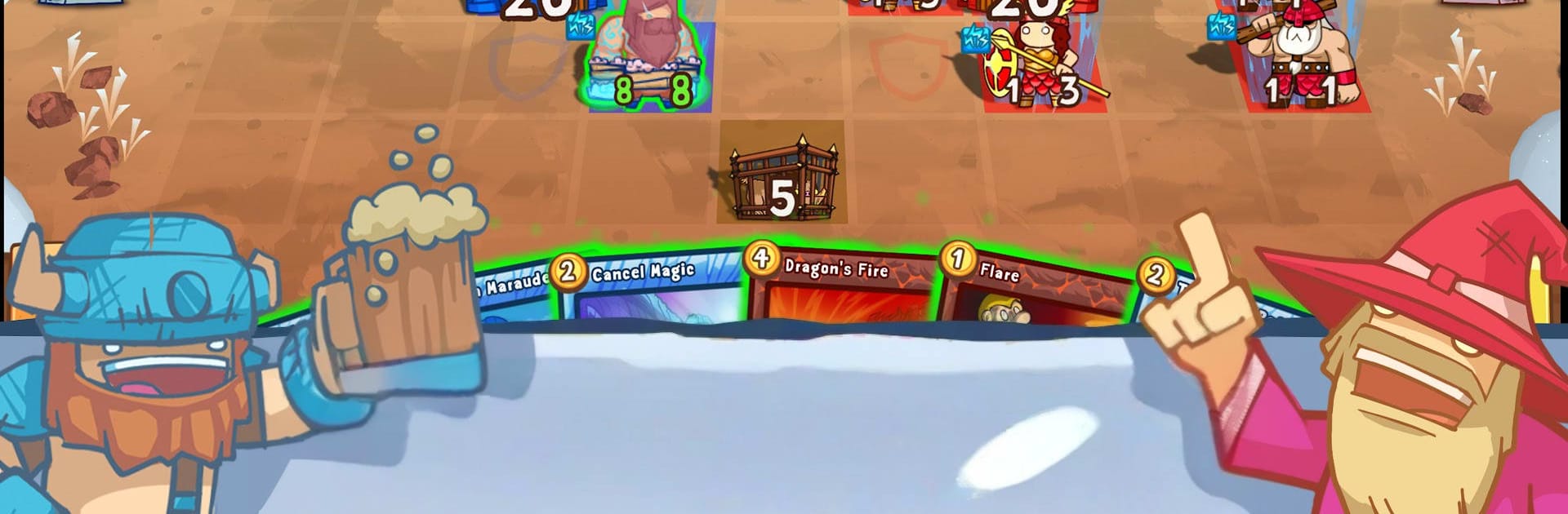
Cards and Castles Ultimate is a Strategy card battler with a twist: every move happens on a grid-based battlefield where positioning matters as much as your deck. You’ll build wild faction combos, outmaneuver enemies, and protect your castle while pulling off flashy plays that come together fast. It plays smoothly on BlueStacks too, if you like the feel of a bigger screen and crisp controls.

Game Features

  • Tactical Board Combat: Place units on a grid, hold chokepoints, set up flanks, or park defenders in front of your castle to blunt a push.
  • Seven Iconic Factions: Vikings, Crusaders, Warlocks, Pirates, Ninjas, Druids, and Undead—mix any two to craft clever synergies and offbeat builds.
  • Draft Tables: Classic pass-the-pack drafting in custom lobbies, perfect for testing instincts and reading the table.
  • Two-Color Power Cards: Special multi-color cards unlock potent combos when your deck hits the right mix.
  • Story Campaign: A single-player run full of handcrafted encounters that teach tricks while telling a tale.
  • Graveyard & Spirits: Fallen units linger as ghosts behind your castle—resurrect them or use color-specific effects to meddle with the dead.
  • Map Objectives: Multiplayer arenas come with optional side goals that create fresh win angles beyond smashing the castle.
  • Guardian Slot: Assign any unit as your castle’s personal bodyguard for flexible defense plans.
  • Faster Starts, Bigger Plays: Early turns snowball quickly, opening up advanced combos sooner than you’d expect.
  • Stomp Ability: Certain units can trample through enemies, changing how you block lanes and set traps.
  • Fewer Random Swings: Less reliance on luck, more on reading the board and sequencing your turns.
  • Legendary Freedom: No cap on legendaries—if it fits your plan, it’s fair game.
  • 350+ Cards: A hefty collection to experiment with, with plenty of room to refine your favorites.
  • Cleaner Interface: A snappier, clearer UI that keeps the focus on the fight.
  • Ranked Play: Leaderboards and an ELO system for players who want to track progress and face tougher competition.

Get ready for a buttery smooth, high-performance gaming action only on BlueStacks.

Game Features

Enhancements

  • Macros
  • Multi Instance
  • Multi Instance Sync
  • Eco Mode
  • Enhancements
Macros

Macros

Skip the boring parts of a game. Play Cards and Castles Ultimate with Macros and get the edge. Simply record a sequence of commands and execute them at any moment.
Multi Instance

Multi Instance

Why limit to one game on your phone when you can play many on your PC? Open multiple instances of Cards and Castles Ultimate at once with Multi-Instance. Leverage the power of different accounts by doing more.
Multi Instance Sync

Multi Instance Sync

Get the best out of Cards and Castles Ultimate with Multi-Instance Sync. Play the game from different accounts and build your own empire. Use Multi-instance sync to repeat the action in the main BlueStacks instance on all other instances.
Eco Mode

Eco Mode

Find the rarest heroes by making multiple summons in Cards and Castles Ultimate. And while you are at it, reduce your PC’s resource consumption with the Eco Mode. Farm efficiently. Get the best results.
Read More

How to Download and Play Cards and Castles Ultimate on PC or Mac

  • Download and install BlueStacks on your PC or Mac

  • Complete Google sign-in to access the Play Store, or do it later

  • Look for Cards and Castles Ultimate in the search bar at the top right corner

  • Click to install Cards and Castles Ultimate from the search results

  • Complete Google sign-in (if you skipped step 2) to install Cards and Castles Ultimate

  • Click the Cards and Castles Ultimate icon on the home screen to start playing

video
Watch Video

Minimum System Requirements

With BlueStacks 5, you can get started on a PC that fulfills the following requirements.

  • Operating System

    Microsoft Windows 7 or above, macOS 11 (Big Sur) or above

  • Processor

    Intel, AMD or Apple Silicon Processor

  • RAM

    at least 4GB

  • HDD

    10GB Free Disk Space

Note:

* You must be an Administrator on your PC. Up to date graphics drivers from Microsoft or the chipset vendor.

Cards and Castles Ultimate - FAQs

  • How to play Cards and Castles Ultimate on Windows PC & Mac?

    Play Cards and Castles Ultimate on your PC or Mac by following these simple steps.

    • Click on 'Play Cards and Castles Ultimate on PC’ to download BlueStacks
    • Install it and log-in to Google Play Store
    • Launch and play the game.
  • Why is BlueStacks the fastest and safest platform to play games on PC?

    BlueStacks respects your privacy and is always safe and secure to use. It does not carry any malware, spyware, or any sort of additional software that could harm your PC.

    It is engineered to optimize speed and performance for a seamless gaming experience.

  • What are Cards and Castles Ultimate PC requirements?

    Minimum requirement to run Cards and Castles Ultimate on your PC

    • OS: Microsoft Windows 7 or above MacOS 11 (Big Sur) or above
    • Processor: Intel, AMD or Apple Silicon Processor
    • RAM: Your PC must have at least 4GB of RAM. (Note that having 4GB or more disk space is not a substitute for RAM)
    • HDD: 10GB Free Disk Space.
    • You must be an Administrator on your PC.