Dead Ahead Enforcers

Dead Ahead Enforcers

Strategy

| Mobirate

Play on PC with BlueStacks or from our cloud

  • Overview
  • Game Features
  • How to Play

Page Modified On: December 05, 2025

Play Dead Ahead Enforcers on PC or Mac

From the innovators and creators at Mobirate, Dead Ahead Enforcers is another fun addition to the World of Strategy games. Go beyond your mobile screen and play it bigger and better on your PC or Mac. An immersive experience awaits you.

About the Game

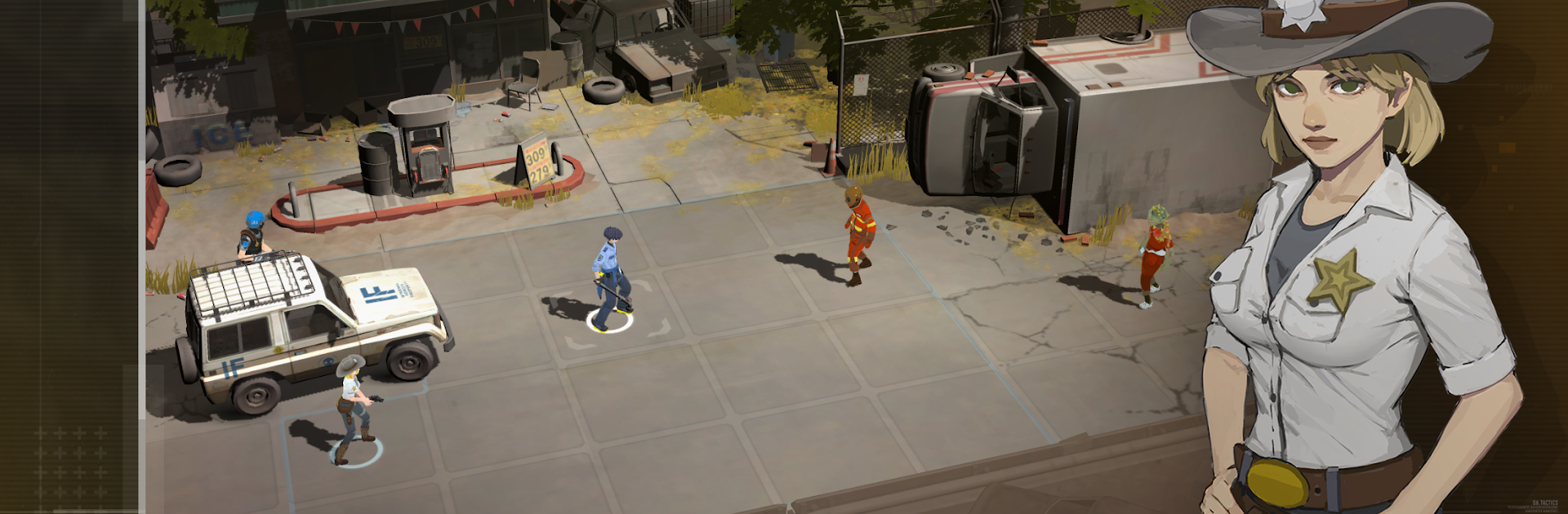
Dead Ahead Enforcers throws you into a grim, turn-based fight for survival after the barricades finally give way. You’ll gather a ragtag squad, plan every move, and try to keep your people alive against hungry crowds that don’t care how careful you were last turn. It’s a Strategy game by Mobirate that rewards smart positioning, risk management, and a cool head when things go sideways. Prefer a bigger screen? Playing on BlueStacks feels great.

Game Features

  • Story-driven battles — Push through boarded-up stores, gas stations on empty, and choked crossroads. Each map hides hazards, supplies, and moments that reveal how everything fell apart.

  • Build your crew — Unlock melee bruisers, calm medics, special forces vets, and quirky engineers. Every survivor brings distinct skills and playstyles, so mix and match to create combos that actually work in the field.

  • Tactical, turn-based combat — Every tile matters. Use cover, control sightlines, set up abilities, and collapse enemy formations. Expect tricky objectives and boss encounters that punish sloppy moves.

  • Gear that changes the plan — Scavenge and upgrade weapons and equipment, from crackling tasers to heavy hitters. Your loadout shapes your tactics, so tune it for stun locks, burst damage, or tight defense.

  • Meaningful progression — Tight resources push tough calls: upgrade a favorite hero, improve key gear, or expand the roster? Strong choices now pay off in the next brutal mission.

  • Varied missions and challenges — Different enemy mixes, map layouts, and objectives keep you adjusting. What worked last time might get you overrun if you don’t rethink the approach.

Start your journey now. Download the game on BlueStacks, invite your friends, and march on a new adventure.


Game Features

Enhancements

  • Macros
  • Multi Instance
  • Multi Instance Sync
  • Eco Mode
  • Enhancements
Macros

Macros

Skip the boring parts of a game. Play Dead Ahead Enforcers with Macros and get the edge. Simply record a sequence of commands and execute them at any moment.
Multi Instance

Multi Instance

Why limit to one game on your phone when you can play many on your PC? Open multiple instances of Dead Ahead Enforcers at once with Multi-Instance. Leverage the power of different accounts by doing more.
Multi Instance Sync

Multi Instance Sync

Get the best out of Dead Ahead Enforcers with Multi-Instance Sync. Play the game from different accounts and build your own empire. Use Multi-instance sync to repeat the action in the main BlueStacks instance on all other instances.
Eco Mode

Eco Mode

Find the rarest heroes by making multiple summons in Dead Ahead Enforcers. And while you are at it, reduce your PC’s resource consumption with the Eco Mode. Farm efficiently. Get the best results.
Read More

How to Download and Play Dead Ahead Enforcers on PC or Mac

  • Download and install BlueStacks on your PC or Mac

  • Complete Google sign-in to access the Play Store, or do it later

  • Look for Dead Ahead Enforcers in the search bar at the top right corner

  • Click to install Dead Ahead Enforcers from the search results

  • Complete Google sign-in (if you skipped step 2) to install Dead Ahead Enforcers

  • Click the Dead Ahead Enforcers icon on the home screen to start playing

video
Watch Video

Minimum System Requirements

With BlueStacks 5, you can get started on a PC that fulfills the following requirements.

  • Operating System

    Microsoft Windows 7 or above, macOS 11 (Big Sur) or above

  • Processor

    Intel, AMD or Apple Silicon Processor

  • RAM

    at least 4GB

  • HDD

    10GB Free Disk Space

Note:

* You must be an Administrator on your PC. Up to date graphics drivers from Microsoft or the chipset vendor.

Dead Ahead Enforcers - FAQs

  • How to play Dead Ahead Enforcers on Windows PC & Mac?

    Play Dead Ahead Enforcers on your PC or Mac by following these simple steps.

    • Click on 'Play Dead Ahead Enforcers on PC’ to download BlueStacks
    • Install it and log-in to Google Play Store
    • Launch and play the game.
  • Why is BlueStacks the fastest and safest platform to play games on PC?

    BlueStacks respects your privacy and is always safe and secure to use. It does not carry any malware, spyware, or any sort of additional software that could harm your PC.

    It is engineered to optimize speed and performance for a seamless gaming experience.

  • What are Dead Ahead Enforcers PC requirements?

    Minimum requirement to run Dead Ahead Enforcers on your PC

    • OS: Microsoft Windows 7 or above MacOS 11 (Big Sur) or above
    • Processor: Intel, AMD or Apple Silicon Processor
    • RAM: Your PC must have at least 4GB of RAM. (Note that having 4GB or more disk space is not a substitute for RAM)
    • HDD: 10GB Free Disk Space.
    • You must be an Administrator on your PC.