Defense Zone HD Lite

Defense Zone HD Lite

Strategy

| HC GLOBAL DISTRIBUTION LIMITED

Play on PC with BlueStacks or from our cloud

  • Overview
  • Game Features
  • How to Play

Page Modified On: August 08, 2025

Play Defense Zone HD Lite on PC or Mac

Explore a whole new adventure with Defense Zone HD Lite, a Strategy game created by ARTEM KOTOV. Experience great gameplay with BlueStacks, the most popular gaming platform to play Android games on your PC or Mac.

About the Game

If you’re a fan of strategy games, Defense Zone HD Lite by ARTEM KOTOV has you covered. It tosses you right into the heat of battle, where you get to plan, build, and tweak your defenses against waves of incoming enemies. This isn’t just about quick reflexes—it’s about making smart choices and finding creative ways to hold your ground.

Game Features

  • Gorgeous Level Design
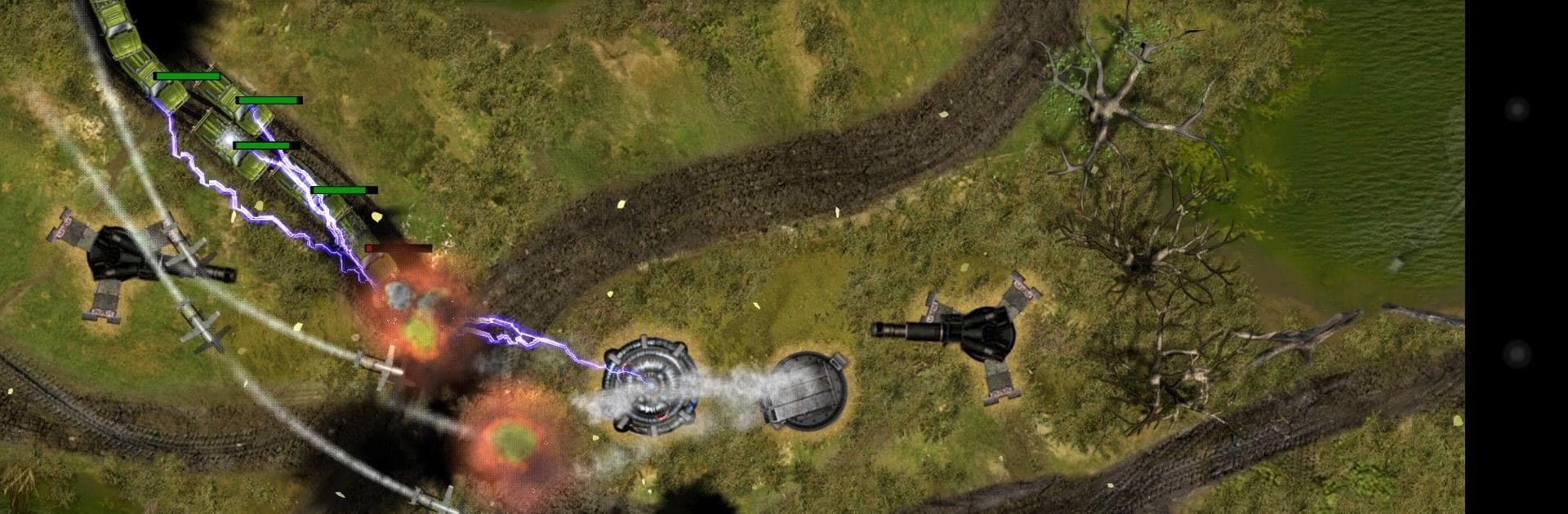
    Each battlefield is crafted with an impressive attention to detail. You’ll spot different environments and terrains that don’t just look great—they also shake up your options for defense.

  • Challenging Tactical Gameplay
    It’s not just about dropping turrets anywhere. The enemies are relentless, so you’ll really need to think through your moves and plan your strategies to keep them from breaking through.

  • Wide Range of Weaponry
    As you progress, you’ll unlock a bunch of new weapons. Each one comes with its own firepower, range, firing speed, and even blast radius. Some are expensive but pack a real punch, while others are budget-friendly and reliable.

  • Resource Management
    Are you the kind of commander who upgrades old units or prefers to test the latest gadgets? Spend your resources how you want—upgrade seasoned turrets or splurge on something shiny and new. Your choice will shape the outcome of every round.

  • Dynamic Tactics and Variety
    Different weapons and diverse landscapes force you to mix up your approach every time. Where you place a turret or how you allocate your budget really matters here; no lazy, cookie-cutter wins.

  • Smooth Experience on BlueStacks
    Want to fine-tune your defensive setup with a mouse and keyboard? BlueStacks lets you enjoy that next-level control, so each tactical decision feels just right.

Start your journey now. Download the game on BlueStacks, invite your friends, and march on a new adventure.


Game Features

Enhancements

  • Macros
  • Multi Instance
  • Multi Instance Sync
  • Eco Mode
  • Enhancements
Macros

Macros

Skip the boring parts of a game. Play Defense Zone HD Lite with Macros and get the edge. Simply record a sequence of commands and execute them at any moment.
Multi Instance

Multi Instance

Why limit to one game on your phone when you can play many on your PC? Open multiple instances of Defense Zone HD Lite at once with Multi-Instance. Leverage the power of different accounts by doing more.
Multi Instance Sync

Multi Instance Sync

Get the best out of Defense Zone HD Lite with Multi-Instance Sync. Play the game from different accounts and build your own empire. Use Multi-instance sync to repeat the action in the main BlueStacks instance on all other instances.
Eco Mode

Eco Mode

Find the rarest heroes by making multiple summons in Defense Zone HD Lite. And while you are at it, reduce your PC’s resource consumption with the Eco Mode. Farm efficiently. Get the best results.
Read More

How to Download and Play Defense Zone HD Lite on PC or Mac

  • Download and install BlueStacks on your PC or Mac

  • Complete Google sign-in to access the Play Store, or do it later

  • Look for Defense Zone HD Lite in the search bar at the top right corner

  • Click to install Defense Zone HD Lite from the search results

  • Complete Google sign-in (if you skipped step 2) to install Defense Zone HD Lite

  • Click the Defense Zone HD Lite icon on the home screen to start playing

video
Watch Video

Minimum System Requirements

With BlueStacks 5, you can get started on a PC that fulfills the following requirements.

  • Operating System

    Microsoft Windows 7 or above, macOS 11 (Big Sur) or above

  • Processor

    Intel, AMD or Apple Silicon Processor

  • RAM

    at least 4GB

  • HDD

    10GB Free Disk Space

Note:

* You must be an Administrator on your PC. Up to date graphics drivers from Microsoft or the chipset vendor.

Defense Zone HD Lite - FAQs

  • How to play Defense Zone HD Lite on Windows PC & Mac?

    Play Defense Zone HD Lite on your PC or Mac by following these simple steps.

    • Click on 'Play Defense Zone HD Lite on PC’ to download BlueStacks
    • Install it and log-in to Google Play Store
    • Launch and play the game.
  • Why is BlueStacks the fastest and safest platform to play games on PC?

    BlueStacks respects your privacy and is always safe and secure to use. It does not carry any malware, spyware, or any sort of additional software that could harm your PC.

    It is engineered to optimize speed and performance for a seamless gaming experience.

  • What are Defense Zone HD Lite PC requirements?

    Minimum requirement to run Defense Zone HD Lite on your PC

    • OS: Microsoft Windows 7 or above MacOS 11 (Big Sur) or above
    • Processor: Intel, AMD or Apple Silicon Processor
    • RAM: Your PC must have at least 4GB of RAM. (Note that having 4GB or more disk space is not a substitute for RAM)
    • HDD: 10GB Free Disk Space.
    • You must be an Administrator on your PC.