Demonbane Chronicles

Demonbane Chronicles

Strategy

| MILACO STUDIO

Play on PC with BlueStacks or from our cloud

  • Overview
  • Game Features
  • How to Play

Page Modified On: July 06, 2026

Play Demonbane Chronicles on PC or Mac

Explore a whole new adventure with Demonbane Chronicles, a Strategy game created by MILACO STUDIO. Experience great gameplay with BlueStacks, the most popular gaming platform to play Android games on your PC or Mac.

About the Game

Demonbane Chronicles pairs chill idle play with thoughtful Strategy, all wrapped in a fantasy world inspired by the East. You’re building up a scrappy little territory into something powerful by unlocking landmarks, upgrading buildings, and squeezing more value out of every minute. It’s the kind of game that hums along while you plan your next move—tap a bit, set things in motion, come back to a bigger haul.

Game Features

  • Idle Economy That Works: Gold and other goodies roll in over time, and quick taps can speed things up when you’re in the mood to be hands-on.
  • Build, Upgrade, Repeat: Invest earnings into structures that boost income, energy, and overall efficiency, then watch your numbers climb faster.
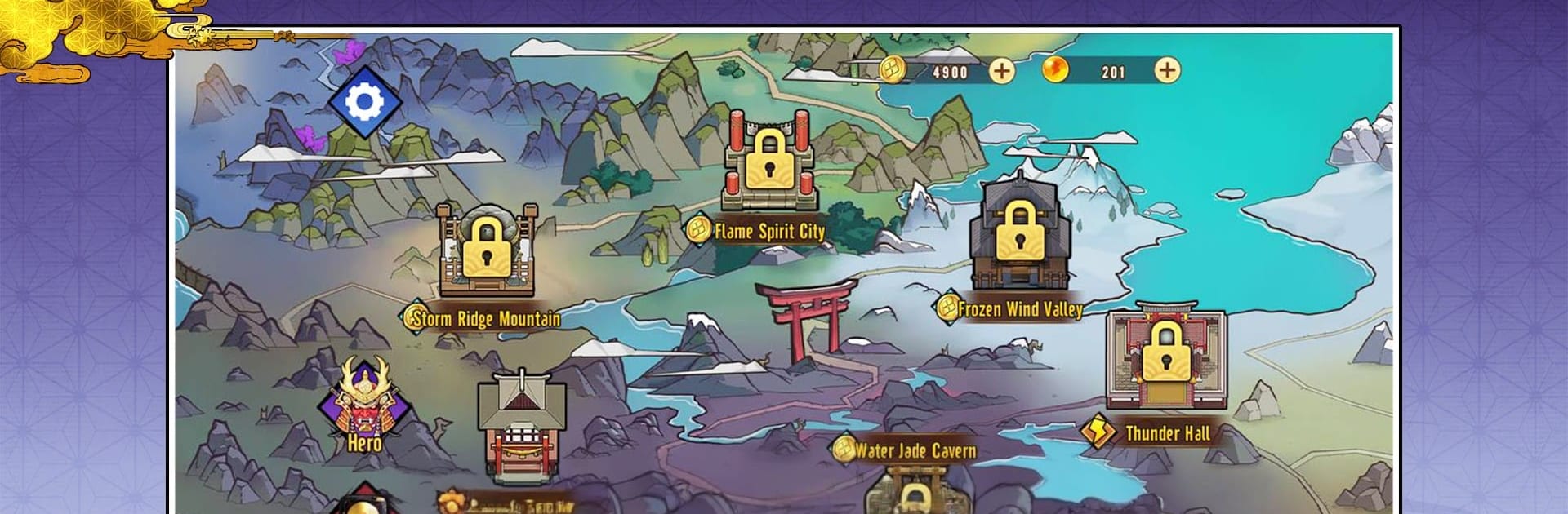
  • A Map Full of Milestones: Open up new zones like Wind Town Mountain, Fire Spirit City, Ice Wind Valley, Water Jade Cave, and the mighty Thunder Palace as you meet requirements.
  • Heroes With Real Utility: Recruit and enhance heroes who trim expedition costs and make your runs more efficient—small tweaks, big impact.
  • Resource Juggling Made Simple: Balance gold, energy, and special materials so upgrades don’t stall. Spend smart, grow steady.
  • Steady Sense of Progress: Clear goals and visible boosts keep you moving forward without feeling grindy.
  • Clean 2D Aesthetic: A bright, Eastern cartoon style gives the world personality without clutter.
  • Quick-Session Friendly: Great for short check-ins, and it doesn’t demand a constant connection to stay fun.
  • Handy Settings: Toggle sound, manage your account, and view detailed breakdowns of resources and growth at any time.
  • PC-Friendly Option: Prefer a bigger screen? You can play it on your computer with BlueStacks for comfy clicking.

Ready to top the leaderboard? We bet you do. Let precise controls and sharp visuals optimized on BlueStacks lead you to victory.


Game Features

Enhancements

  • Macros
  • Multi Instance
  • Multi Instance Sync
  • Eco Mode
  • Enhancements
Macros

Macros

Skip the boring parts of a game. Play Demonbane Chronicles with Macros and get the edge. Simply record a sequence of commands and execute them at any moment.
Multi Instance

Multi Instance

Why limit to one game on your phone when you can play many on your PC? Open multiple instances of Demonbane Chronicles at once with Multi-Instance. Leverage the power of different accounts by doing more.
Multi Instance Sync

Multi Instance Sync

Get the best out of Demonbane Chronicles with Multi-Instance Sync. Play the game from different accounts and build your own empire. Use Multi-instance sync to repeat the action in the main BlueStacks instance on all other instances.
Eco Mode

Eco Mode

Find the rarest heroes by making multiple summons in Demonbane Chronicles. And while you are at it, reduce your PC’s resource consumption with the Eco Mode. Farm efficiently. Get the best results.
Read More

How to Download and Play Demonbane Chronicles on PC or Mac

  • Download and install BlueStacks on your PC or Mac

  • Complete Google sign-in to access the Play Store, or do it later

  • Look for Demonbane Chronicles in the search bar at the top right corner

  • Click to install Demonbane Chronicles from the search results

  • Complete Google sign-in (if you skipped step 2) to install Demonbane Chronicles

  • Click the Demonbane Chronicles icon on the home screen to start playing

video
Watch Video

Minimum System Requirements

With BlueStacks 5, you can get started on a PC that fulfills the following requirements.

  • Operating System

    Microsoft Windows 7 or above, macOS 11 (Big Sur) or above

  • Processor

    Intel, AMD or Apple Silicon Processor

  • RAM

    at least 4GB

  • HDD

    10GB Free Disk Space

Note:

* You must be an Administrator on your PC. Up to date graphics drivers from Microsoft or the chipset vendor.

Demonbane Chronicles - FAQs

  • How to play Demonbane Chronicles on Windows PC & Mac?

    Play Demonbane Chronicles on your PC or Mac by following these simple steps.

    • Click on 'Play Demonbane Chronicles on PC’ to download BlueStacks
    • Install it and log-in to Google Play Store
    • Launch and play the game.
  • Why is BlueStacks the fastest and safest platform to play games on PC?

    BlueStacks respects your privacy and is always safe and secure to use. It does not carry any malware, spyware, or any sort of additional software that could harm your PC.

    It is engineered to optimize speed and performance for a seamless gaming experience.

  • What are Demonbane Chronicles PC requirements?

    Minimum requirement to run Demonbane Chronicles on your PC

    • OS: Microsoft Windows 7 or above MacOS 11 (Big Sur) or above
    • Processor: Intel, AMD or Apple Silicon Processor
    • RAM: Your PC must have at least 4GB of RAM. (Note that having 4GB or more disk space is not a substitute for RAM)
    • HDD: 10GB Free Disk Space.
    • You must be an Administrator on your PC.