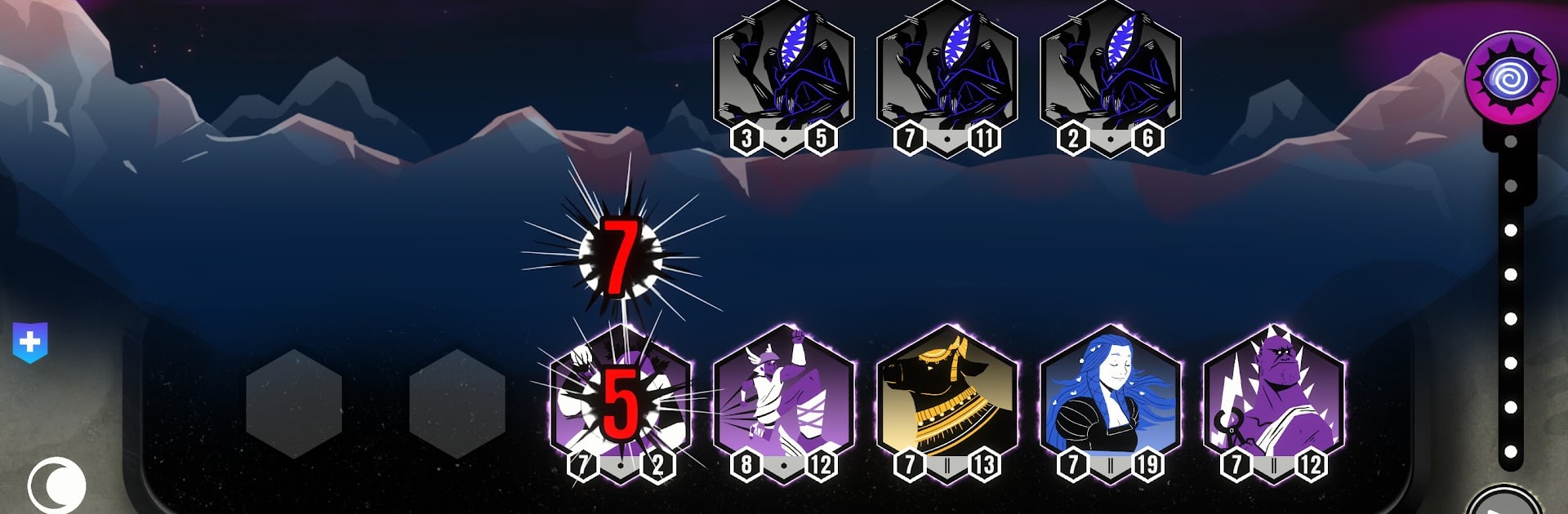
Gods vs Horrors
Gods vs Horrors

Gods vs Horrors

Strategy

| Oriol Cosp Games

Play on PC with BlueStacks or from our cloud

  • Overview
  • Game Features
  • How to Play

Page Modified On: July 27, 2026

Play Gods vs Horrors on PC or Mac

Step into the World of Gods vs Horrors, a thrilling Strategy game from the house of Oriol Cosp Games. Play this Android game on BlueStacks App Player and experience immersive gaming on PC or Mac.

About the Game

Gods vs Horrors is a Strategy roguelike where you pull together a squad of mythic heavy-hitters and pit them against reality-warping nasties. It’s all about smart drafting, clever combos, and lining up your team just right so your plan actually works when the monsters hit. Expect quick runs with big decisions, satisfying power spikes, and plenty of “wait, that actually worked?!” moments.

Game Features

  • Draft Your Pantheon: Hand-pick gods from different mythologies, each bringing unique roles and abilities. Mix and match to build a lineup that feels yours.
  • Synergies That Snowball: Find effects that feed into each other, stack buffs, and watch small combos turn into board-wiping engines as the run goes on.
  • Positioning Matters: Frontliners, flankers, fragile backline nukers—where you place each unit can win or lose a fight. Tiny tweaks can swing an entire battle.
  • Upgrades With Bite: Power up your team between waves, choose meaningful improvements, and shape your build around the tools you actually see.
  • Rising Cosmic Threats: Face escalating waves of otherworldly horrors, each pushing you to rethink your formation and adapt on the fly.
  • Roguelike Runs, Fresh Every Time: New drafts, different matchups, and shifting plans keep every attempt feeling fresh, not formulaic.
  • Clean Demo, Simple Unlock: Try a no-ads demo, then grab the full game with a one-time purchase—no fuss.
  • Feels Familiar, Plays Fresh: Blends the tension of drafting with the tactical crunch of auto-battler positioning for a tight, replayable loop.
  • Smooth on PC With BlueStacks: Prefer keyboard and mouse? It plays comfortably there, too, without getting in the way of the action.

Ready to top the leaderboard? We bet you do. Let precise controls and sharp visuals optimized on BlueStacks lead you to victory.


Game Features

Enhancements

  • Macros
  • Multi Instance
  • Multi Instance Sync
  • Eco Mode
  • Enhancements
Macros

Macros

Skip the boring parts of a game. Play Gods vs Horrors with Macros and get the edge. Simply record a sequence of commands and execute them at any moment.
Multi Instance

Multi Instance

Why limit to one game on your phone when you can play many on your PC? Open multiple instances of Gods vs Horrors at once with Multi-Instance. Leverage the power of different accounts by doing more.
Multi Instance Sync

Multi Instance Sync

Get the best out of Gods vs Horrors with Multi-Instance Sync. Play the game from different accounts and build your own empire. Use Multi-instance sync to repeat the action in the main BlueStacks instance on all other instances.
Eco Mode

Eco Mode

Find the rarest heroes by making multiple summons in Gods vs Horrors. And while you are at it, reduce your PC’s resource consumption with the Eco Mode. Farm efficiently. Get the best results.
Read More

How to Download and Play Gods vs Horrors on PC or Mac

  • Download and install BlueStacks on your PC or Mac

  • Complete Google sign-in to access the Play Store, or do it later

  • Look for Gods vs Horrors in the search bar at the top right corner

  • Click to install Gods vs Horrors from the search results

  • Complete Google sign-in (if you skipped step 2) to install Gods vs Horrors

  • Click the Gods vs Horrors icon on the home screen to start playing

video
Watch Video

Minimum System Requirements

With BlueStacks 5, you can get started on a PC that fulfills the following requirements.

  • Operating System

    Microsoft Windows 7 or above, macOS 11 (Big Sur) or above

  • Processor

    Intel, AMD or Apple Silicon Processor

  • RAM

    at least 4GB

  • HDD

    10GB Free Disk Space

Note:

* You must be an Administrator on your PC. Up to date graphics drivers from Microsoft or the chipset vendor.

Gods vs Horrors - FAQs

  • How to play Gods vs Horrors on Windows PC & Mac?

    Play Gods vs Horrors on your PC or Mac by following these simple steps.

    • Click on 'Play Gods vs Horrors on PC’ to download BlueStacks
    • Install it and log-in to Google Play Store
    • Launch and play the game.
  • Why is BlueStacks the fastest and safest platform to play games on PC?

    BlueStacks respects your privacy and is always safe and secure to use. It does not carry any malware, spyware, or any sort of additional software that could harm your PC.

    It is engineered to optimize speed and performance for a seamless gaming experience.

  • What are Gods vs Horrors PC requirements?

    Minimum requirement to run Gods vs Horrors on your PC

    • OS: Microsoft Windows 7 or above MacOS 11 (Big Sur) or above
    • Processor: Intel, AMD or Apple Silicon Processor
    • RAM: Your PC must have at least 4GB of RAM. (Note that having 4GB or more disk space is not a substitute for RAM)
    • HDD: 10GB Free Disk Space.
    • You must be an Administrator on your PC.