Indian Election Game

Indian Election Game

Strategy

| Ensaran

Play on PC with BlueStacks or from our cloud

  • Overview
  • Game Features
  • How to Play

Page Modified On: June 17, 2026

Play Indian Election Game on PC or Mac

Indian Election Game brings the Strategy genre to life, and throws up exciting challenges for gamers. Developed by Ensaran, this Android game is best experienced on BlueStacks, the World’s #1 app player for PC and Mac users.

About the Game

Indian Election Game is a seat-by-seat Strategy showdown where you try to build a Lok Sabha majority across a massive national map. You’ll juggle budgets, pick your battles, and outthink a crafty AI that’s playing to win. It’s fast to learn, but every turn counts—can you reach that crucial 272?

Game Features

  • Majority or Bust: Chase 272 out of 543 seats to claim power. Every state, every turn, every rupee matters.
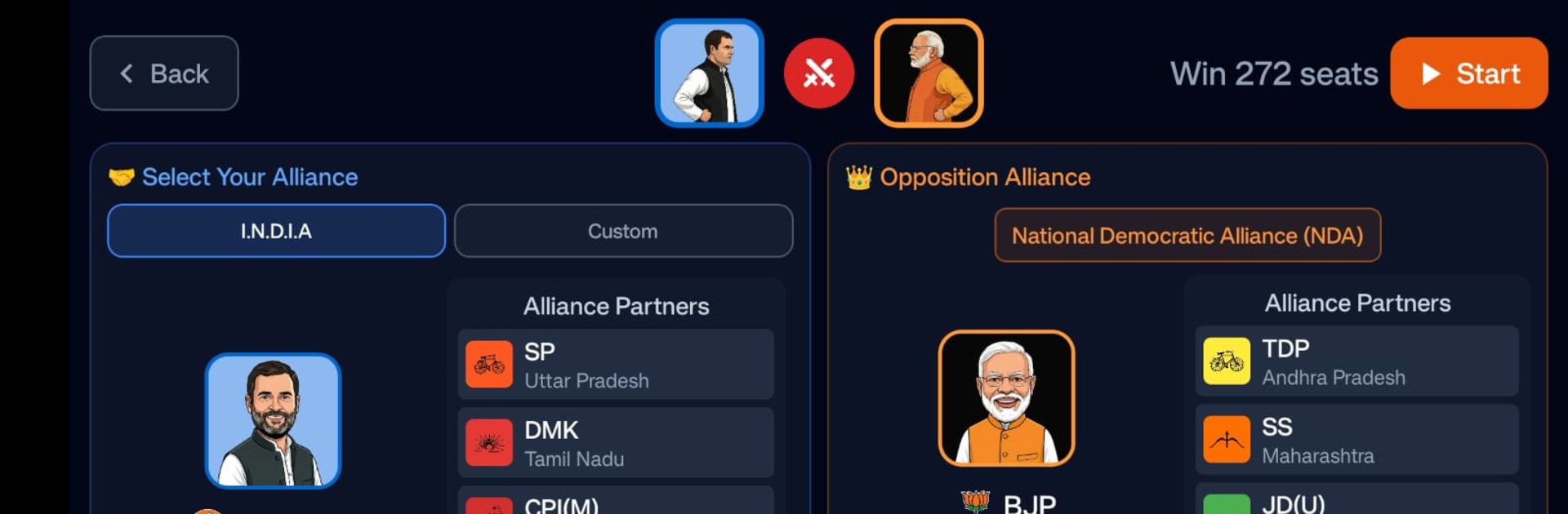
  • Choose Your Banner: Jump in as Congress or AAP, or spin up a Custom Party with your own name, leader, symbol, color, and avatar. Prefer coalitions? Flip on Alliance Mode and pit the I.N.D.I.A bloc against the NDA.
  • Smart Budget Play: Start with ₹50 Cr and earn more each turn. Split spending across 28 states and 8 Union Territories using two campaign lanes—Digital outreach and on‑ground rallies/booth work—then balance costs to qualify for seats.
  • Region Control Bonuses: States are grouped into five distinct regions. Secure a majority in one to unlock extra, region‑only funds; lose your grip and that boost disappears.
  • Tactical Cards, Big Swings: Snag Bonus Cards like Corporate Funding (+₹30 Cr/turn) or Black Money Funneling (+₹50 Cr/turn), trim costs with Discount Cards, or shake up the math with Swing Cards such as Hindu Polarisation and Revdi (Freebies) to tilt seats across unlocked states.
  • A Thinking Opponent: Face a bot BJP (led by Narendra Modi) that allocates budgets, targets states, and competes for cards—no freebies here.
  • Live Map, Real Tradeoffs: Work an interactive map of India with clear constituencies. Seats are awarded proportionally based on how you invest.
  • Modes and Must‑Haves: Play Normal or Alliance, track your record with Game History, and resume runs anytime. Available in English and Hindi, fully offline, with no ads or in‑app purchases.
  • Privacy by Default: Data stays on your device—no accounts, no tracking.
  • Play Your Way: Great on mobile, and it also runs smoothly on PC with BlueStacks if you prefer a bigger screen and keyboard.

Get ready for a buttery smooth, high-performance gaming action only on BlueStacks.

Game Features

Enhancements

  • Macros
  • Multi Instance
  • Multi Instance Sync
  • Eco Mode
  • Enhancements
Macros

Macros

Skip the boring parts of a game. Play Indian Election Game with Macros and get the edge. Simply record a sequence of commands and execute them at any moment.
Multi Instance

Multi Instance

Why limit to one game on your phone when you can play many on your PC? Open multiple instances of Indian Election Game at once with Multi-Instance. Leverage the power of different accounts by doing more.
Multi Instance Sync

Multi Instance Sync

Get the best out of Indian Election Game with Multi-Instance Sync. Play the game from different accounts and build your own empire. Use Multi-instance sync to repeat the action in the main BlueStacks instance on all other instances.
Eco Mode

Eco Mode

Find the rarest heroes by making multiple summons in Indian Election Game. And while you are at it, reduce your PC’s resource consumption with the Eco Mode. Farm efficiently. Get the best results.
Read More

How to Download and Play Indian Election Game on PC or Mac

  • Download and install BlueStacks on your PC or Mac

  • Complete Google sign-in to access the Play Store, or do it later

  • Look for Indian Election Game in the search bar at the top right corner

  • Click to install Indian Election Game from the search results

  • Complete Google sign-in (if you skipped step 2) to install Indian Election Game

  • Click the Indian Election Game icon on the home screen to start playing

video
Watch Video

Minimum System Requirements

With BlueStacks 5, you can get started on a PC that fulfills the following requirements.

  • Operating System

    Microsoft Windows 7 or above, macOS 11 (Big Sur) or above

  • Processor

    Intel, AMD or Apple Silicon Processor

  • RAM

    at least 4GB

  • HDD

    10GB Free Disk Space

Note:

* You must be an Administrator on your PC. Up to date graphics drivers from Microsoft or the chipset vendor.

Indian Election Game - FAQs

  • How to play Indian Election Game on Windows PC & Mac?

    Play Indian Election Game on your PC or Mac by following these simple steps.

    • Click on 'Play Indian Election Game on PC’ to download BlueStacks
    • Install it and log-in to Google Play Store
    • Launch and play the game.
  • Why is BlueStacks the fastest and safest platform to play games on PC?

    BlueStacks respects your privacy and is always safe and secure to use. It does not carry any malware, spyware, or any sort of additional software that could harm your PC.

    It is engineered to optimize speed and performance for a seamless gaming experience.

  • What are Indian Election Game PC requirements?

    Minimum requirement to run Indian Election Game on your PC

    • OS: Microsoft Windows 7 or above MacOS 11 (Big Sur) or above
    • Processor: Intel, AMD or Apple Silicon Processor
    • RAM: Your PC must have at least 4GB of RAM. (Note that having 4GB or more disk space is not a substitute for RAM)
    • HDD: 10GB Free Disk Space.
    • You must be an Administrator on your PC.