Morifis - Grow and Defend

Morifis - Grow and Defend

Strategy

| hakumai-studio

Play on PC with BlueStacks or from our cloud

  • Overview
  • Game Features
  • How to Play

Page Modified On: October 30, 2026

Play Morifis - Grow and Defend on PC or Mac

Morifis – Grow and Defend brings the Strategy genre to life, and throws up exciting challenges for gamers. Developed by hakumai-studio, this Android game is best experienced on BlueStacks, the World’s #1 app player for PC and Mac users.

About the Game

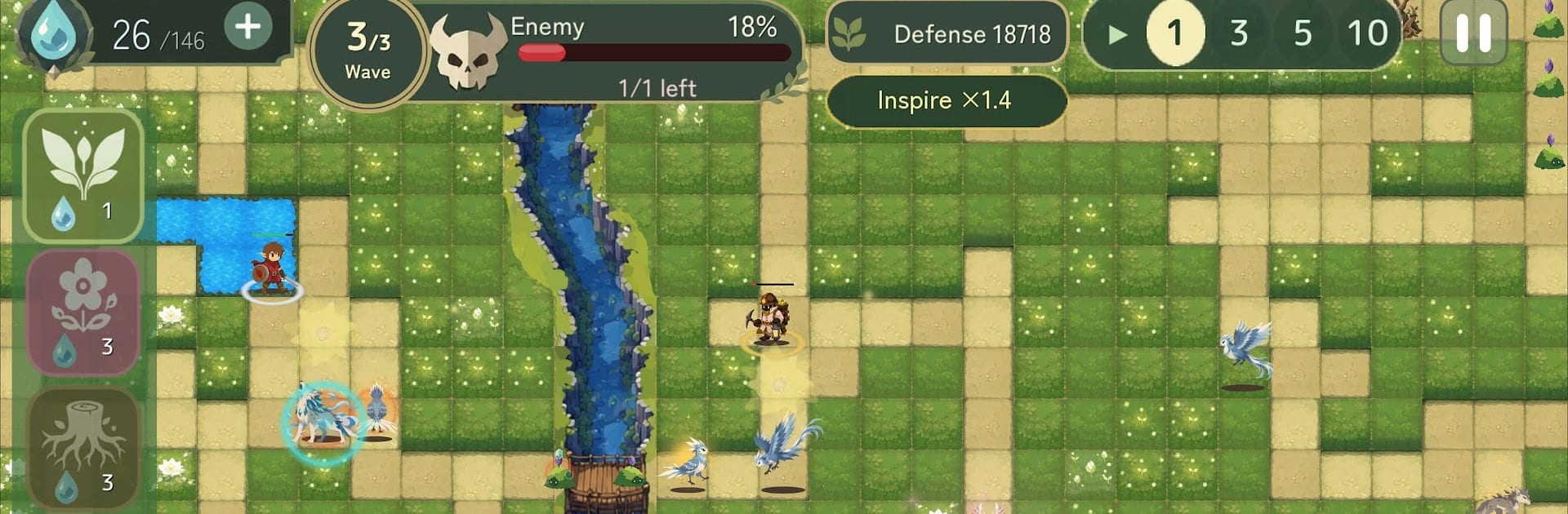
Morifis – Grow and Defend turns pathmaking into the heart of the fight. This real-time tower defense Strategy game lets you carve routes through a living forest, then use those trails to outsmart waves of intruders with a squad of hand-picked allies. Prefer playing on PC? It also feels great on BlueStacks with mouse-and-keyboard control.

Game Features

  • Path-first defense: Cut through the woods to sketch enemy routes, building choke points and loops that become your very own dungeon.
  • Tight, puzzle-like choices: You get a limited number of actions each stage, so every snip and turn of the path has real tactical weight.
  • Real-time control shifts: Watch the battle unfold and jump in mid-fight to reposition units or pop abilities when things get hairy.
  • Nearly 50 allies to collect: Recruit forest spirits, oddballs, and dragons, then grow them, evolve them, and fill out a satisfying codex.
  • Distinct combat roles: Mix healers, howl-style buffers, split-summoners, aerial chasers, and icy tanks that can bounce damage back at attackers.
  • Build-your-own synergies: Tackle the same stage with a different crew and discover completely new ways to win.
  • Five varied worlds: Journey from sunlit groves to snow-capped forests, with fresh terrain twists and new enemy behaviors in each zone.
  • Story with stakes: A fading kingdom, a sacred Komorebi Stone deep in the woods, and a creeping threat that won’t stop unless you do.

Ready to top the leaderboard? We bet you do. Let precise controls and sharp visuals optimized on BlueStacks lead you to victory.


Game Features

Enhancements

  • Macros
  • Multi Instance
  • Multi Instance Sync
  • Eco Mode
  • Enhancements
Macros

Macros

Skip the boring parts of a game. Play Morifis - Grow and Defend with Macros and get the edge. Simply record a sequence of commands and execute them at any moment.
Multi Instance

Multi Instance

Why limit to one game on your phone when you can play many on your PC? Open multiple instances of Morifis - Grow and Defend at once with Multi-Instance. Leverage the power of different accounts by doing more.
Multi Instance Sync

Multi Instance Sync

Get the best out of Morifis - Grow and Defend with Multi-Instance Sync. Play the game from different accounts and build your own empire. Use Multi-instance sync to repeat the action in the main BlueStacks instance on all other instances.
Eco Mode

Eco Mode

Find the rarest heroes by making multiple summons in Morifis - Grow and Defend. And while you are at it, reduce your PC’s resource consumption with the Eco Mode. Farm efficiently. Get the best results.
Read More

How to Download and Play Morifis - Grow and Defend on PC or Mac

  • Download and install BlueStacks on your PC or Mac

  • Complete Google sign-in to access the Play Store, or do it later

  • Look for Morifis - Grow and Defend in the search bar at the top right corner

  • Click to install Morifis - Grow and Defend from the search results

  • Complete Google sign-in (if you skipped step 2) to install Morifis - Grow and Defend

  • Click the Morifis - Grow and Defend icon on the home screen to start playing

video
Watch Video

Minimum System Requirements

With BlueStacks 5, you can get started on a PC that fulfills the following requirements.

  • Operating System

    Microsoft Windows 7 or above, macOS 11 (Big Sur) or above

  • Processor

    Intel, AMD or Apple Silicon Processor

  • RAM

    at least 4GB

  • HDD

    10GB Free Disk Space

Note:

* You must be an Administrator on your PC. Up to date graphics drivers from Microsoft or the chipset vendor.

Morifis - Grow and Defend - FAQs

  • How to play Morifis - Grow and Defend on Windows PC & Mac?

    Play Morifis - Grow and Defend on your PC or Mac by following these simple steps.

    • Click on 'Play Morifis - Grow and Defend on PC’ to download BlueStacks
    • Install it and log-in to Google Play Store
    • Launch and play the game.
  • Why is BlueStacks the fastest and safest platform to play games on PC?

    BlueStacks respects your privacy and is always safe and secure to use. It does not carry any malware, spyware, or any sort of additional software that could harm your PC.

    It is engineered to optimize speed and performance for a seamless gaming experience.

  • What are Morifis - Grow and Defend PC requirements?

    Minimum requirement to run Morifis - Grow and Defend on your PC

    • OS: Microsoft Windows 7 or above MacOS 11 (Big Sur) or above
    • Processor: Intel, AMD or Apple Silicon Processor
    • RAM: Your PC must have at least 4GB of RAM. (Note that having 4GB or more disk space is not a substitute for RAM)
    • HDD: 10GB Free Disk Space.
    • You must be an Administrator on your PC.