Nebulae - Astropolitics MMO

Nebulae - Astropolitics MMO

Strategy

| Northern Lights Entertainment

Play on PC with BlueStacks or from our cloud

  • Overview
  • Game Features
  • How to Play

Page Modified On: October 13, 2026

Play Nebulae - Astropolitics MMO on PC or Mac

Nebulae – Astropolitics MMO brings the Strategy genre to life, and throws up exciting challenges for gamers. Developed by Northern Lights Entertainment, this Android game is best experienced on BlueStacks, the World’s #1 app player for PC and Mac users.

About the Game

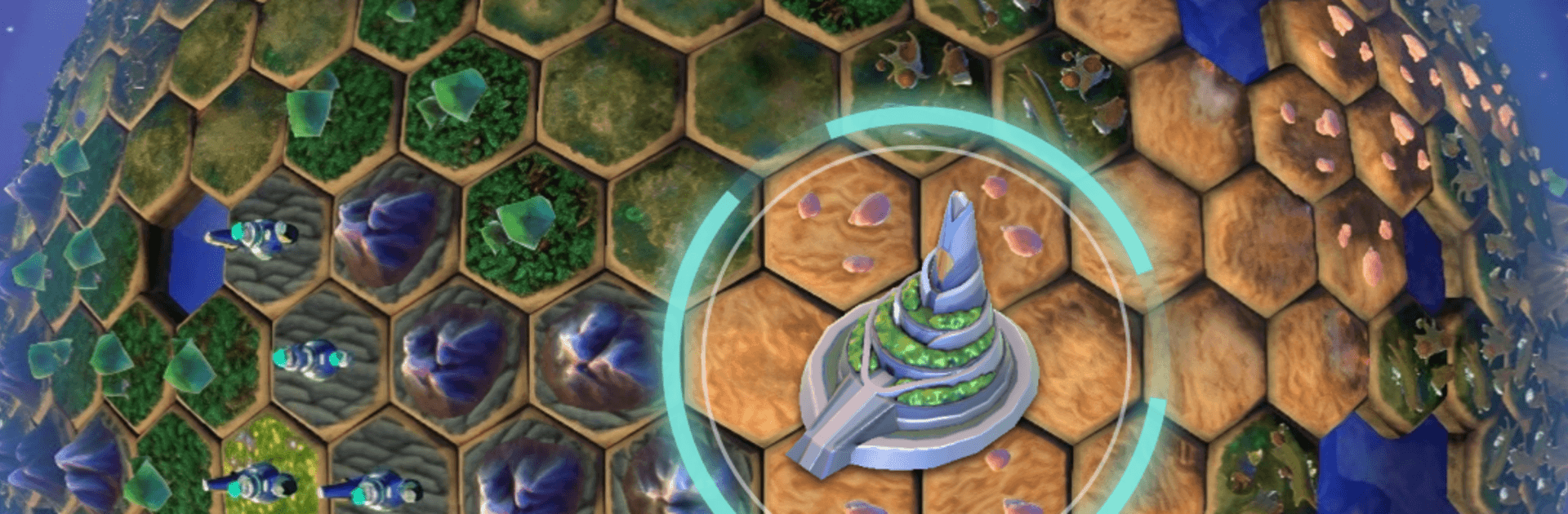
Nebulae – Astropolitics MMO drops you into a galaxy where governments rise, economies boom (or crash), and starships square off when talks break down. It’s a Strategy experience about tough choices—balancing personal ambition with your faction’s survival as a mysterious Nebula creeps across space. If you prefer a desktop setup, it also plays smoothly on BlueStacks.

Game Features

  • Planet stewardship: Develop your assigned world, balancing industry, infrastructure, and citizen well‑being while keeping environmental strain in check.
  • Player-driven economy: Gather and manage resources from your planets to fuel everything else—politics, defense, and expansion all depend on what you produce.
  • National decision-making: Join elections, draft or oppose laws, and collaborate (or clash) with fellow citizens to steer your star-spanning nation.
  • Multiple political paths: Rise through the ranks as a steadfast loyalist, bold reformer, or quiet operative advancing a rival power’s agenda.
  • Espionage and intrigue: Collect intel, influence opinions, and orchestrate covert moves that shift negotiations—or sabotage them.
  • Real-time starship battles: When diplomacy stalls, pilot a spacecraft in tactical arenas and fight for your nation’s interests in the moment.
  • Territory on the line: Win more engagements across a contested system to claim control of its space and the planets within.
  • Environmental risk management: Expand too fast and you’ll invite disasters; grow smart and keep your world stable under mounting pressure.
  • Community-shaped history: Every vote, treaty, and victory contributes to a persistent galaxy where players write the next chapter together.

Ready to top the leaderboard? We bet you do. Let precise controls and sharp visuals optimized on BlueStacks lead you to victory.


Game Features

Enhancements

  • Macros
  • Multi Instance
  • Multi Instance Sync
  • Eco Mode
  • Enhancements
Macros

Macros

Skip the boring parts of a game. Play Nebulae - Astropolitics MMO with Macros and get the edge. Simply record a sequence of commands and execute them at any moment.
Multi Instance

Multi Instance

Why limit to one game on your phone when you can play many on your PC? Open multiple instances of Nebulae - Astropolitics MMO at once with Multi-Instance. Leverage the power of different accounts by doing more.
Multi Instance Sync

Multi Instance Sync

Get the best out of Nebulae - Astropolitics MMO with Multi-Instance Sync. Play the game from different accounts and build your own empire. Use Multi-instance sync to repeat the action in the main BlueStacks instance on all other instances.
Eco Mode

Eco Mode

Find the rarest heroes by making multiple summons in Nebulae - Astropolitics MMO. And while you are at it, reduce your PC’s resource consumption with the Eco Mode. Farm efficiently. Get the best results.
Read More

How to Download and Play Nebulae - Astropolitics MMO on PC or Mac

  • Download and install BlueStacks on your PC or Mac

  • Complete Google sign-in to access the Play Store, or do it later

  • Look for Nebulae - Astropolitics MMO in the search bar at the top right corner

  • Click to install Nebulae - Astropolitics MMO from the search results

  • Complete Google sign-in (if you skipped step 2) to install Nebulae - Astropolitics MMO

  • Click the Nebulae - Astropolitics MMO icon on the home screen to start playing

video
Watch Video

Minimum System Requirements

With BlueStacks 5, you can get started on a PC that fulfills the following requirements.

  • Operating System

    Microsoft Windows 7 or above, macOS 11 (Big Sur) or above

  • Processor

    Intel, AMD or Apple Silicon Processor

  • RAM

    at least 4GB

  • HDD

    10GB Free Disk Space

Note:

* You must be an Administrator on your PC. Up to date graphics drivers from Microsoft or the chipset vendor.

Nebulae - Astropolitics MMO - FAQs

  • How to play Nebulae - Astropolitics MMO on Windows PC & Mac?

    Play Nebulae - Astropolitics MMO on your PC or Mac by following these simple steps.

    • Click on 'Play Nebulae - Astropolitics MMO on PC’ to download BlueStacks
    • Install it and log-in to Google Play Store
    • Launch and play the game.
  • Why is BlueStacks the fastest and safest platform to play games on PC?

    BlueStacks respects your privacy and is always safe and secure to use. It does not carry any malware, spyware, or any sort of additional software that could harm your PC.

    It is engineered to optimize speed and performance for a seamless gaming experience.

  • What are Nebulae - Astropolitics MMO PC requirements?

    Minimum requirement to run Nebulae - Astropolitics MMO on your PC

    • OS: Microsoft Windows 7 or above MacOS 11 (Big Sur) or above
    • Processor: Intel, AMD or Apple Silicon Processor
    • RAM: Your PC must have at least 4GB of RAM. (Note that having 4GB or more disk space is not a substitute for RAM)
    • HDD: 10GB Free Disk Space.
    • You must be an Administrator on your PC.