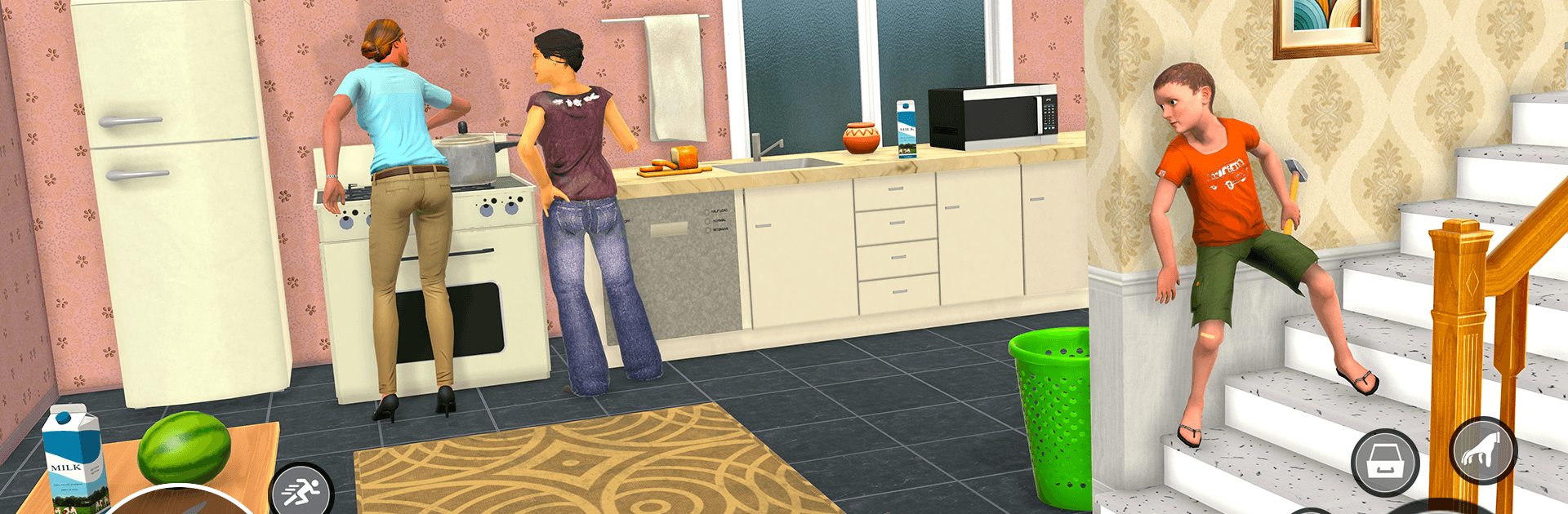
Schoolboy Parent House Runaway

Schoolboy Parent House Runaway

Strategy

| Boom Games Studio Inc

Play on PC with BlueStacks or from our cloud

  • Overview
  • Game Features
  • How to Play

Page Modified On: August 24, 2026

Play Schoolboy Parent House Runaway on PC or Mac

Play Schoolboy Parent House Runaway by Boom Games Studio Inc on PC or Mac with BlueStacks. Use a bigger screen, mouse and keyboard controls, and smoother performance while you play.

About the Game

Schoolboy Parent House Runaway is a Strategy game about sneaking out of home while your parents patrol the halls. It blends stealth with bite-size puzzles and quick decisions, turning every room into a tiny heist; one noisy step can send you back. If you like a bigger screen and precise controls, it plays great on BlueStacks.

Game Features

  • Sneak-first gameplay: Hug corners, peek through doorways, and use cover to stay off your parents’ radar.
  • Living, creaky house: Navigate kitchens, studies, hallways, and bedrooms with layouts that reward smart routes and punish loud steps.
  • Timing that matters: Track patrol patterns, wait for the perfect gap, then slip past—or risk getting marched back to your room.
  • Smart distractions: Drop or toss items to spark noise, pull attention away, and buy just enough time to move.
  • Puzzles and shortcuts: Find keys, crack little locks, and uncover hidden passages that open fresh escape options.
  • Multiple paths, fresh outcomes: Try new routes and solutions each run so escapes never play out exactly the same.
  • Environmental hiding spots: Duck under tables, slide into closets, or flatten behind doors when things get tense.
  • Quick restarts, steady learning: Restart fast after mistakes, apply what you learned, and tighten your plan with each attempt.
  • Simple controls, tactile feedback: Smooth movement and believable physics make every squeak, bump, and step feel consequential.

Ready to top the leaderboard? We bet you do. Let precise controls and sharp visuals optimized on BlueStacks lead you to victory.


Game Features

Enhancements

  • Macros
  • Multi Instance
  • Multi Instance Sync
  • Eco Mode
  • Enhancements
Macros

Macros

Skip the boring parts of a game. Play Schoolboy Parent House Runaway with Macros and get the edge. Simply record a sequence of commands and execute them at any moment.
Multi Instance

Multi Instance

Why limit to one game on your phone when you can play many on your PC? Open multiple instances of Schoolboy Parent House Runaway at once with Multi-Instance. Leverage the power of different accounts by doing more.
Multi Instance Sync

Multi Instance Sync

Get the best out of Schoolboy Parent House Runaway with Multi-Instance Sync. Play the game from different accounts and build your own empire. Use Multi-instance sync to repeat the action in the main BlueStacks instance on all other instances.
Eco Mode

Eco Mode

Find the rarest heroes by making multiple summons in Schoolboy Parent House Runaway. And while you are at it, reduce your PC’s resource consumption with the Eco Mode. Farm efficiently. Get the best results.
Read More

How to Download and Play Schoolboy Parent House Runaway on PC or Mac

  • Download and install BlueStacks on your PC or Mac

  • Complete Google sign-in to access the Play Store, or do it later

  • Look for Schoolboy Parent House Runaway in the search bar at the top right corner

  • Click to install Schoolboy Parent House Runaway from the search results

  • Complete Google sign-in (if you skipped step 2) to install Schoolboy Parent House Runaway

  • Click the Schoolboy Parent House Runaway icon on the home screen to start playing

video
Watch Video

Minimum System Requirements

With BlueStacks 5, you can get started on a PC that fulfills the following requirements.

  • Operating System

    Microsoft Windows 7 or above, macOS 11 (Big Sur) or above

  • Processor

    Intel, AMD or Apple Silicon Processor

  • RAM

    at least 4GB

  • HDD

    10GB Free Disk Space

Note:

* You must be an Administrator on your PC. Up to date graphics drivers from Microsoft or the chipset vendor.

Schoolboy Parent House Runaway - FAQs

  • How to play Schoolboy Parent House Runaway on Windows PC & Mac?

    Play Schoolboy Parent House Runaway on your PC or Mac by following these simple steps.

    • Click on 'Play Schoolboy Parent House Runaway on PC’ to download BlueStacks
    • Install it and log-in to Google Play Store
    • Launch and play the game.
  • Why is BlueStacks the fastest and safest platform to play games on PC?

    BlueStacks respects your privacy and is always safe and secure to use. It does not carry any malware, spyware, or any sort of additional software that could harm your PC.

    It is engineered to optimize speed and performance for a seamless gaming experience.

  • What are Schoolboy Parent House Runaway PC requirements?

    Minimum requirement to run Schoolboy Parent House Runaway on your PC

    • OS: Microsoft Windows 7 or above MacOS 11 (Big Sur) or above
    • Processor: Intel, AMD or Apple Silicon Processor
    • RAM: Your PC must have at least 4GB of RAM. (Note that having 4GB or more disk space is not a substitute for RAM)
    • HDD: 10GB Free Disk Space.
    • You must be an Administrator on your PC.