Spider World
Spider World

Spider World

Strategy

| XGames365

Play on PC with BlueStacks or from our cloud

  • Overview
  • Game Features
  • How to Play

Page Modified On: October 21, 2026

Play Spider World on PC or Mac

Play Spider World by XGames365 on PC or Mac with BlueStacks. Use a bigger screen, mouse and keyboard controls, and smoother performance while you play.

About the Game

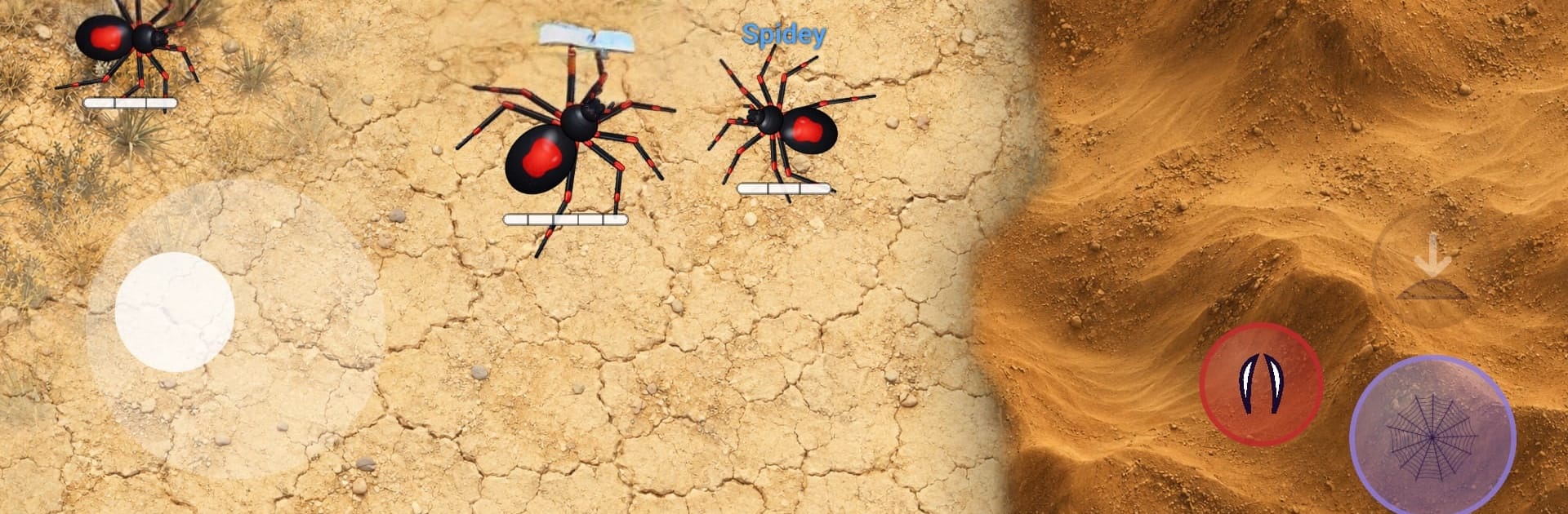
Spider World drops you into fast, five‑on‑five bug hunts where teamwork wins meals. It’s a competitive Strategy game built around quick matches, sharp decisions, and clever coordination—pick red or blue, then race to clear the map before your rivals do. Want a bigger view of the action? You can play on PC with BlueStacks and keep the same snappy feel.

Game Features

  • 5v5 Team Hunts: Two squads share one arena and compete to eat the most prey before it’s all gone.
  • No-Respawn Prey: Bugs don’t come back, so every cricket, beetle, and roach you snag can tilt the match.
  • Web Tactics: Fire a web whose impact scales with your current vitality—commit big or play it safe, and time it with teammates.
  • Risky Bites: Leap in for a quick bite at a health cost; startled insects sprint off, so pick your moment carefully.
  • Cocoon Comeback: Hit zero and you’re wrapped, untouchable, and slowly recovering until you rejoin the hunt.
  • Callouts & Minimap: Ping food, danger, and ambushes; your alerts show up on your team’s minimap for clean coordination.
  • Eat, Heal, Grow: Every snack patches you up and makes you larger—stronger presence, slower turns and steps.
  • Four Playstyles: Choose from four distinct spiders and find the role that fits how you like to skirmish.
  • Two Arenas: Learn the routes and choke points across Grass and Desert, each favoring different team plans.
  • Quickfire Rounds: Hop into real-time matches in seconds, keep the pace high, and chase that next win.
  • Personal Records: Track your best single‑match haul and try to outdo yourself, one room at a time.
  • Simple, Snappy Controls: Easy to learn and responsive under pressure, so your focus stays on the hunt.

Get ready for a buttery smooth, high-performance gaming action only on BlueStacks.

Game Features

Enhancements

  • Macros
  • Multi Instance
  • Multi Instance Sync
  • Eco Mode
  • Enhancements
Macros

Macros

Skip the boring parts of a game. Play Spider World with Macros and get the edge. Simply record a sequence of commands and execute them at any moment.
Multi Instance

Multi Instance

Why limit to one game on your phone when you can play many on your PC? Open multiple instances of Spider World at once with Multi-Instance. Leverage the power of different accounts by doing more.
Multi Instance Sync

Multi Instance Sync

Get the best out of Spider World with Multi-Instance Sync. Play the game from different accounts and build your own empire. Use Multi-instance sync to repeat the action in the main BlueStacks instance on all other instances.
Eco Mode

Eco Mode

Find the rarest heroes by making multiple summons in Spider World. And while you are at it, reduce your PC’s resource consumption with the Eco Mode. Farm efficiently. Get the best results.
Read More

How to Download and Play Spider World on PC or Mac

  • Download and install BlueStacks on your PC or Mac

  • Complete Google sign-in to access the Play Store, or do it later

  • Look for Spider World in the search bar at the top right corner

  • Click to install Spider World from the search results

  • Complete Google sign-in (if you skipped step 2) to install Spider World

  • Click the Spider World icon on the home screen to start playing

video
Watch Video

Minimum System Requirements

With BlueStacks 5, you can get started on a PC that fulfills the following requirements.

  • Operating System

    Microsoft Windows 7 or above, macOS 11 (Big Sur) or above

  • Processor

    Intel, AMD or Apple Silicon Processor

  • RAM

    at least 4GB

  • HDD

    10GB Free Disk Space

Note:

* You must be an Administrator on your PC. Up to date graphics drivers from Microsoft or the chipset vendor.

Spider World - FAQs

  • How to play Spider World on Windows PC & Mac?

    Play Spider World on your PC or Mac by following these simple steps.

    • Click on 'Play Spider World on PC’ to download BlueStacks
    • Install it and log-in to Google Play Store
    • Launch and play the game.
  • Why is BlueStacks the fastest and safest platform to play games on PC?

    BlueStacks respects your privacy and is always safe and secure to use. It does not carry any malware, spyware, or any sort of additional software that could harm your PC.

    It is engineered to optimize speed and performance for a seamless gaming experience.

  • What are Spider World PC requirements?

    Minimum requirement to run Spider World on your PC

    • OS: Microsoft Windows 7 or above MacOS 11 (Big Sur) or above
    • Processor: Intel, AMD or Apple Silicon Processor
    • RAM: Your PC must have at least 4GB of RAM. (Note that having 4GB or more disk space is not a substitute for RAM)
    • HDD: 10GB Free Disk Space.
    • You must be an Administrator on your PC.