Steel & Fire: War Strategy

Steel & Fire: War Strategy

Strategy

| LexMaX

Play on PC with BlueStacks or from our cloud

  • Overview
  • Game Features
  • How to Play

Page Modified On: May 25, 2026

Play Steel & Fire: War Strategy on PC or Mac

Steel & Fire: War Strategy by LexMaX has plenty to keep you busy. BlueStacks lets you play it on PC or Mac with more screen space, better control, and fewer mobile limits.

About the Game

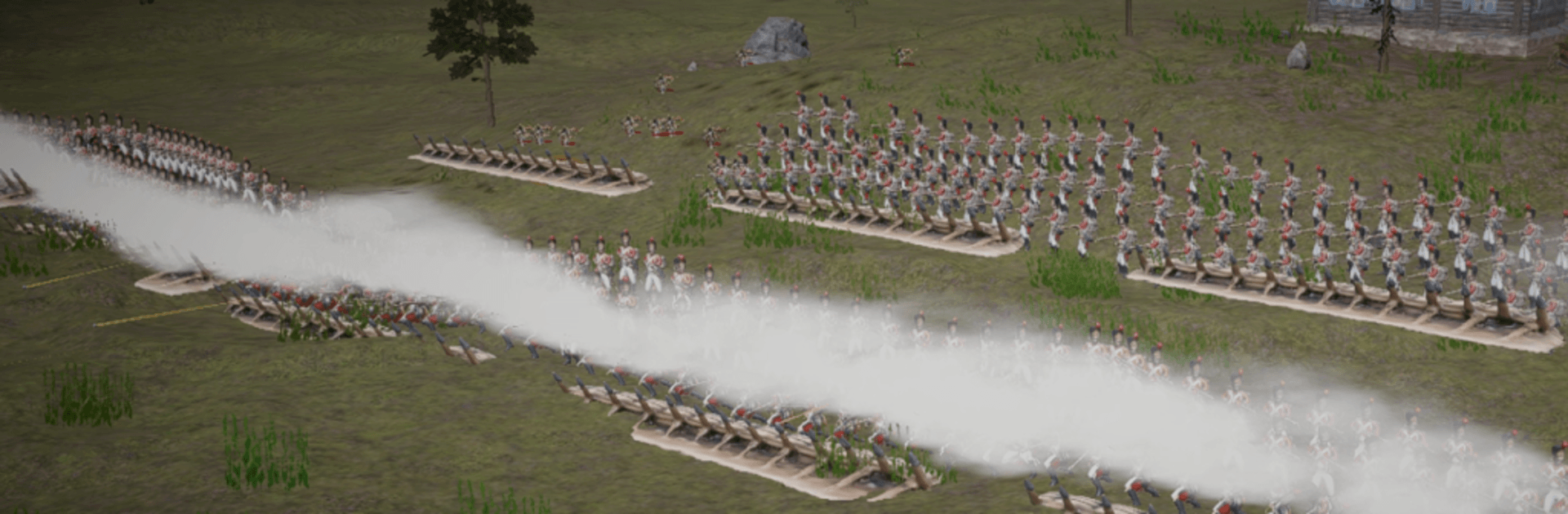
Steel & Fire: War Strategy puts you at the helm of 19th‑century armies fighting for control of the European map. You’ll plot grand campaigns one turn at a time, then jump into tense real‑time battles where formation, timing, and nerve decide everything. It’s a Strategy game that rewards brains over brute force—outthink opponents, pick your moment, and make history bend to your plans.

Game Features

  • Grand campaign map: March across a detailed European theater filled with provinces, fortified cities, resource points, and narrow passes worth bleeding for. Expand, secure supply lines, and decide where to dig in or push hard.
  • Real‑time command: Form infantry squares, time cavalry charges, and pound enemy lines with artillery. Terrain, elevation, and cover matter, and a well‑timed flank can undo a larger army.
  • Nations with character: Lead one of six powers—Russia, France, Austria, Britain, the Ottoman Empire, or Prussia—each bringing distinct units, strengths, and playstyles to the table.
  • Diplomacy with teeth: Broker deals, trade, agree to peace—or tear up the paper when it suits you. Coalitions rise and fall, and a mistimed treaty can be as costly as a lost battle.
  • Economy and governance: Appoint officials, develop cities, and balance your treasury between cannons and civilians. Starved coffers mean hungry armies and stalled offensives.
  • War at sea: Build fleets from nimble brigs to ships of the line. Blockade ports, protect coasts, and stage amphibious landings to crack enemy defenses from unexpected angles.
  • Seasons and weather: Winter slows marches, thaws open new routes, and shifting conditions—fog, storms, and more—shape every decision on and off the field.
  • Cinematic clashes: Watch units maneuver and collide in striking 3D, with animations that make each volley and charge feel weighty.
  • Play comfortably: Smooth on mobile—and easy to enjoy on PC with BlueStacks if you prefer keyboard and mouse.

Ready to top the leaderboard? We bet you do. Let precise controls and sharp visuals optimized on BlueStacks lead you to victory.


Game Features

Enhancements

  • Macros
  • Multi Instance
  • Multi Instance Sync
  • Eco Mode
  • Enhancements
Macros

Macros

Skip the boring parts of a game. Play Steel & Fire: War Strategy with Macros and get the edge. Simply record a sequence of commands and execute them at any moment.
Multi Instance

Multi Instance

Why limit to one game on your phone when you can play many on your PC? Open multiple instances of Steel & Fire: War Strategy at once with Multi-Instance. Leverage the power of different accounts by doing more.
Multi Instance Sync

Multi Instance Sync

Get the best out of Steel & Fire: War Strategy with Multi-Instance Sync. Play the game from different accounts and build your own empire. Use Multi-instance sync to repeat the action in the main BlueStacks instance on all other instances.
Eco Mode

Eco Mode

Find the rarest heroes by making multiple summons in Steel & Fire: War Strategy. And while you are at it, reduce your PC’s resource consumption with the Eco Mode. Farm efficiently. Get the best results.
Read More

How to Download and Play Steel & Fire: War Strategy on PC or Mac

  • Download and install BlueStacks on your PC or Mac

  • Complete Google sign-in to access the Play Store, or do it later

  • Look for Steel & Fire: War Strategy in the search bar at the top right corner

  • Click to install Steel & Fire: War Strategy from the search results

  • Complete Google sign-in (if you skipped step 2) to install Steel & Fire: War Strategy

  • Click the Steel & Fire: War Strategy icon on the home screen to start playing

video
Watch Video

Minimum System Requirements

With BlueStacks 5, you can get started on a PC that fulfills the following requirements.

  • Operating System

    Microsoft Windows 7 or above, macOS 11 (Big Sur) or above

  • Processor

    Intel, AMD or Apple Silicon Processor

  • RAM

    at least 4GB

  • HDD

    10GB Free Disk Space

Note:

* You must be an Administrator on your PC. Up to date graphics drivers from Microsoft or the chipset vendor.

Steel & Fire: War Strategy - FAQs

  • How to play Steel & Fire: War Strategy on Windows PC & Mac?

    Play Steel & Fire: War Strategy on your PC or Mac by following these simple steps.

    • Click on 'Play Steel & Fire: War Strategy on PC’ to download BlueStacks
    • Install it and log-in to Google Play Store
    • Launch and play the game.
  • Why is BlueStacks the fastest and safest platform to play games on PC?

    BlueStacks respects your privacy and is always safe and secure to use. It does not carry any malware, spyware, or any sort of additional software that could harm your PC.

    It is engineered to optimize speed and performance for a seamless gaming experience.

  • What are Steel & Fire: War Strategy PC requirements?

    Minimum requirement to run Steel & Fire: War Strategy on your PC

    • OS: Microsoft Windows 7 or above MacOS 11 (Big Sur) or above
    • Processor: Intel, AMD or Apple Silicon Processor
    • RAM: Your PC must have at least 4GB of RAM. (Note that having 4GB or more disk space is not a substitute for RAM)
    • HDD: 10GB Free Disk Space.
    • You must be an Administrator on your PC.