Three Kingdoms: World Conquest

Three Kingdoms: World Conquest

Strategy

| RASTAR GAMES HK

BlueStacks Verified

Play on PC with BlueStacks or from our cloud

  • Overview
  • Game Features
  • How to Play

Page Modified On: May 21, 2026

Play Three Kingdoms: World Conquest on PC or Mac

Explore a whole new adventure with Three Kingdoms: World Conquest, a Strategy game created by RASTAR GAMES HK. Experience great gameplay with BlueStacks, the most popular gaming platform to play Android games on your PC or Mac.

About the Game

Three Kingdoms: World Conquest is a Strategy epic that puts you right in the thick of massive, real-time clashes across ancient China. You’re drawing routes, springing ambushes, and steering entire armies as the map shifts with weather, seasons, and enemy plans. Prefer a bigger screen and crisp controls? It plays comfortably on BlueStacks too.

Game Features

  • Living 3D Battlefield: March across true-to-history terrain, watch seasons roll in, and fight under rain or sunshine with detailed architecture and striking visuals that make every engagement feel grounded.

  • Real-Time Maneuvers: Plot custom paths, set up pincer attacks, pull off evasive moves, and coordinate multiple legions at once. No static reports—see the action unfold with every clash and volley.

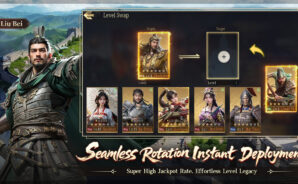
  • Legendary Officers, Instantly Fielded: Recruit over 100 iconic figures like Guan Yu, Lü Bu, Cao Cao, and Liu Bei. Swap officers and skills on the fly without slogging through levels, and enjoy player-friendly summon rates that keep roster building exciting.

  • Three Classes, One War Plan: Mix the strengths of Ranger, Physician, and Farmer. Scout and harass, keep troops fighting fit, and fuel campaigns with smart resource play—then sync with allies for coordinated pushes.

  • Smarter Systems, Less Grind: Let auto-recruitment, healing, and scheduled operations handle the busywork so you can focus on the big brain moves: timing, positioning, and alliance strategy.

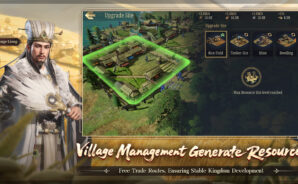
  • Build a Thriving Domain: Set up self-sufficient villages, specialize production, and run trade routes. From domestic tasks to treasure hunts and farm life, your economy becomes the backbone of every conquest.

  • Stories, Puzzles, and Companions: Meet famed confidantes, take on challenge stages for valuable spoils, and unwind with lighter activities like lantern riddles between campaigns.

Start playing Three Kingdoms: World Conquest on BlueStacks and get a smoother, more comfortable PC or Mac setup.

Game Features

Enhancements

  • Macros
  • Multi Instance
  • Multi Instance Sync
  • Eco Mode
  • Enhancements
Macros

Macros

Skip the boring parts of a game. Play Three Kingdoms: World Conquest with Macros and get the edge. Simply record a sequence of commands and execute them at any moment.
Multi Instance

Multi Instance

Why limit to one game on your phone when you can play many on your PC? Open multiple instances of Three Kingdoms: World Conquest at once with Multi-Instance. Leverage the power of different accounts by doing more.
Multi Instance Sync

Multi Instance Sync

Get the best out of Three Kingdoms: World Conquest with Multi-Instance Sync. Play the game from different accounts and build your own empire. Use Multi-instance sync to repeat the action in the main BlueStacks instance on all other instances.
Eco Mode

Eco Mode

Find the rarest heroes by making multiple summons in Three Kingdoms: World Conquest. And while you are at it, reduce your PC’s resource consumption with the Eco Mode. Farm efficiently. Get the best results.
Read More

How to Download and Play Three Kingdoms: World Conquest on PC or Mac

  • Download and install BlueStacks on your PC or Mac

  • Complete Google sign-in to access the Play Store, or do it later

  • Look for Three Kingdoms: World Conquest in the search bar at the top right corner

  • Click to install Three Kingdoms: World Conquest from the search results

  • Complete Google sign-in (if you skipped step 2) to install Three Kingdoms: World Conquest

  • Click the Three Kingdoms: World Conquest icon on the home screen to start playing

video
Watch Video

Minimum System Requirements

With BlueStacks 5, you can get started on a PC that fulfills the following requirements.

  • Operating System

    Microsoft Windows 7 or above, macOS 11 (Big Sur) or above

  • Processor

    Intel, AMD or Apple Silicon Processor

  • RAM

    at least 4GB

  • HDD

    10GB Free Disk Space

Note:

* You must be an Administrator on your PC. Up to date graphics drivers from Microsoft or the chipset vendor.

Three Kingdoms: World Conquest - FAQs

  • How to play Three Kingdoms: World Conquest on Windows PC & Mac?

    Play Three Kingdoms: World Conquest on your PC or Mac by following these simple steps.

    • Click on 'Play Three Kingdoms: World Conquest on PC’ to download BlueStacks
    • Install it and log-in to Google Play Store
    • Launch and play the game.
  • Why is BlueStacks the fastest and safest platform to play games on PC?

    BlueStacks respects your privacy and is always safe and secure to use. It does not carry any malware, spyware, or any sort of additional software that could harm your PC.

    It is engineered to optimize speed and performance for a seamless gaming experience.

  • What are Three Kingdoms: World Conquest PC requirements?

    Minimum requirement to run Three Kingdoms: World Conquest on your PC

    • OS: Microsoft Windows 7 or above MacOS 11 (Big Sur) or above
    • Processor: Intel, AMD or Apple Silicon Processor
    • RAM: Your PC must have at least 4GB of RAM. (Note that having 4GB or more disk space is not a substitute for RAM)
    • HDD: 10GB Free Disk Space.
    • You must be an Administrator on your PC.