Tiny Islands
Tiny Islands

Tiny Islands

Strategy

| Keen on Games

Play on PC with BlueStacks or from our cloud

  • Overview
  • Game Features
  • How to Play

Page Modified On: May 18, 2026

Play Tiny Islands on PC or Mac

From the innovators and creators at Keen on Games, Tiny Islands is another fun addition to the World of Strategy games. Go beyond your mobile screen and play it bigger and better on your PC or Mac. An immersive experience awaits you.

About the Game

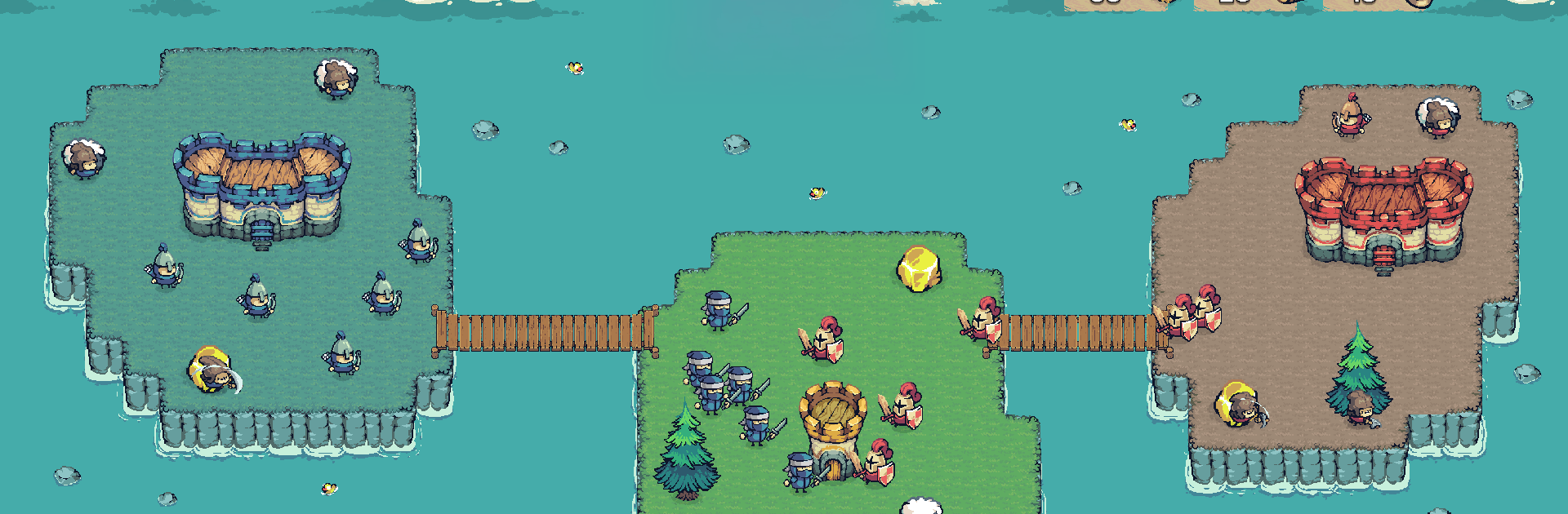
Tiny Islands is a fast, head-to-head Strategy skirmisher from Keen on Games where every second (and every swipe) matters. You’re battling another player across a scatter of small isles, racing to expand, connect, and outmaneuver in real time. Build bridges, gather what you need, and send the right units at the right moment to flip the map and break into their base before they crack yours.

Game Features

  • Real-time PvP: Face off in quick, no-turn battles where timing, positioning, and snap decisions decide who takes control.
  • Bridges as battle lines: Create new routes between isles to open fresh fronts—or cut your rival off and strand their forces.
  • Smart resource play: Collect resources and spend with intent, balancing expansion with defense so you never stall out mid-push.
  • Distinct units with roles: Mix speedy harassers, tough frontliners, and ranged support; counter what’s on the field and pivot when the tide turns.
  • Territory that never sits still: Islands change hands fast, so keep momentum, chain captures together, and set up the strike that cracks the enemy’s base.
  • Short, tense matches: Get satisfying, high-stakes bouts that fit into a break but still reward solid game sense and steady micro.
  • Clean controls, clear reads: Snappy touch controls and readable maps keep the focus on strategy. Prefer a bigger screen and precise clicks? It plays smoothly on BlueStacks too.

Ready to top the leaderboard? We bet you do. Let precise controls and sharp visuals optimized on BlueStacks lead you to victory.


Game Features

Enhancements

  • Macros
  • Multi Instance
  • Multi Instance Sync
  • Eco Mode
  • Enhancements
Macros

Macros

Skip the boring parts of a game. Play Tiny Islands with Macros and get the edge. Simply record a sequence of commands and execute them at any moment.
Multi Instance

Multi Instance

Why limit to one game on your phone when you can play many on your PC? Open multiple instances of Tiny Islands at once with Multi-Instance. Leverage the power of different accounts by doing more.
Multi Instance Sync

Multi Instance Sync

Get the best out of Tiny Islands with Multi-Instance Sync. Play the game from different accounts and build your own empire. Use Multi-instance sync to repeat the action in the main BlueStacks instance on all other instances.
Eco Mode

Eco Mode

Find the rarest heroes by making multiple summons in Tiny Islands. And while you are at it, reduce your PC’s resource consumption with the Eco Mode. Farm efficiently. Get the best results.
Read More

How to Download and Play Tiny Islands on PC or Mac

  • Download and install BlueStacks on your PC or Mac

  • Complete Google sign-in to access the Play Store, or do it later

  • Look for Tiny Islands in the search bar at the top right corner

  • Click to install Tiny Islands from the search results

  • Complete Google sign-in (if you skipped step 2) to install Tiny Islands

  • Click the Tiny Islands icon on the home screen to start playing

video
Watch Video

Minimum System Requirements

With BlueStacks 5, you can get started on a PC that fulfills the following requirements.

  • Operating System

    Microsoft Windows 7 or above, macOS 11 (Big Sur) or above

  • Processor

    Intel, AMD or Apple Silicon Processor

  • RAM

    at least 4GB

  • HDD

    10GB Free Disk Space

Note:

* You must be an Administrator on your PC. Up to date graphics drivers from Microsoft or the chipset vendor.

Tiny Islands - FAQs

  • How to play Tiny Islands on Windows PC & Mac?

    Play Tiny Islands on your PC or Mac by following these simple steps.

    • Click on 'Play Tiny Islands on PC’ to download BlueStacks
    • Install it and log-in to Google Play Store
    • Launch and play the game.
  • Why is BlueStacks the fastest and safest platform to play games on PC?

    BlueStacks respects your privacy and is always safe and secure to use. It does not carry any malware, spyware, or any sort of additional software that could harm your PC.

    It is engineered to optimize speed and performance for a seamless gaming experience.

  • What are Tiny Islands PC requirements?

    Minimum requirement to run Tiny Islands on your PC

    • OS: Microsoft Windows 7 or above MacOS 11 (Big Sur) or above
    • Processor: Intel, AMD or Apple Silicon Processor
    • RAM: Your PC must have at least 4GB of RAM. (Note that having 4GB or more disk space is not a substitute for RAM)
    • HDD: 10GB Free Disk Space.
    • You must be an Administrator on your PC.