Warforged - Strategic Battles

Warforged - Strategic Battles

Strategy

| Mallat Entertainment

Play on PC with BlueStacks or from our cloud

  • Overview
  • Game Features
  • How to Play

Page Modified On: November 10, 2025

Play Warforged - Strategic Battles on PC or Mac

Bring your A-game to Warforged – Strategic Battles, the Strategy game sensation from Mallat Entertainment. Give your gameplay the much-needed boost with precise game controls, high FPS graphics, and top-tier features on your PC or Mac with BlueStacks.

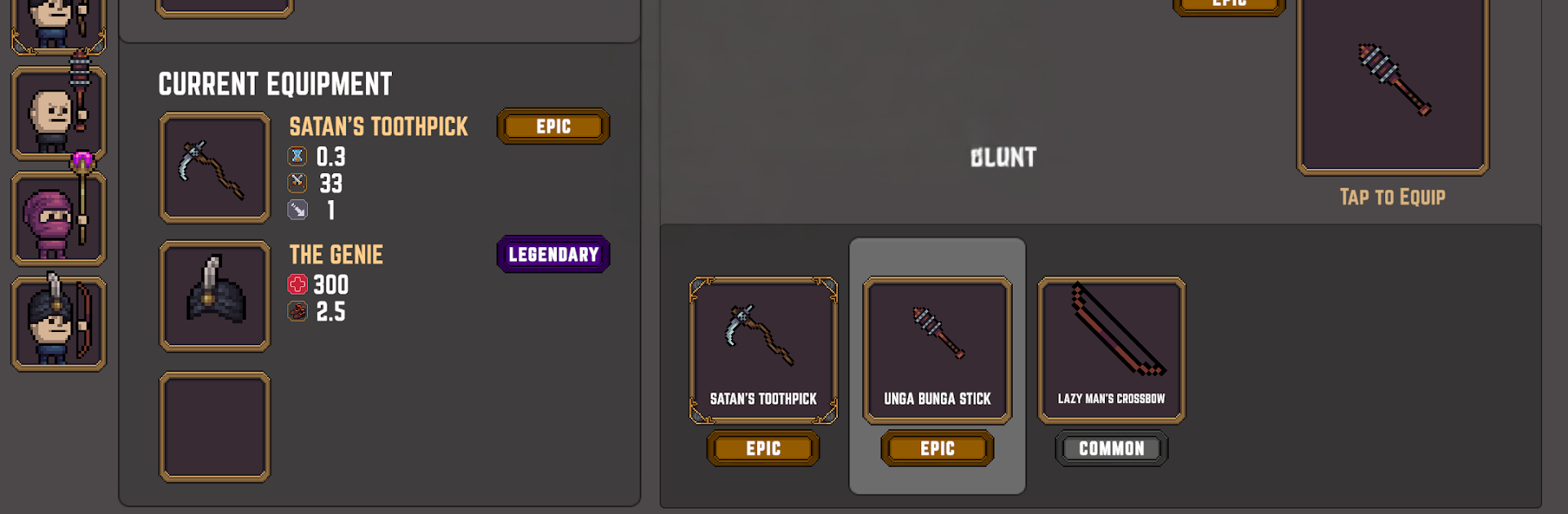
Warforged is a side‑scrolling tug of war where two bases face off and everything comes down to timing, gear, and smart unit picks. Players build a tiny squad of five soldiers, then kit them out with weapons for damage, armor for extra health, shields to blunt hits, and little badge abilities that tilt fights in weird ways. The neat bit is that duplicate gear is not wasted, it can go on more than one soldier, so a whole line can carry the same blade or shield if that fits the plan. Battles play out in real time, soldiers auto‑attack as they march, and the frontline keeps inching forward until one castle cracks. Spawning costs wargold and each unit has a cool down, so it turns into a small puzzle of do you flood the lane with cheap bodies or save for a heavier hitter that needs protection.

What stands out is how much of the strategy sits in loadouts. Synergy matters more than raw stats, like stacking survivability on a blocker so ranged units actually get to fire. Wins feed coins and new gear, which opens different builds rather than just higher numbers, and it works offline if someone wants to grind a bit on the go. On PC with BlueStacks it plays clean, mouse clicks make deploying and swapping menus easier, and the side‑scroll format feels perfect for a quick match that still has bite. Anyone who liked Age of War style games will get the idea fast, but there is enough depth here for tinkering and min‑maxing without feeling like homework.

Make your gaming sessions memorable with precise controls that give you an edge in close combats and visuals that pop up, bringing every character to life.


Game Features

Enhancements

  • Macros
  • Multi Instance
  • Multi Instance Sync
  • Eco Mode
  • Enhancements
Macros

Macros

Skip the boring parts of a game. Play Warforged - Strategic Battles with Macros and get the edge. Simply record a sequence of commands and execute them at any moment.
Multi Instance

Multi Instance

Why limit to one game on your phone when you can play many on your PC? Open multiple instances of Warforged - Strategic Battles at once with Multi-Instance. Leverage the power of different accounts by doing more.
Multi Instance Sync

Multi Instance Sync

Get the best out of Warforged - Strategic Battles with Multi-Instance Sync. Play the game from different accounts and build your own empire. Use Multi-instance sync to repeat the action in the main BlueStacks instance on all other instances.
Eco Mode

Eco Mode

Find the rarest heroes by making multiple summons in Warforged - Strategic Battles. And while you are at it, reduce your PC’s resource consumption with the Eco Mode. Farm efficiently. Get the best results.
Read More

How to Download and Play Warforged - Strategic Battles on PC or Mac

  • Download and install BlueStacks on your PC or Mac

  • Complete Google sign-in to access the Play Store, or do it later

  • Look for Warforged - Strategic Battles in the search bar at the top right corner

  • Click to install Warforged - Strategic Battles from the search results

  • Complete Google sign-in (if you skipped step 2) to install Warforged - Strategic Battles

  • Click the Warforged - Strategic Battles icon on the home screen to start playing

video
Watch Video

Minimum System Requirements

With BlueStacks 5, you can get started on a PC that fulfills the following requirements.

  • Operating System

    Microsoft Windows 7 or above, macOS 11 (Big Sur) or above

  • Processor

    Intel, AMD or Apple Silicon Processor

  • RAM

    at least 4GB

  • HDD

    10GB Free Disk Space

Note:

* You must be an Administrator on your PC. Up to date graphics drivers from Microsoft or the chipset vendor.

Warforged - Strategic Battles - FAQs

  • How to play Warforged - Strategic Battles on Windows PC & Mac?

    Play Warforged - Strategic Battles on your PC or Mac by following these simple steps.

    • Click on 'Play Warforged - Strategic Battles on PC’ to download BlueStacks
    • Install it and log-in to Google Play Store
    • Launch and play the game.
  • Why is BlueStacks the fastest and safest platform to play games on PC?

    BlueStacks respects your privacy and is always safe and secure to use. It does not carry any malware, spyware, or any sort of additional software that could harm your PC.

    It is engineered to optimize speed and performance for a seamless gaming experience.

  • What are Warforged - Strategic Battles PC requirements?

    Minimum requirement to run Warforged - Strategic Battles on your PC

    • OS: Microsoft Windows 7 or above MacOS 11 (Big Sur) or above
    • Processor: Intel, AMD or Apple Silicon Processor
    • RAM: Your PC must have at least 4GB of RAM. (Note that having 4GB or more disk space is not a substitute for RAM)
    • HDD: 10GB Free Disk Space.
    • You must be an Administrator on your PC.