
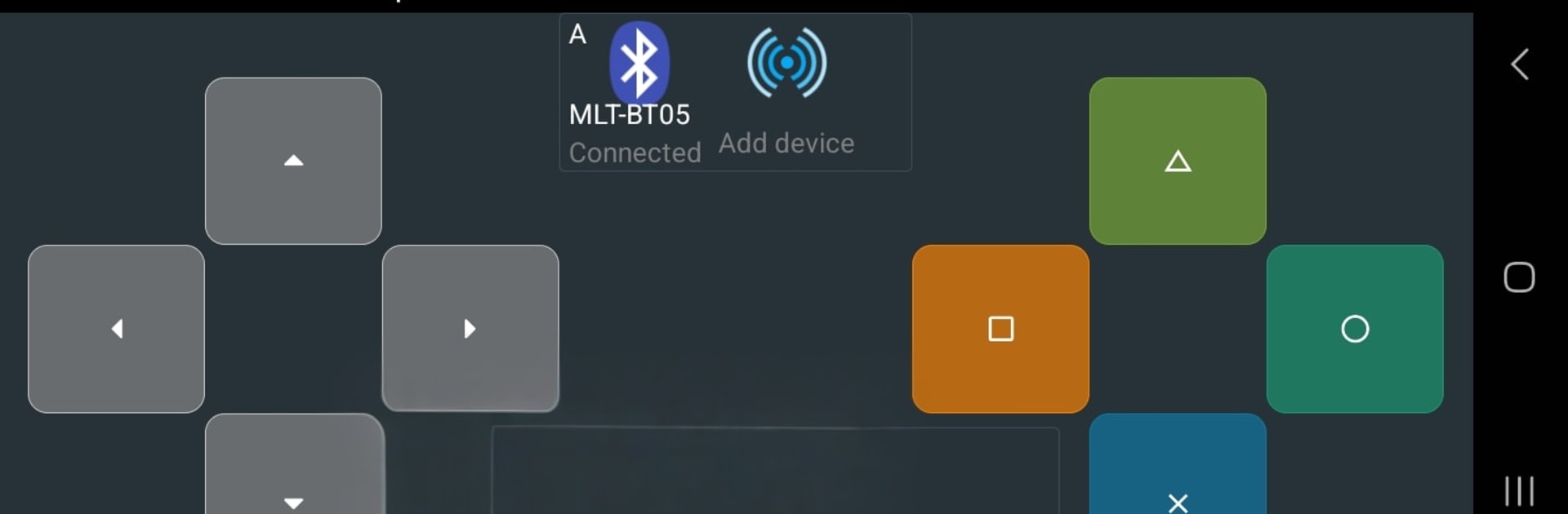
Bluetooth Commander Pro

Bluetooth Commander Pro

Tools

| Marek Masár

Play on PC with BlueStacks or from our cloud

  • Overview
  • How to Download

Page Modified On: December 15, 2025

Run Bluetooth Commander Pro on PC or Mac

What’s better than using Bluetooth Commander Pro by Marek Masár? Well, try it on a big screen, on your PC or Mac, with BlueStacks to see the difference.

About the App

Bluetooth Commander Pro is a flexible terminal and controller for talking to gadgets, robots, and custom hardware over a bunch of connection types. It’s built for hands-on tinkering—connect, send commands, and watch live data without jumping between apps. Whether you’re testing sensors, steering a rover, or debugging a prototype, this Tools app from Marek Masár keeps everything in one clean workspace. Prefer a bigger screen? You can also run it on your PC with BlueStacks.

App Features

  • Many ways to connect: Pair with classic Bluetooth or BLE devices, open a listening Bluetooth socket, plug into supported USB‑serial adapters, or go over the network with TCP (server or client) and UDP. There’s also an MQTT client for IoT workflows.
  • Multi-device at once: Talk to several targets simultaneously. Mix connection types in one session and keep the streams separate but manageable.
  • Command/message editor: Build messages in hex or text, or inject values from your phone’s sensors—GPS coordinates, ambient temperature, proximity, accelerometer data, and more.
  • One‑tap sending: Save your go‑to commands and fire them off with a tap. Great for repetitive testing or quick control.
  • Custom UI designer: Create your own control surface from available components—buttons, sliders, and panels—so your dashboard fits your project, not the other way around.
  • Ready-made layouts: Use the Basic layout with a tidy command list, connected devices at the top, and a resizable log below. Need motion controls? Switch to the Gamepad layout for driving, arm positioning, or orientation tasks. Or go fully Custom.
  • Scheduled transmissions: Set messages to send on a timer—handy for polling sensors or keeping a device alive during testing.
  • Detailed logging: Capture data from multiple connections with timestamps, so you can review, compare, and troubleshoot with context.

Switch to BlueStacks and make the most of your apps on your PC or Mac.

How to Download and Run Bluetooth Commander Pro on PC or Mac

  • Download and install BlueStacks on your PC or Mac

  • Complete Google sign-in to access the Play Store, or do it later

  • Look for Bluetooth Commander Pro in the search bar at the top right corner

  • Click to install Bluetooth Commander Pro from the search results

  • Complete Google sign-in (if you skipped step 2) to install Bluetooth Commander Pro

  • Click the Bluetooth Commander Pro icon on the home screen to start playing

video
Watch Video

Minimum System Requirements

With BlueStacks 5, you can get started on a PC that fulfills the following requirements.

  • Operating System

    Microsoft Windows 7 or above, macOS 11 (Big Sur) or above

  • Processor

    Intel, AMD or Apple Silicon Processor

  • RAM

    at least 4GB

  • HDD

    10GB Free Disk Space

Note:

* You must be an Administrator on your PC. Up to date graphics drivers from Microsoft or the chipset vendor.

Bluetooth Commander Pro - FAQs

  • How to Run Bluetooth Commander Pro on Windows PC & Mac?

    Run Bluetooth Commander Pro on your PC or Mac by following these simple steps.

    • Click on ‘Download Bluetooth Commander Pro on PC’ to download BlueStacks
    • Install it and log-in to Google Play Store
    • Launch and run the app.
  • Why is BlueStacks the fastest and safest platform to play games on PC?

    BlueStacks respects your privacy and is always safe and secure to use. It does not carry any malware, spyware, or any sort of additional software that could harm your PC.

    It is engineered to optimize speed and performance for a seamless gaming experience.

  • What are Bluetooth Commander Pro PC requirements?

    Minimum requirement to run Bluetooth Commander Pro on your PC

    • OS: Microsoft Windows 7 and above:
    • Processor: Intel or AMD Processor:
    • RAM: Your PC must have at least 2GB of RAM. (Note that having 2GB or more disk space is not a substitute for RAM):
    • HDD: 5GB Free Disk Space.
    • You must be an Administrator on your PC.




