Mobius
Mobius

Mobius

Tools

| EcoTech Marine

Play on PC with BlueStacks or from our cloud

  • Overview
  • How to Download

Page Modified On: July 07, 2026

Run Mobius on PC or Mac

Upgrade your experience. Try Mobius, the fantastic Tools app from EcoTech Marine, from the comfort of your laptop, PC, or Mac, only on BlueStacks.

About the App

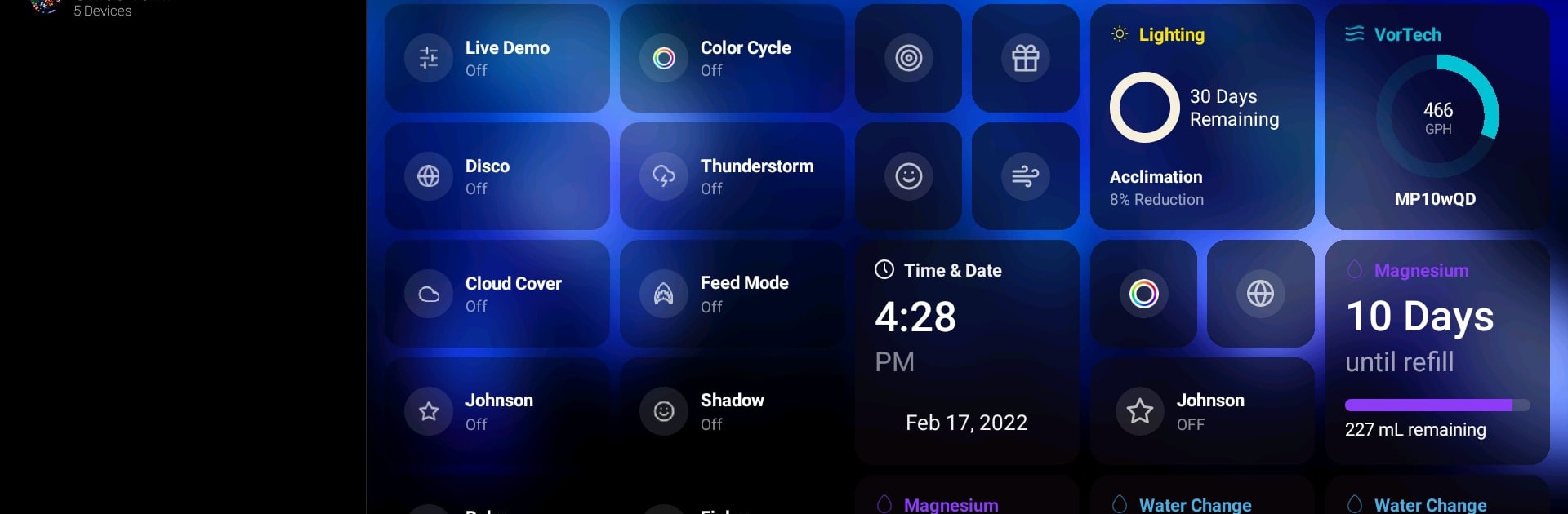
Mobius puts your aquarium gear in one clean, easy-to-use place. It’s built for hobbyists who want precise control without digging through complicated menus. Set up routines, check in on multiple tanks, and handle everyday tasks with just a couple of taps. Prefer a bigger canvas? You can also use Mobius on your PC or Mac with BlueStacks.

App Features

  • Unified dashboard: See what’s happening at a glance, pin the widgets you actually use, and jump to any device in seconds.
  • One-tap Scenes: Bundle repetitive tasks—like water changes or maintenance—into a single button you can run from the dashboard.
  • Drag-and-drop schedules: Build daily or weekly routines in a visual timeline that’s quick to tweak and easy to understand.
  • Multi-tank management: Keep tabs on several aquariums and flip between them without losing your place.
  • Lighting made simple: Start with proven templates, fine-tune your spectrum, and use coral acclimation to bring new livestock online gently. Save and share your custom presets.
  • Smart flow control: Customize Vectra and VorTech schedules, switch between ReefCrest, Lagoon, or Tidal Swell modes, and pause flow with Feed mode when it’s time to spot-feed. Calibration is guided and straightforward.
  • Precise dosing options: Choose Auto for best-practice timing, Manual for complete control, or Continuous for steady delivery with Versa. Track how much additive is left, calibrate with a quick walkthrough, and use Instant Dose when you need a one-off top-up.
  • Quick device access: Add, organize, and manage equipment fast so you can focus on your tank—not the menus.

BlueStacks brings your apps to life on a bigger screen—seamless and straightforward.

How to Download and Run Mobius on PC or Mac

  • Download and install BlueStacks on your PC or Mac

  • Complete Google sign-in to access the Play Store, or do it later

  • Look for Mobius in the search bar at the top right corner

  • Click to install Mobius from the search results

  • Complete Google sign-in (if you skipped step 2) to install Mobius

  • Click the Mobius icon on the home screen to start playing

video
Watch Video

Minimum System Requirements

With BlueStacks 5, you can get started on a PC that fulfills the following requirements.

  • Operating System

    Microsoft Windows 7 or above, macOS 11 (Big Sur) or above

  • Processor

    Intel, AMD or Apple Silicon Processor

  • RAM

    at least 4GB

  • HDD

    10GB Free Disk Space

Note:

* You must be an Administrator on your PC. Up to date graphics drivers from Microsoft or the chipset vendor.

Mobius - FAQs

  • How to Run Mobius on Windows PC & Mac?

    Run Mobius on your PC or Mac by following these simple steps.

    • Click on ‘Download Mobius on PC’ to download BlueStacks
    • Install it and log-in to Google Play Store
    • Launch and run the app.
  • Why is BlueStacks the fastest and safest platform to play games on PC?

    BlueStacks respects your privacy and is always safe and secure to use. It does not carry any malware, spyware, or any sort of additional software that could harm your PC.

    It is engineered to optimize speed and performance for a seamless gaming experience.

  • What are Mobius PC requirements?

    Minimum requirement to run Mobius on your PC

    • OS: Microsoft Windows 7 and above:
    • Processor: Intel or AMD Processor:
    • RAM: Your PC must have at least 2GB of RAM. (Note that having 2GB or more disk space is not a substitute for RAM):
    • HDD: 5GB Free Disk Space.
    • You must be an Administrator on your PC.