
Positional: GPS, Compass, Level, Time, Sun, Moon

Positional: GPS, Compass, Level, Time, Sun, Moon

Tools

| Hamza Rizwan

Play on PC with BlueStacks or from our cloud

  • Overview
  • How to Download

Page Modified On: October 03, 2025

Run Positional: GPS, Compass, Level, Time, Sun, Moon on PC or Mac

Let BlueStacks turn your PC, Mac, or laptop into the perfect home for Positional: GPS, Compass, Level, Time, Sun, Moon, a fun Tools app from Hamza Rizwan.

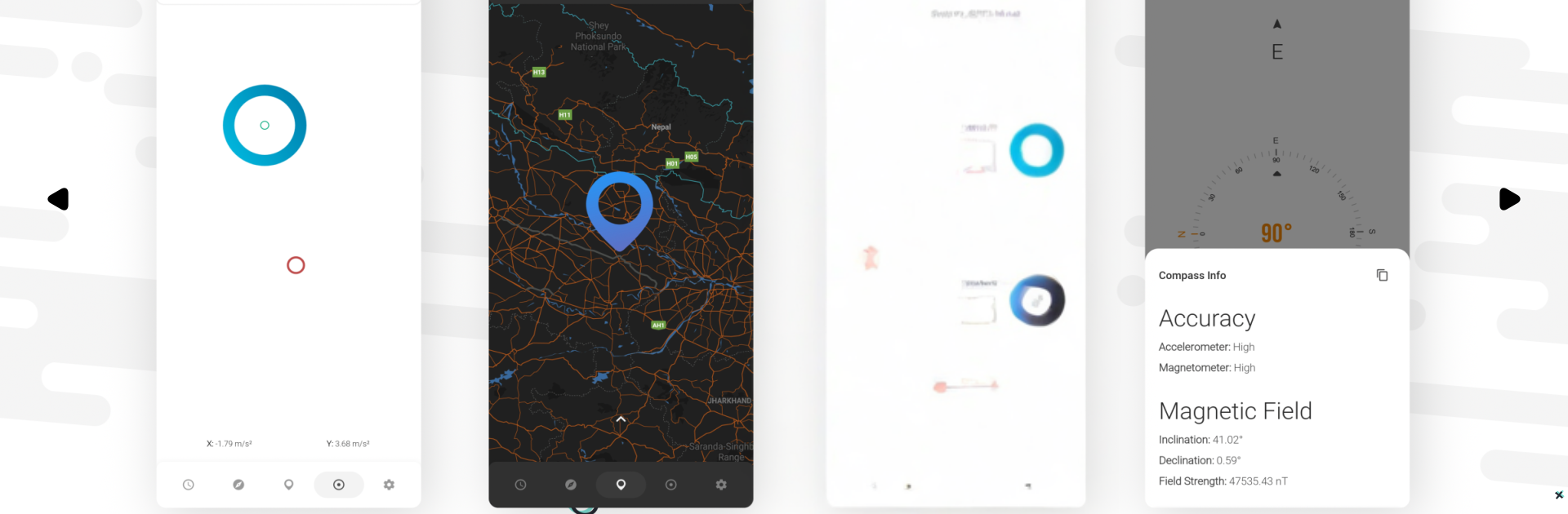
Positional feels like a tidy dashboard for real-world data. It centers on location and reads out the useful stuff without fuss: coordinates, altitude, speed, and a clean address line that updates fast. There is a separate compass panel that uses the device’s magnetic sensors, a level with X and Y tilt so a shelf or desk can be checked, and a time screen that shows local and UTC time along with sunrise, sunset, the twilight types, moon phases, illumination, angles, and other bits space nerds like. The design is minimal and calm, with smooth little animations, a tiny map that can show labels or keep things bare, and graphs that make the numbers easy to read. Units swap between metric and imperial, the speedometer goes to silly-high speeds, and the dark theme can flip on by itself based on time.

On a PC through BlueStacks it acts like a big, clean instrument panel. The emulator location can be set, so users can jump the pin to another city and instantly see how sun and moon data change there, or enter latitude and longitude by hand. It does not try to find cafes or friends, it just measures and reports. No ads, no nagging, and calculations stay on the device so it does not feel nosy. There is also a custom location mode, optional bloom styling for extra polish, compass sensor speed controls, displacement and movement direction readouts, and a day night mode that follows the clock. People who like accurate numbers and a no-noise layout will get what this app is doing right away.

Big screen. Bigger performance. Use BlueStacks on your PC or Mac to run your favorite apps.

How to Download and Run Positional: GPS, Compass, Level, Time, Sun, Moon on PC or Mac

  • Download and install BlueStacks on your PC or Mac

  • Complete Google sign-in to access the Play Store, or do it later

  • Look for Positional: GPS, Compass, Level, Time, Sun, Moon in the search bar at the top right corner

  • Click to install Positional: GPS, Compass, Level, Time, Sun, Moon from the search results

  • Complete Google sign-in (if you skipped step 2) to install Positional: GPS, Compass, Level, Time, Sun, Moon

  • Click the Positional: GPS, Compass, Level, Time, Sun, Moon icon on the home screen to start playing

video
Watch Video

Minimum System Requirements

With BlueStacks 5, you can get started on a PC that fulfills the following requirements.

  • Operating System

    Microsoft Windows 7 or above, macOS 11 (Big Sur) or above

  • Processor

    Intel, AMD or Apple Silicon Processor

  • RAM

    at least 4GB

  • HDD

    10GB Free Disk Space

Note:

* You must be an Administrator on your PC. Up to date graphics drivers from Microsoft or the chipset vendor.

Positional: GPS, Compass, Level, Time, Sun, Moon - FAQs

  • How to Run Positional: GPS, Compass, Level, Time, Sun, Moon on Windows PC & Mac?

    Run Positional: GPS, Compass, Level, Time, Sun, Moon on your PC or Mac by following these simple steps.

    • Click on ‘Download Positional: GPS, Compass, Level, Time, Sun, Moon on PC’ to download BlueStacks
    • Install it and log-in to Google Play Store
    • Launch and run the app.
  • Why is BlueStacks the fastest and safest platform to play games on PC?

    BlueStacks respects your privacy and is always safe and secure to use. It does not carry any malware, spyware, or any sort of additional software that could harm your PC.

    It is engineered to optimize speed and performance for a seamless gaming experience.

  • What are Positional: GPS, Compass, Level, Time, Sun, Moon PC requirements?

    Minimum requirement to run Positional: GPS, Compass, Level, Time, Sun, Moon on your PC

    • OS: Microsoft Windows 7 and above:
    • Processor: Intel or AMD Processor:
    • RAM: Your PC must have at least 2GB of RAM. (Note that having 2GB or more disk space is not a substitute for RAM):
    • HDD: 5GB Free Disk Space.
    • You must be an Administrator on your PC.




