Hot & Cold: Word Challenge

Hot & Cold: Word Challenge

Word

| Lambda 7 Tech

Play on PC with BlueStacks or from our cloud

  • Overview
  • Game Features
  • How to Play

Page Modified On: October 30, 2026

Play Hot & Cold: Word Challenge on PC or Mac

Hot & Cold: Word Challenge brings the Word genre to life, and throws up exciting challenges for gamers. Developed by Lambda 7 Tech, this Android game is best experienced on BlueStacks, the World’s #1 app player for PC and Mac users.

About the Game

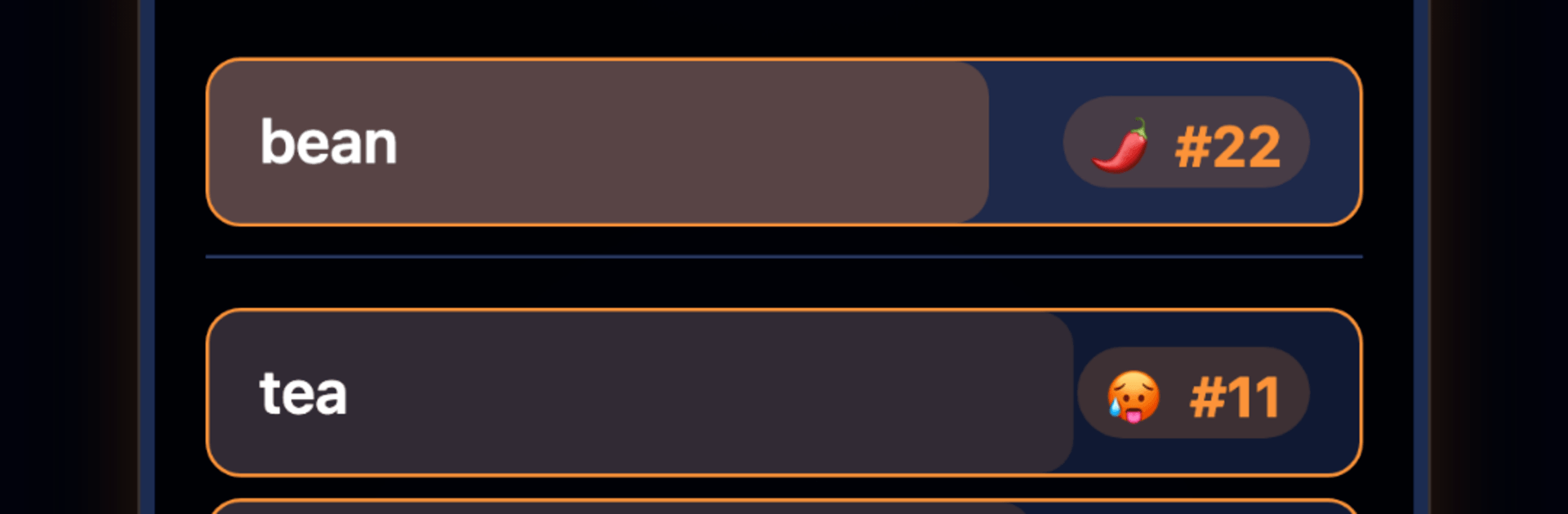
Hot & Cold: Word Challenge turns meaning into your compass. Type any word, watch the temperature guide shift from ice-cold to red-hot, and use those vibes to steer closer to the hidden answer. It’s a quick, thinky Word game that works for a one-minute brain snack or a long streak—and if you prefer a bigger screen, it plays smoothly on BlueStacks.

Game Features

  • Meaning-first feedback: Enter any term and get a heat read on semantic closeness, so you’re chasing ideas, not matching letters.
  • Ranked closeness meter: Every guess is scored against the entire word list; the nearer you are to the top slot, the hotter your trail.
  • Daily secret & streaks: One shared mystery word drops worldwide each day; keep your streak alive and share a spoiler-safe result when you’re done.
  • Unlimited practice: Fire up endless rounds with random targets; add an optional timer or hint nudges whenever you want more pressure (or less).
  • Friend rooms, async play: Send a link so friends join the same puzzle; jump in whenever and stack series points across multiple back-to-back rounds.
  • Team up, one board: Split into 2–4 teams and collaborate on a shared board; everyone’s guesses appear live, and any solve wins it for the whole crew.
  • Built-in chat, spoiler safety: Talk strategy inside the room; a protected channel opens only after you finish, so nobody spoils the answer mid-run.
  • Solo vs. bot: Practice offline against a local bot when you want low-stakes reps and sharper instincts.
  • Heat Ascension mode: Tackle a roguelike climb through rarer words; pick routes, draft rule-bending modifiers, and face bosses as difficulty ramps up.
  • Privacy by design: Play anonymously—opponents only see display names and heat scores, not your guesses; optional sign-in adds leaderboards and cross-device stats, and you can wipe your data anytime.
  • Play without interruptions: No forced ads; there’s an optional rewarded video if you feel like pitching in.

BlueStacks gives you more room to focus on the game and less time adjusting around mobile limitations.


Game Features

Enhancements

  • Macros
  • Multi Instance
  • Multi Instance Sync
  • Script
  • Enhancements
Macros

Macros

Automate the predictable in Hot & Cold: Word Challenge and transform your gameplay with Macros. Get access to inventive Macros in the BlueStacks Macro Community
Multi Instance

Multi Instance

Play Hot & Cold: Word Challenge on one window. And chat with your friend on the other. Press CTRL + Shift + 8 to open the Multi-Instance Manager. And start creating fresh instances or clone an existing one.
Multi Instance Sync

Multi Instance Sync

Play Hot & Cold: Word Challenge with the power of Multi-Instance Sync. Replicate what you are doing on the main instance on all other instances. Level up faster, play more.
Script

Script

Script your way to gaming glory in Hot & Cold: Word Challenge with BlueStacks Script. Write and run a set of commands to automate repeated tasks. Trigger the command by assigning it to any key.
Read More

How to Download and Play Hot & Cold: Word Challenge on PC or Mac

  • Download and install BlueStacks on your PC or Mac

  • Complete Google sign-in to access the Play Store, or do it later

  • Look for Hot & Cold: Word Challenge in the search bar at the top right corner

  • Click to install Hot & Cold: Word Challenge from the search results

  • Complete Google sign-in (if you skipped step 2) to install Hot & Cold: Word Challenge

  • Click the Hot & Cold: Word Challenge icon on the home screen to start playing

video
Watch Video

Minimum System Requirements

With BlueStacks 5, you can get started on a PC that fulfills the following requirements.

  • Operating System

    Microsoft Windows 7 or above, macOS 11 (Big Sur) or above

  • Processor

    Intel, AMD or Apple Silicon Processor

  • RAM

    at least 4GB

  • HDD

    10GB Free Disk Space

Note:

* You must be an Administrator on your PC. Up to date graphics drivers from Microsoft or the chipset vendor.

Hot & Cold: Word Challenge - FAQs

  • How to play Hot & Cold: Word Challenge on Windows PC & Mac?

    Play Hot & Cold: Word Challenge on your PC or Mac by following these simple steps.

    • Click on 'Play Hot & Cold: Word Challenge on PC’ to download BlueStacks
    • Install it and log-in to Google Play Store
    • Launch and play the game.
  • Why is BlueStacks the fastest and safest platform to play games on PC?

    BlueStacks respects your privacy and is always safe and secure to use. It does not carry any malware, spyware, or any sort of additional software that could harm your PC.

    It is engineered to optimize speed and performance for a seamless gaming experience.

  • What are Hot & Cold: Word Challenge PC requirements?

    Minimum requirement to run Hot & Cold: Word Challenge on your PC

    • OS: Microsoft Windows 7 or above MacOS 11 (Big Sur) or above
    • Processor: Intel, AMD or Apple Silicon Processor
    • RAM: Your PC must have at least 4GB of RAM. (Note that having 4GB or more disk space is not a substitute for RAM)
    • HDD: 10GB Free Disk Space.
    • You must be an Administrator on your PC.