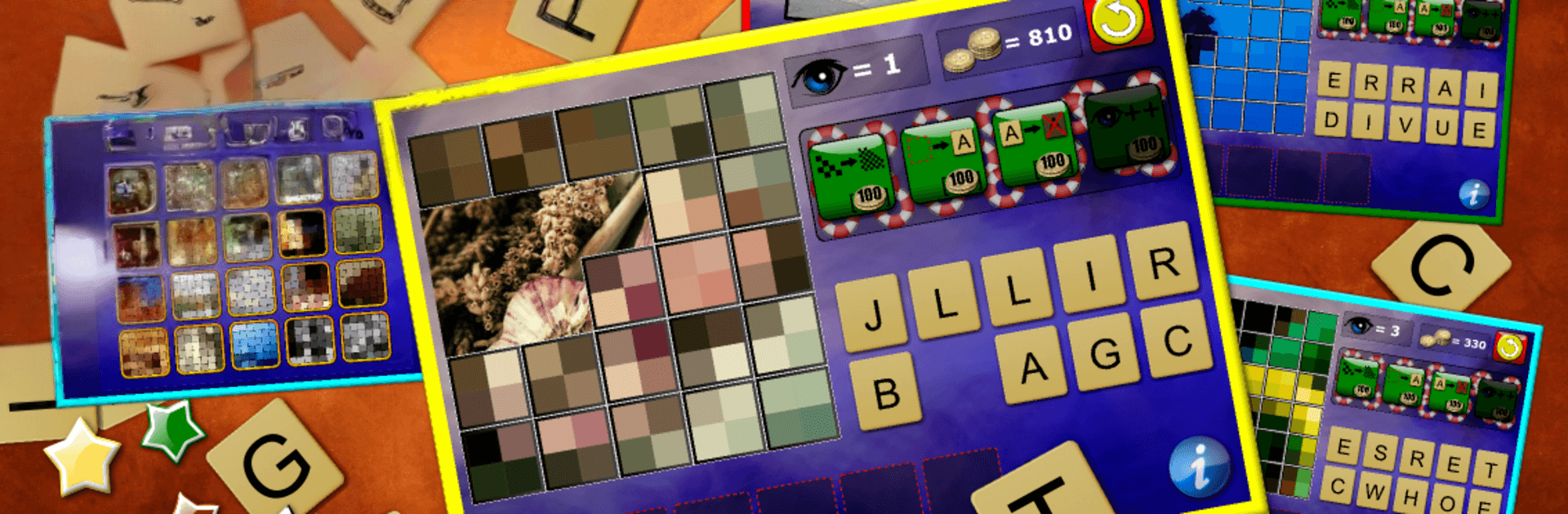
What's Pixelated - word puzzle

What's Pixelated - word puzzle

Word

| Espace Publishing

Play on PC with BlueStacks or from our cloud

  • Overview
  • Game Features
  • How to Play

Page Modified On: April 21, 2026

Play What's Pixelated - word puzzle on PC or Mac

Explore a whole new adventure with What’s Pixelated – word puzzle, a Word game created by Espace Publishing. Experience great gameplay with BlueStacks, the most popular gaming platform to play Android games on your PC or Mac.

About the Game

What’s Pixelated – word puzzle takes a simple idea and makes it seriously addictive. Each round starts with a heavily blurred photo, and it’s your job to reveal just enough tiles to figure out the hidden word. It’s a chill, clever Word game from Espace Publishing that blends picture recognition with vocabulary smarts—part guesswork, part “aha!” moments. Prefer a bigger screen? It also feels great on BlueStacks.

Game Features

  • Pixel Peek Gameplay: Tap to uncover small sections of a photo and guess the word before you run out of reveals. The fewer tiles you flip, the more satisfying the win.
  • Guess the Right Noun: Every solution is a noun, so the challenge is fair for all ages—kids, teens, and grown-ups can spot the answer without obscure trivia getting in the way.
  • Smart Hints and Coins: Earn coins for correct answers and spend them on helpful nudges when a picture has you stumped. Need more? Optional purchases are there if you want them.
  • Clean, Family-Friendly Fun: No adult content, no weird surprises—just a solid brain teaser you can hand to anyone.
  • Crisp Photos That Pop: High-quality images look sharp on phones and tablets, and they’re extra clear when you play on a larger display with BlueStacks.
  • Difficulty That Ramps Up: Early puzzles warm you up, then things steadily get trickier as you unlock more sets.
  • Lots to Solve: With roughly 200 pictures already in the mix and more planned, you’ll have plenty of “just one more” moments.
  • Play in Your Language: Choose from 16 supported languages, including English, Spanish, German, French, Italian, Portuguese, Russian, Greek, Turkish, Romanian, Arabic, Persian, Danish, Dutch, Norwegian, and Finnish.
  • No Ads, Just Play: Focus on the puzzle, not pop-ups—enjoy uninterrupted gameplay from the first reveal to the final guess.

Slay your opponents with your epic moves. Play it your way on BlueStacks and dominate the battlefield.


Game Features

Enhancements

  • Macros
  • Multi Instance
  • Multi Instance Sync
  • Script
  • Enhancements
Macros

Macros

Automate the predictable in What's Pixelated - word puzzle and transform your gameplay with Macros. Get access to inventive Macros in the BlueStacks Macro Community
Multi Instance

Multi Instance

Play What's Pixelated - word puzzle on one window. And chat with your friend on the other. Press CTRL + Shift + 8 to open the Multi-Instance Manager. And start creating fresh instances or clone an existing one.
Multi Instance Sync

Multi Instance Sync

Play What's Pixelated - word puzzle with the power of Multi-Instance Sync. Replicate what you are doing on the main instance on all other instances. Level up faster, play more.
Script

Script

Script your way to gaming glory in What's Pixelated - word puzzle with BlueStacks Script. Write and run a set of commands to automate repeated tasks. Trigger the command by assigning it to any key.
Read More

How to Download and Play What's Pixelated - word puzzle on PC or Mac

  • Download and install BlueStacks on your PC or Mac

  • Complete Google sign-in to access the Play Store, or do it later

  • Look for What's Pixelated - word puzzle in the search bar at the top right corner

  • Click to install What's Pixelated - word puzzle from the search results

  • Complete Google sign-in (if you skipped step 2) to install What's Pixelated - word puzzle

  • Click the What's Pixelated - word puzzle icon on the home screen to start playing

video
Watch Video

Minimum System Requirements

With BlueStacks 5, you can get started on a PC that fulfills the following requirements.

  • Operating System

    Microsoft Windows 7 or above, macOS 11 (Big Sur) or above

  • Processor

    Intel, AMD or Apple Silicon Processor

  • RAM

    at least 4GB

  • HDD

    10GB Free Disk Space

Note:

* You must be an Administrator on your PC. Up to date graphics drivers from Microsoft or the chipset vendor.

What's Pixelated - word puzzle - FAQs

  • How to play What's Pixelated - word puzzle on Windows PC & Mac?

    Play What's Pixelated - word puzzle on your PC or Mac by following these simple steps.

    • Click on 'Play What's Pixelated - word puzzle on PC’ to download BlueStacks
    • Install it and log-in to Google Play Store
    • Launch and play the game.
  • Why is BlueStacks the fastest and safest platform to play games on PC?

    BlueStacks respects your privacy and is always safe and secure to use. It does not carry any malware, spyware, or any sort of additional software that could harm your PC.

    It is engineered to optimize speed and performance for a seamless gaming experience.

  • What are What's Pixelated - word puzzle PC requirements?

    Minimum requirement to run What's Pixelated - word puzzle on your PC

    • OS: Microsoft Windows 7 or above MacOS 11 (Big Sur) or above
    • Processor: Intel, AMD or Apple Silicon Processor
    • RAM: Your PC must have at least 4GB of RAM. (Note that having 4GB or more disk space is not a substitute for RAM)
    • HDD: 10GB Free Disk Space.
    • You must be an Administrator on your PC.