AI Personal Assistant Apps in 2026: Workers That Do Tasks
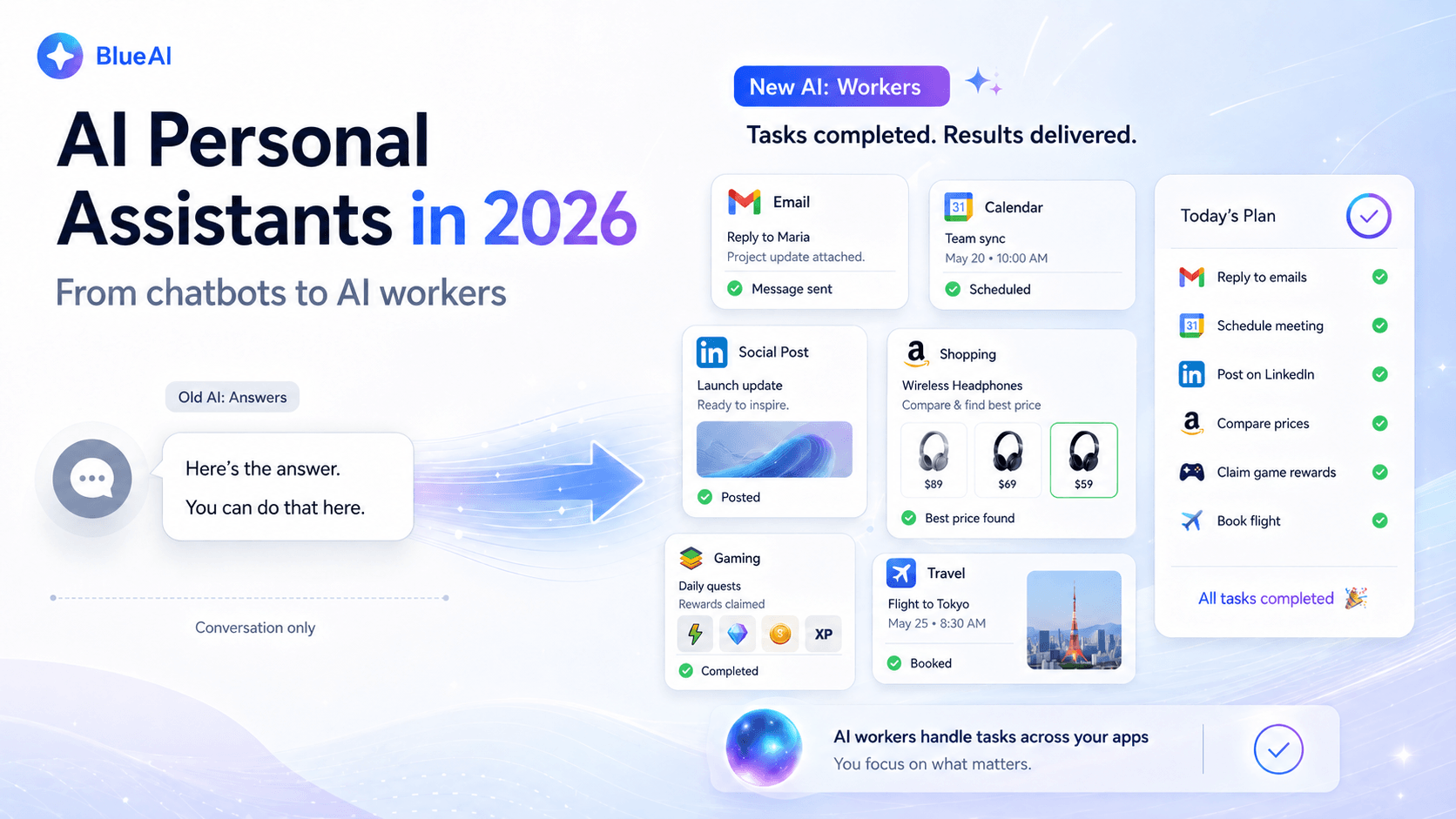
For years, an “AI assistant” meant something that talked back. You asked a question, it gave you an answer, and the actual work, applying to the job, replying to the message, editing the photo, booking the slot, was still left to you.
That is changing fast. The most useful AI personal assistant apps in 2026 do not stop at advice. They open the app, tap the buttons, fill the fields, and finish the task. The category is evolving in three stages: the chatbot tells you what to do, the assistant drafts it for you, and the newest layer, the AI worker, actually does it.
Put simply: an AI assistant tells you what to do. An AI worker does it. This guide explains the shift, what to look for in a modern AI assistant app, and the tools leading the move from conversation to completion.
What is an AI personal assistant in 2026?
An AI personal assistant is software that understands a request in plain language and carries it out on your behalf. The first wave (the chatbot wave) was built around answering. The current wave is built around acting.
The simplest way to tell them apart is to look at where the work ends:
- A chatbot assistant writes the email and hands it back to you to send.
- An agent assistant writes the email, opens your mail app, and sends it.
That second behavior is what people increasingly mean when they search for an AI that does tasks for you. It is also why search demand for terms like “ai assistant app” and “ai personal assistant” has climbed several thousand percent over the last four years. The expectation has moved from “help me think” to “handle it.”
If you want the one-line version: a modern AI personal assistant is an AI agent that does tasks on your phone, not just a smarter search box.
What changed: the rise of the AI agent
Three things pushed assistants from talking to doing.
- Models learned to use tools. Newer AI models can read a screen, decide what to tap, and take the next step toward a goal. That turned the assistant from a writer into a doer.
- Tasks got broken into skills. Instead of trying to do everything at once, the best agents work from a library of reusable skills, where each skill knows how to complete one specific job in one app (post a caption, reply to a chat, apply to a listing). Small, reliable skills beat one giant model trying to wing it.
- The work moved to where apps already live. Most of the tasks people want automated (messaging, social posting, job applications, bookings) happen inside mobile apps. So the agents that matter are the ones that can actually operate those apps, the same way a person would.
This is the core of what people now call AI automation: software that performs multi-step jobs end to end, across the apps you already use, with little or no hand-holding.
What to look for in an AI assistant app
Not every app that says “AI assistant” actually does the task. Use this checklist:
- Does it finish the job, or just draft it? The whole point of an agent is that the task ends done, not half done in your clipboard.
- Does it work inside real apps? The valuable tasks live in apps like WhatsApp, Instagram, LinkedIn, and your photo editor. An assistant that cannot touch those is limited to chat.
- Is it reliable on the same task twice? A good agent does the job the same way every time. Look for tools built on a defined skill library rather than improvising each run.
- Does it ask before doing anything risky? Sending money, deleting accounts, posting publicly: a trustworthy agent confirms these with you first.
- Can it run while you do something else? The best assistants take the task off your plate entirely, rather than needing you to babysit every tap.
The shift in action: example tasks people automate
These are the jobs that map cleanly to an agent rather than a chatbot, and the categories growing fastest in search:
- Messaging: auto-reply on WhatsApp, draft and send responses, summarize long chats.
- Content creation: generate a caption and post it, turn an idea into a ready-to-publish social post.
- Job applications: auto-apply to listings that match your profile, the textbook “let the agent do the tedious part” use case.
- Email: triage the inbox, draft replies in your voice, and clear the routine messages.
- Bookings and appointments: find a slot and book it inside the app that owns the calendar.
- Photo and media editing: apply an edit and save or share the result, not just describe how to do it.
The common thread: in every case the user does not want a tutorial. They want the thing done.
Blue AI: an AI worker built to do the task, not describe it
One example of this worker-first approach is Blue AI, an AI worker rather than a chat assistant. Instead of answering and stopping, Blue AI installs, launches, and operates real Android apps to complete a task from start to finish, drawing on a growing library of skills that each handle a specific job in a specific app.
Today Blue AI runs on top of BlueStacks, the same platform that already runs Android apps on your computer, so it can carry out app-based work, reply to a message, generate and post a caption, apply to a job, on a full-size screen while you get on with something else. Direct mobile connect, running Blue AI on your own phone, is coming soon. Either way, you describe the task in plain language and the worker does the tapping.
It is a clean illustration of where AI personal assistants are heading: less conversation, more completion. You can see what it does at bluestacks.ai.
How agent assistants actually run the apps
A quick note on the mechanics, because it explains why some assistants can do far more than others.
To act inside an app, a worker needs a real Android environment to operate, the same screens, buttons, and inputs a person would use. That is why these tools are often paired with a platform that runs Android apps at full size, where the worker has room to see the screen and control it reliably. If you are curious about the underlying layer, BlueStacks has long been the way to run Android apps and your full app library on a PC, and it is the surface Blue AI uses today to get real work done, with the option to run on your own phone coming soon.
The takeaway for a buyer: an assistant is only as capable as the apps it can actually reach. The ones that can operate your real apps are the ones that can actually finish your tasks.
The bottom line
The phrase “AI personal assistant” used to describe something that talked. In 2026 it increasingly describes something that does, which is really the job of an AI worker. As you compare AI assistant apps, the question that separates the useful from the merely clever is simple: when the conversation ends, is your task done?
The tools that can answer yes, the AI workers that actually operate your apps, are the ones worth your attention. See how Blue AI does the task for you.