BLOCKAPOLYPSE™ 2 Terror Strike

BLOCKAPOLYPSE™ 2 Terror Strike

Action

| mobadu

Play on PC with BlueStacks or from our cloud

  • Overview
  • Game Features
  • How to Play

Page Modified On: April 07, 2026

Play BLOCKAPOLYPSE™ 2 Terror Strike on PC or Mac

BLOCKAPOLYPSE™ 2 Terror Strike brings the Action genre to life, and throws up exciting challenges for gamers. Developed by mobadu, this Android game is best experienced on BlueStacks, the World’s #1 app player for PC and Mac users.

About the Game

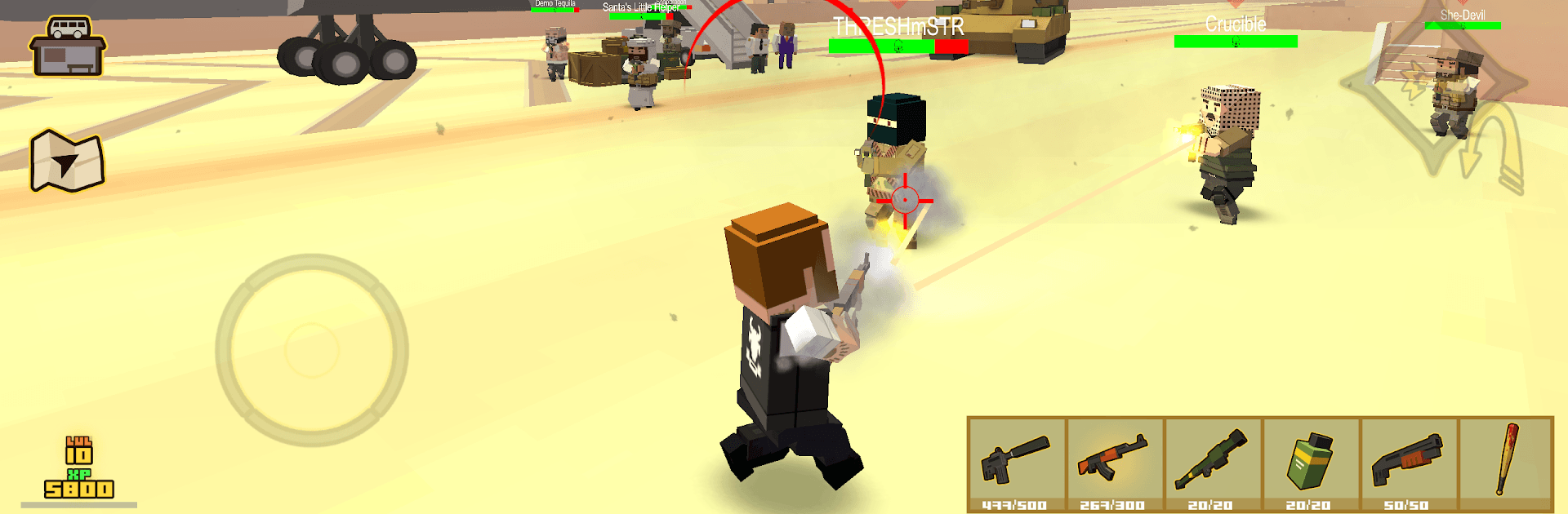
BLOCKAPOLYPSE™ 2 Terror Strike drops you into a blocky metropolis that’s on the brink. You touch down in a dusty airfield, get ambushed, and quickly realize a militant group has nabbed four lethal vials and enough explosives to wipe out the city. This Action shooter from mobadu mixes fast firefights with tactical decisions, whether you’re clearing story missions or squeezing in a few rounds of multiplayer. Prefer playing on a bigger screen with a mouse and keyboard? It runs smoothly on BlueStacks, too.

Game Features

  • Two ways to aim: Swap between first- and third-person views whenever the fight demands it.
  • Story-driven missions: Tackle 20 handcrafted operations across airports, desert villages, military compounds, and city streets to shut down the plot.
  • Big, punchy arsenal: Kit up with rifles, shotguns, SMGs, and heavier toys—then pair them with protective armor to stay in the fight longer.
  • Wheels and rails: Jump behind the wheel to blitz across districts, or use the metro to zip between hot zones and flank enemies.
  • PvP that pops: Jump into quick, competitive deathmatches against real players when you want a break from the campaign.
  • Demolition chaos: A bonus mode where cars become battering rams and skeletal creeps become speed bumps.
  • Look the part: Unlock character skins and gear up with different armors; bring along a pet companion that trots into battle with you.
  • Clean block style: A crisp, colorful voxel look that stays smooth even when things get hectic.
  • Open combat spaces: Explore wide urban arenas with multiple paths, sneaky angles, and plenty of room for improvisation.
  • Snappy controls: Responsive movement and gunplay that make headshots and quick peeks feel natural.

Get ready for a buttery smooth, high-performance gaming action only on BlueStacks.

Game Features

Enhancements

  • Macros
  • Multi Instance
  • Multi Instance Sync
  • Eco Mode
  • Enhancements
Macros

Macros

Skip the boring parts of a game. Play BLOCKAPOLYPSE™ 2 Terror Strike with Macros and get the edge. Simply record a sequence of commands and execute them at any moment.
Multi Instance

Multi Instance

Why limit to one game on your phone when you can play many on your PC? Open multiple instances of BLOCKAPOLYPSE™ 2 Terror Strike at once with Multi-Instance. Leverage the power of different accounts by doing more.
Multi Instance Sync

Multi Instance Sync

Get the best out of BLOCKAPOLYPSE™ 2 Terror Strike with Multi-Instance Sync. Play the game from different accounts and build your own empire. Use Multi-instance sync to repeat the action in the main BlueStacks instance on all other instances.
Eco Mode

Eco Mode

Find the rarest heroes by making multiple summons in BLOCKAPOLYPSE™ 2 Terror Strike. And while you are at it, reduce your PC’s resource consumption with the Eco Mode. Farm efficiently. Get the best results.
Read More

How to Download and Play BLOCKAPOLYPSE™ 2 Terror Strike on PC or Mac

  • Download and install BlueStacks on your PC or Mac

  • Complete Google sign-in to access the Play Store, or do it later

  • Look for BLOCKAPOLYPSE™ 2 Terror Strike in the search bar at the top right corner

  • Click to install BLOCKAPOLYPSE™ 2 Terror Strike from the search results

  • Complete Google sign-in (if you skipped step 2) to install BLOCKAPOLYPSE™ 2 Terror Strike

  • Click the BLOCKAPOLYPSE™ 2 Terror Strike icon on the home screen to start playing

video
Watch Video

Minimum System Requirements

With BlueStacks 5, you can get started on a PC that fulfills the following requirements.

  • Operating System

    Microsoft Windows 7 or above, macOS 11 (Big Sur) or above

  • Processor

    Intel, AMD or Apple Silicon Processor

  • RAM

    at least 4GB

  • HDD

    10GB Free Disk Space

Note:

* You must be an Administrator on your PC. Up to date graphics drivers from Microsoft or the chipset vendor.

BLOCKAPOLYPSE™ 2 Terror Strike - FAQs

  • How to play BLOCKAPOLYPSE™ 2 Terror Strike on Windows PC & Mac?

    Play BLOCKAPOLYPSE™ 2 Terror Strike on your PC or Mac by following these simple steps.

    • Click on 'Play BLOCKAPOLYPSE™ 2 Terror Strike on PC’ to download BlueStacks
    • Install it and log-in to Google Play Store
    • Launch and play the game.
  • Why is BlueStacks the fastest and safest platform to play games on PC?

    BlueStacks respects your privacy and is always safe and secure to use. It does not carry any malware, spyware, or any sort of additional software that could harm your PC.

    It is engineered to optimize speed and performance for a seamless gaming experience.

  • What are BLOCKAPOLYPSE™ 2 Terror Strike PC requirements?

    Minimum requirement to run BLOCKAPOLYPSE™ 2 Terror Strike on your PC

    • OS: Microsoft Windows 7 or above MacOS 11 (Big Sur) or above
    • Processor: Intel, AMD or Apple Silicon Processor
    • RAM: Your PC must have at least 4GB of RAM. (Note that having 4GB or more disk space is not a substitute for RAM)
    • HDD: 10GB Free Disk Space.
    • You must be an Administrator on your PC.