Dragon Guardians: Action RPG

Dragon Guardians: Action RPG

Action

| Queen Developer 95

Play on PC with BlueStacks or from our cloud

  • Overview
  • Game Features
  • How to Play

Page Modified On: September 18, 2026

Play Dragon Guardians: Action RPG on PC or Mac

Play Dragon Guardians: Action RPG by Queen Developer 95 on PC or Mac with BlueStacks. Use a bigger screen, mouse and keyboard controls, and smoother performance while you play.

About the Game

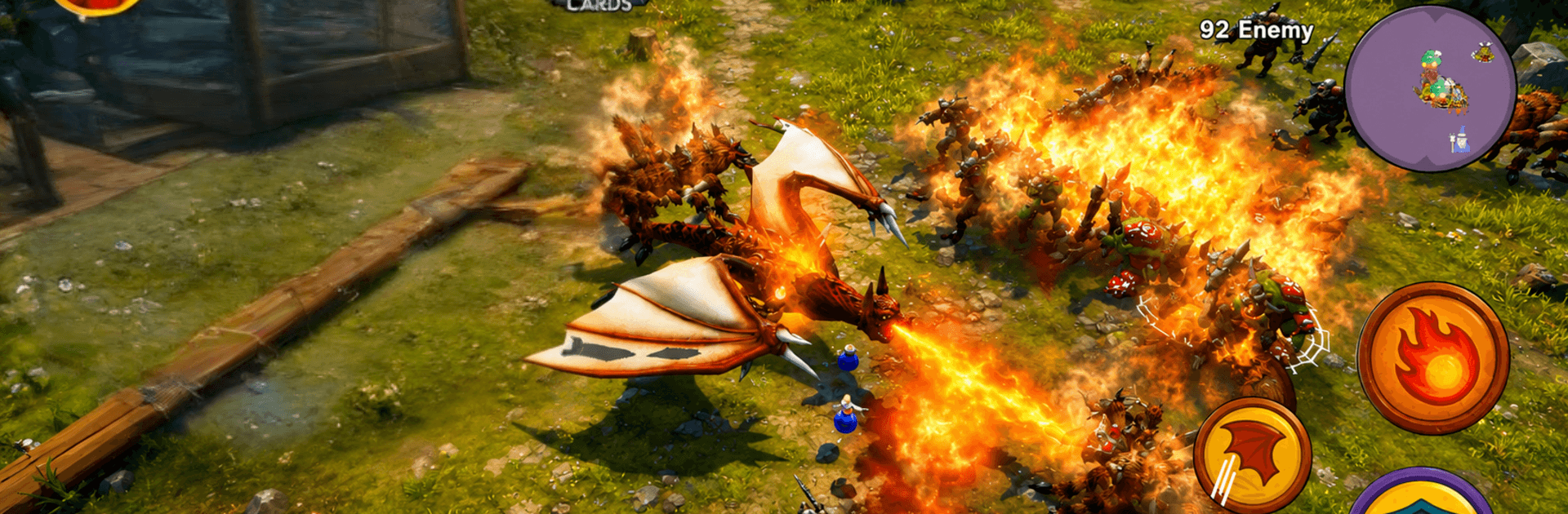
Dragon Guardians: Action RPG drops you into a bright, monster-filled world where you raise mighty dragons and put their powers to the test. It’s an Action experience that blends fast aerial combat, quick decision-making, and team building as you push back a creeping darkness. Prefer a bigger screen and precise inputs? You can play it on PC with BlueStacks.

Game Features

  • Train your brood: Grow a roster of distinct dragons, boost their stats, and unlock signature moves that reshape how you approach each fight.
  • Aerial skirmishes: Glide, swoop, and strike from above while dodging projectiles and unleashing breath attacks that clear the skies.
  • Elemental mastery: Wield fire, ice, lightning, wind, and more—mix elements to break shields, trigger combos, and punish weak spots.
  • Collect and expand: Gather dragon cards to recruit new guardians, then evolve them into specialized roles for your preferred playstyle.
  • Boss throwdowns: Face towering creatures with tricky patterns and multi-stage battles that reward timing, positioning, and smart swaps.
  • Team synergies: Build a squad, switch dragons mid-battle, and chain abilities to control crowds or burst down priority targets.
  • Progress that sticks: Earn resources after every encounter and channel them into permanent upgrades that make the next run smoother.
  • Worlds worth exploring: Fly across lava cliffs, frozen ruins, and stormy coasts—each zone adds fresh enemies and hazards to learn.
  • Easy-to-grasp controls: Jump in fast with intuitive controls and clear feedback, so skill expression—not fiddly inputs—steals the spotlight.
  • Skill paths to explore: Invest in passives and new abilities to fine-tune damage, survivability, or utility, crafting builds that feel uniquely yours.

BlueStacks gives you more room to focus on the game and less time adjusting around mobile limitations.


Game Features

Enhancements

  • Macros
  • Multi Instance
  • Multi Instance Sync
  • Eco Mode
  • Enhancements
Macros

Macros

Skip the boring parts of a game. Play Dragon Guardians: Action RPG with Macros and get the edge. Simply record a sequence of commands and execute them at any moment.
Multi Instance

Multi Instance

Why limit to one game on your phone when you can play many on your PC? Open multiple instances of Dragon Guardians: Action RPG at once with Multi-Instance. Leverage the power of different accounts by doing more.
Multi Instance Sync

Multi Instance Sync

Get the best out of Dragon Guardians: Action RPG with Multi-Instance Sync. Play the game from different accounts and build your own empire. Use Multi-instance sync to repeat the action in the main BlueStacks instance on all other instances.
Eco Mode

Eco Mode

Find the rarest heroes by making multiple summons in Dragon Guardians: Action RPG. And while you are at it, reduce your PC’s resource consumption with the Eco Mode. Farm efficiently. Get the best results.
Read More

How to Download and Play Dragon Guardians: Action RPG on PC or Mac

  • Download and install BlueStacks on your PC or Mac

  • Complete Google sign-in to access the Play Store, or do it later

  • Look for Dragon Guardians: Action RPG in the search bar at the top right corner

  • Click to install Dragon Guardians: Action RPG from the search results

  • Complete Google sign-in (if you skipped step 2) to install Dragon Guardians: Action RPG

  • Click the Dragon Guardians: Action RPG icon on the home screen to start playing

video
Watch Video

Minimum System Requirements

With BlueStacks 5, you can get started on a PC that fulfills the following requirements.

  • Operating System

    Microsoft Windows 7 or above, macOS 11 (Big Sur) or above

  • Processor

    Intel, AMD or Apple Silicon Processor

  • RAM

    at least 4GB

  • HDD

    10GB Free Disk Space

Note:

* You must be an Administrator on your PC. Up to date graphics drivers from Microsoft or the chipset vendor.

Dragon Guardians: Action RPG - FAQs

  • How to play Dragon Guardians: Action RPG on Windows PC & Mac?

    Play Dragon Guardians: Action RPG on your PC or Mac by following these simple steps.

    • Click on 'Play Dragon Guardians: Action RPG on PC’ to download BlueStacks
    • Install it and log-in to Google Play Store
    • Launch and play the game.
  • Why is BlueStacks the fastest and safest platform to play games on PC?

    BlueStacks respects your privacy and is always safe and secure to use. It does not carry any malware, spyware, or any sort of additional software that could harm your PC.

    It is engineered to optimize speed and performance for a seamless gaming experience.

  • What are Dragon Guardians: Action RPG PC requirements?

    Minimum requirement to run Dragon Guardians: Action RPG on your PC

    • OS: Microsoft Windows 7 or above MacOS 11 (Big Sur) or above
    • Processor: Intel, AMD or Apple Silicon Processor
    • RAM: Your PC must have at least 4GB of RAM. (Note that having 4GB or more disk space is not a substitute for RAM)
    • HDD: 10GB Free Disk Space.
    • You must be an Administrator on your PC.