Drone Fury: War Shooting Games

Drone Fury: War Shooting Games

Action

| Jazzi Games

Play on PC with BlueStacks or from our cloud

  • Overview
  • Game Features
  • How to Play

Page Modified On: October 30, 2026

Play Drone Fury: War Shooting Games on PC or Mac

Drone Fury: War Shooting Games brings the Action genre to life, and throws up exciting challenges for gamers. Developed by Jazzi Games, this Android game is best experienced on BlueStacks, the World’s #1 app player for PC and Mac users.

About the Game

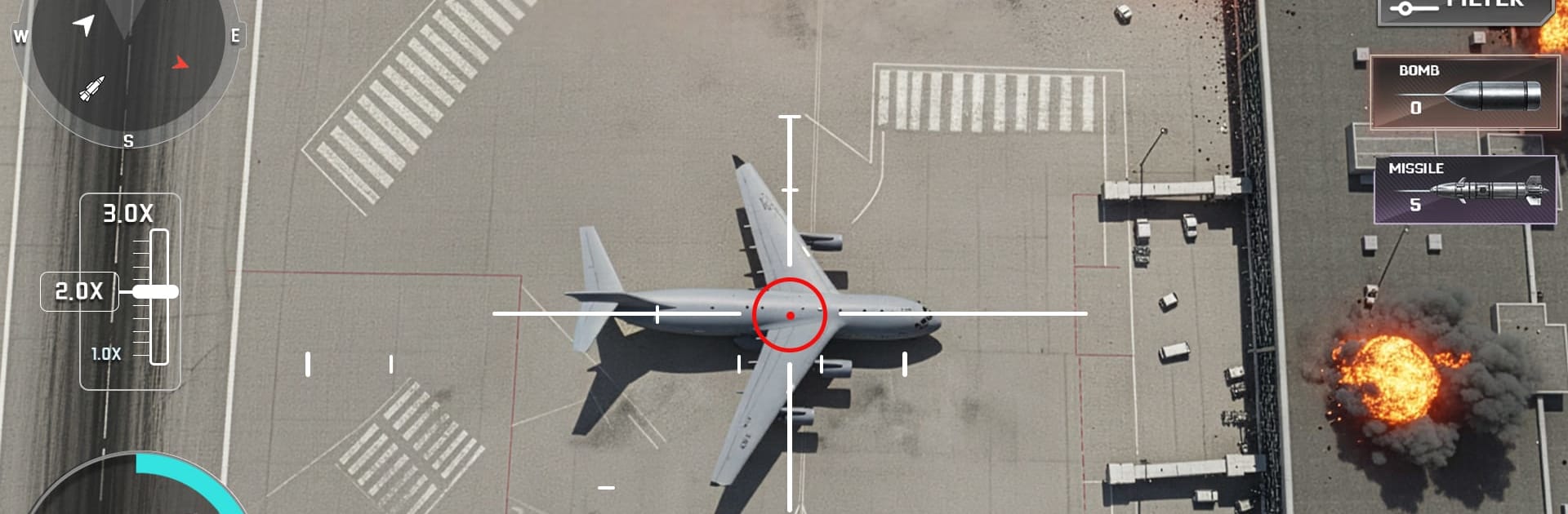
Drone Fury: War Shooting Games puts you in the hot seat of modern aerial combat, where every decision can flip a mission from clean win to chaotic scramble. It’s an Action experience focused on precision strikes, stealth flights, and cool-headed tactics. Want a bigger view? It also plays great on BlueStacks if you’re into keyboard-and-mouse control.

Game Features

  • Tactical FPV Combat: Fly using first-person drone feeds and swap between thermal, infrared, and night optics to spot targets hiding in darkness, smoke, or rough weather.
  • Varied Missions: Hit armored convoys and radar sites, provide overwatch for friendly units, hold the line during base assaults, and take the fight to the sea against warships and sub installations.
  • Specialized UAV Arsenal: Field a lineup of purpose-built drones—fast strike models, long-range delta-wing carriers, stealth platforms for low-light ops, and precision rigs designed to shrug off signal jamming.
  • Smart Weapons Suite: Load out with heat-seeking missiles, laser-guided bombs, rapid cannons, and EMP tools; then tweak performance with faster locks, longer flight time, stronger armor, and tuned sensors.
  • Countermeasures and Evasion: Expect SAMs and heavy flak; break locks with flares, jink hard, change altitude, and use timing to slip past enemy fire and finish the job.
  • Progression and Ranks: Earn medals, climb a military ladder from rookie pilot to seasoned commander, and unlock tougher drones and gear as your reputation grows.
  • Gunship-Style Moments: Rain down precision support from high altitude when missions call for overwhelming firepower and tight target control.
  • Offline Play: Run full missions without an internet connection, perfect for long sessions or quick sorties when you’ve got a few minutes.
  • Smooth Performance: Enjoy quick loads and stable frame rates thanks to a lean build that keeps the focus on crisp visuals and responsive controls.

Start playing Drone Fury: War Shooting Games on BlueStacks and get a smoother, more comfortable PC or Mac setup.


Game Features

Enhancements

  • Macros
  • Multi Instance
  • Multi Instance Sync
  • Eco Mode
  • Enhancements
Macros

Macros

Skip the boring parts of a game. Play Drone Fury: War Shooting Games with Macros and get the edge. Simply record a sequence of commands and execute them at any moment.
Multi Instance

Multi Instance

Why limit to one game on your phone when you can play many on your PC? Open multiple instances of Drone Fury: War Shooting Games at once with Multi-Instance. Leverage the power of different accounts by doing more.
Multi Instance Sync

Multi Instance Sync

Get the best out of Drone Fury: War Shooting Games with Multi-Instance Sync. Play the game from different accounts and build your own empire. Use Multi-instance sync to repeat the action in the main BlueStacks instance on all other instances.
Eco Mode

Eco Mode

Find the rarest heroes by making multiple summons in Drone Fury: War Shooting Games. And while you are at it, reduce your PC’s resource consumption with the Eco Mode. Farm efficiently. Get the best results.
Read More

How to Download and Play Drone Fury: War Shooting Games on PC or Mac

  • Download and install BlueStacks on your PC or Mac

  • Complete Google sign-in to access the Play Store, or do it later

  • Look for Drone Fury: War Shooting Games in the search bar at the top right corner

  • Click to install Drone Fury: War Shooting Games from the search results

  • Complete Google sign-in (if you skipped step 2) to install Drone Fury: War Shooting Games

  • Click the Drone Fury: War Shooting Games icon on the home screen to start playing

video
Watch Video

Minimum System Requirements

With BlueStacks 5, you can get started on a PC that fulfills the following requirements.

  • Operating System

    Microsoft Windows 7 or above, macOS 11 (Big Sur) or above

  • Processor

    Intel, AMD or Apple Silicon Processor

  • RAM

    at least 4GB

  • HDD

    10GB Free Disk Space

Note:

* You must be an Administrator on your PC. Up to date graphics drivers from Microsoft or the chipset vendor.

Drone Fury: War Shooting Games - FAQs

  • How to play Drone Fury: War Shooting Games on Windows PC & Mac?

    Play Drone Fury: War Shooting Games on your PC or Mac by following these simple steps.

    • Click on 'Play Drone Fury: War Shooting Games on PC’ to download BlueStacks
    • Install it and log-in to Google Play Store
    • Launch and play the game.
  • Why is BlueStacks the fastest and safest platform to play games on PC?

    BlueStacks respects your privacy and is always safe and secure to use. It does not carry any malware, spyware, or any sort of additional software that could harm your PC.

    It is engineered to optimize speed and performance for a seamless gaming experience.

  • What are Drone Fury: War Shooting Games PC requirements?

    Minimum requirement to run Drone Fury: War Shooting Games on your PC

    • OS: Microsoft Windows 7 or above MacOS 11 (Big Sur) or above
    • Processor: Intel, AMD or Apple Silicon Processor
    • RAM: Your PC must have at least 4GB of RAM. (Note that having 4GB or more disk space is not a substitute for RAM)
    • HDD: 10GB Free Disk Space.
    • You must be an Administrator on your PC.