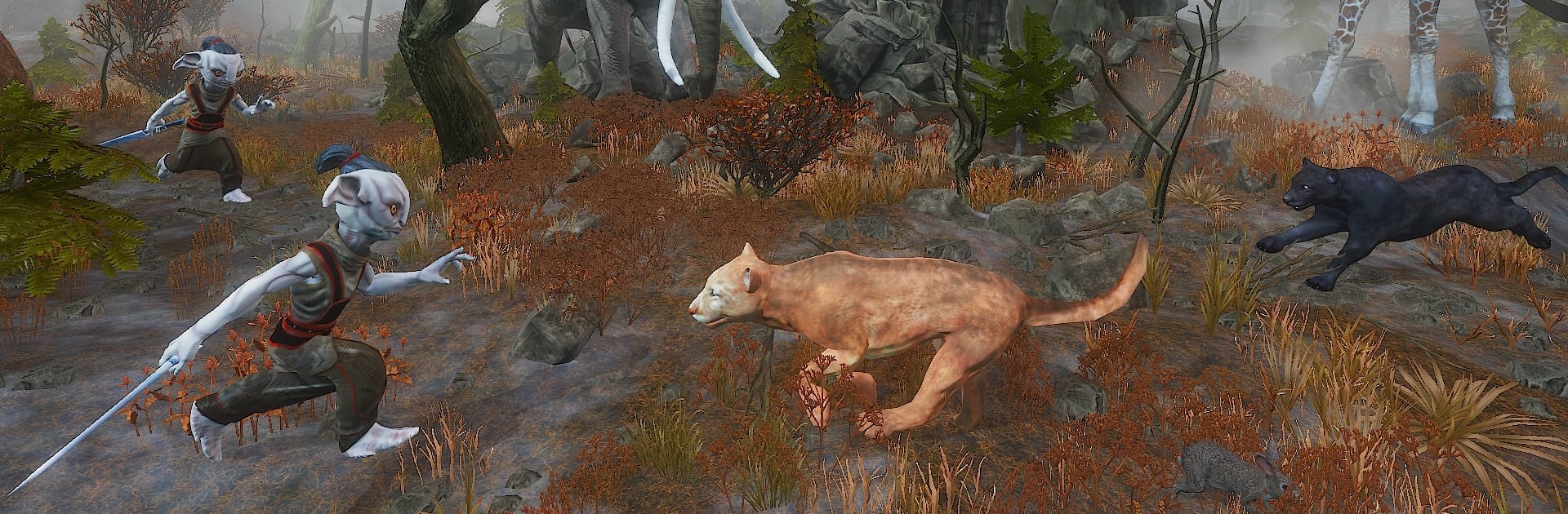
Forest Guardian Simulator

Forest Guardian Simulator

Action

| Yusibo Simulator Games

Play on PC with BlueStacks or from our cloud

  • Overview
  • Game Features
  • How to Play

Page Modified On: April 21, 2026

Play Forest Guardian Simulator on PC or Mac

Join millions to experience Forest Guardian Simulator, an exciting Action game from Yusibo Simulator Games. With BlueStacks App Player, you are always a step ahead of your opponent, ready to outplay them with faster gameplay and better control with the mouse and keyboard on your PC or Mac.

About the Game

Forest Guardian Simulator is an Action game from Yusibo Simulator Games that puts you in charge of a tight-knit pack sworn to protect a living, breathing jungle. You’re not just swinging a sword—you’re planning ambushes, calling the shots, and reacting when trouble stirs in the trees. Expect quick clashes, smart positioning, and those tense moments where one well-timed ability saves the whole team.

Game Features

  • Lead the pack: Command a squad of guardians, swap between members on the fly, and set up smart plays that turn a chaotic fight into a clean win.
  • Enemies with personality: Face off against humans, monsters, and roaming barbarians—each with quirks that force you to rethink your approach.
  • Tactical abilities: Every guardian brings a unique skill set, from hard-hitting power moves to crowd control and support—mix and match for the right situation.
  • Allies from the wild: Cross paths with jungle animals that can become helpful companions, adding utility and extra bite to your strategy.
  • Rising challenge: As you push deeper into the forest, encounters get tougher and faster, pushing both your reflexes and your planning.
  • Living jungle: Stalk through dense undergrowth, patrol ancient ruins, and use the terrain to your advantage—flanks, funnels, and high ground matter here.
  • Snappy combat feel: Responsive controls and readable animations make it easy to weave abilities together and react when enemies swarm.
  • Play your way: Prefer keyboard and mouse? The game runs smoothly on BlueStacks, so you can handle pack management and combat with comfy PC controls.

Get ready for a buttery smooth, high-performance gaming action only on BlueStacks.

Game Features

Enhancements

  • Macros
  • Multi Instance
  • Multi Instance Sync
  • Eco Mode
  • Enhancements
Macros

Macros

Skip the boring parts of a game. Play Forest Guardian Simulator with Macros and get the edge. Simply record a sequence of commands and execute them at any moment.
Multi Instance

Multi Instance

Why limit to one game on your phone when you can play many on your PC? Open multiple instances of Forest Guardian Simulator at once with Multi-Instance. Leverage the power of different accounts by doing more.
Multi Instance Sync

Multi Instance Sync

Get the best out of Forest Guardian Simulator with Multi-Instance Sync. Play the game from different accounts and build your own empire. Use Multi-instance sync to repeat the action in the main BlueStacks instance on all other instances.
Eco Mode

Eco Mode

Find the rarest heroes by making multiple summons in Forest Guardian Simulator. And while you are at it, reduce your PC’s resource consumption with the Eco Mode. Farm efficiently. Get the best results.
Read More

How to Download and Play Forest Guardian Simulator on PC or Mac

  • Download and install BlueStacks on your PC or Mac

  • Complete Google sign-in to access the Play Store, or do it later

  • Look for Forest Guardian Simulator in the search bar at the top right corner

  • Click to install Forest Guardian Simulator from the search results

  • Complete Google sign-in (if you skipped step 2) to install Forest Guardian Simulator

  • Click the Forest Guardian Simulator icon on the home screen to start playing

video
Watch Video

Minimum System Requirements

With BlueStacks 5, you can get started on a PC that fulfills the following requirements.

  • Operating System

    Microsoft Windows 7 or above, macOS 11 (Big Sur) or above

  • Processor

    Intel, AMD or Apple Silicon Processor

  • RAM

    at least 4GB

  • HDD

    10GB Free Disk Space

Note:

* You must be an Administrator on your PC. Up to date graphics drivers from Microsoft or the chipset vendor.

Forest Guardian Simulator - FAQs

  • How to play Forest Guardian Simulator on Windows PC & Mac?

    Play Forest Guardian Simulator on your PC or Mac by following these simple steps.

    • Click on 'Play Forest Guardian Simulator on PC’ to download BlueStacks
    • Install it and log-in to Google Play Store
    • Launch and play the game.
  • Why is BlueStacks the fastest and safest platform to play games on PC?

    BlueStacks respects your privacy and is always safe and secure to use. It does not carry any malware, spyware, or any sort of additional software that could harm your PC.

    It is engineered to optimize speed and performance for a seamless gaming experience.

  • What are Forest Guardian Simulator PC requirements?

    Minimum requirement to run Forest Guardian Simulator on your PC

    • OS: Microsoft Windows 7 or above MacOS 11 (Big Sur) or above
    • Processor: Intel, AMD or Apple Silicon Processor
    • RAM: Your PC must have at least 4GB of RAM. (Note that having 4GB or more disk space is not a substitute for RAM)
    • HDD: 10GB Free Disk Space.
    • You must be an Administrator on your PC.