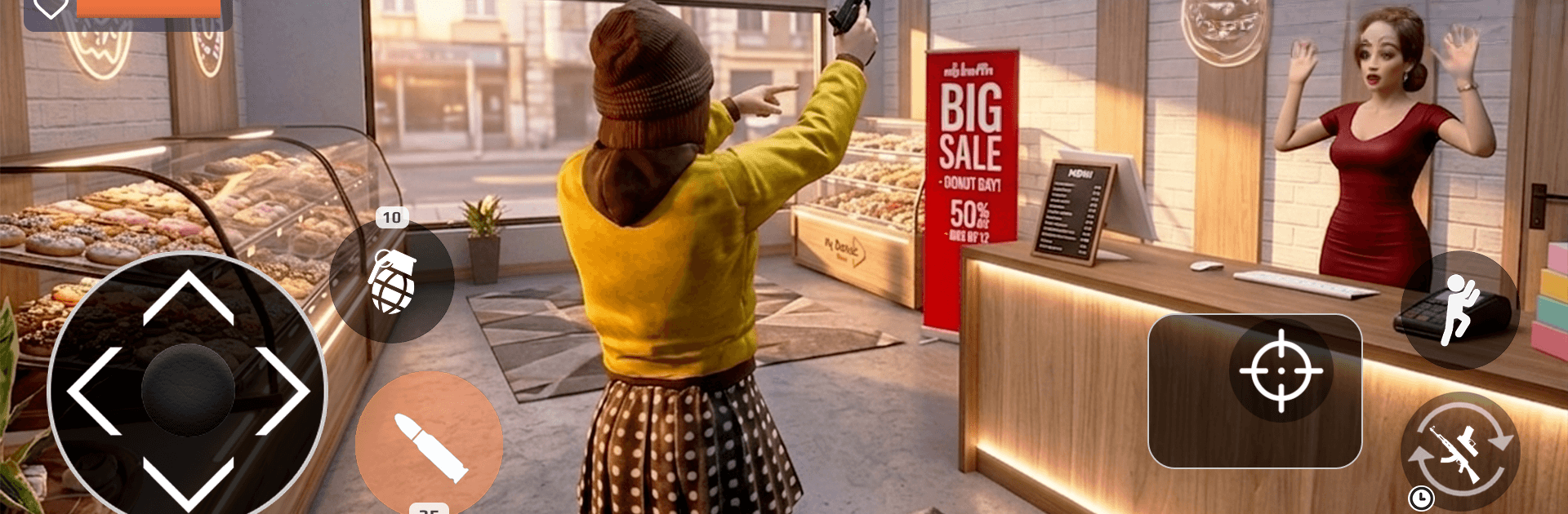
Grand Crime RP Life Simulator

Grand Crime RP Life Simulator

Action

| Game Pickle

Play on PC with BlueStacks or from our cloud

  • Overview
  • Game Features
  • How to Play

Page Modified On: September 07, 2026

Play Grand Crime RP Life Simulator on PC or Mac

Explore a whole new adventure with Grand Crime RP Life Simulator, a Action game created by Game Pickle. Experience great gameplay with BlueStacks, the most popular gaming platform to play Android games on your PC or Mac.

About the Game

Grand Crime RP Life Simulator throws you into a sprawling city where every risky choice can pay off big—or blow up fast. This Action game is all about building a name, taking on daring jobs, and shaping your own path from small-time hustler to city-shaking boss. If you like playing on PC, it also runs nicely with BlueStacks.

Game Features

  • Open-world sandbox: Roam a dense urban map packed with shady corners, bright skylines, and plenty of side hustles waiting to be found.
  • Your path, your rules: Back the badge, side with the gangs, or play both—your decisions shift who’s got your back and who’s on your tail.
  • High-stakes missions: Hit rival hideouts, pull off heists, escort VIPs, recover stolen cash, wreck enemy convoys, and face down bosses for citywide control.
  • Big arsenal, big impact: Handle pistols, shotguns, rifles, snipers, and heavy hitters like launchers and grenades, each tuned for close brawls or long-range standoffs.
  • Land, sea, and air rides: Jack, collect, and customize more than 60 vehicles—cars, helicopters, planes, and boats—then use them to outrun heat or pull off slick getaways.
  • Thrilling chases and firefights: Weave through traffic, cut across rooftops, or skim the water while bullets fly and sirens close in.
  • Crew command: Rally a squad for tougher gigs, call the shots mid-mission, and push your influence deeper into enemy turf.
  • Style and properties: Switch up outfits and looks, then invest in homes, garages, helipads, and docks to expand your reach.
  • Living city systems: A full day-night cycle, rainstorms, and detailed neighborhoods keep the streets unpredictable and always worth another lap.
  • Built-in tools: Use your in-game device to accept contracts, track objectives, and follow GPS routes without breaking immersion.
  • Rank up the hard way: Climb from Bronze to Master by proving it in chases and shootouts—higher rank means harder jobs and tougher rivals.

BlueStacks gives you more room to focus on the game and less time adjusting around mobile limitations.


Game Features

Enhancements

  • Macros
  • Multi Instance
  • Multi Instance Sync
  • Eco Mode
  • Enhancements
Macros

Macros

Skip the boring parts of a game. Play Grand Crime RP Life Simulator with Macros and get the edge. Simply record a sequence of commands and execute them at any moment.
Multi Instance

Multi Instance

Why limit to one game on your phone when you can play many on your PC? Open multiple instances of Grand Crime RP Life Simulator at once with Multi-Instance. Leverage the power of different accounts by doing more.
Multi Instance Sync

Multi Instance Sync

Get the best out of Grand Crime RP Life Simulator with Multi-Instance Sync. Play the game from different accounts and build your own empire. Use Multi-instance sync to repeat the action in the main BlueStacks instance on all other instances.
Eco Mode

Eco Mode

Find the rarest heroes by making multiple summons in Grand Crime RP Life Simulator. And while you are at it, reduce your PC’s resource consumption with the Eco Mode. Farm efficiently. Get the best results.
Read More

How to Download and Play Grand Crime RP Life Simulator on PC or Mac

  • Download and install BlueStacks on your PC or Mac

  • Complete Google sign-in to access the Play Store, or do it later

  • Look for Grand Crime RP Life Simulator in the search bar at the top right corner

  • Click to install Grand Crime RP Life Simulator from the search results

  • Complete Google sign-in (if you skipped step 2) to install Grand Crime RP Life Simulator

  • Click the Grand Crime RP Life Simulator icon on the home screen to start playing

video
Watch Video

Minimum System Requirements

With BlueStacks 5, you can get started on a PC that fulfills the following requirements.

  • Operating System

    Microsoft Windows 7 or above, macOS 11 (Big Sur) or above

  • Processor

    Intel, AMD or Apple Silicon Processor

  • RAM

    at least 4GB

  • HDD

    10GB Free Disk Space

Note:

* You must be an Administrator on your PC. Up to date graphics drivers from Microsoft or the chipset vendor.

Grand Crime RP Life Simulator - FAQs

  • How to play Grand Crime RP Life Simulator on Windows PC & Mac?

    Play Grand Crime RP Life Simulator on your PC or Mac by following these simple steps.

    • Click on 'Play Grand Crime RP Life Simulator on PC’ to download BlueStacks
    • Install it and log-in to Google Play Store
    • Launch and play the game.
  • Why is BlueStacks the fastest and safest platform to play games on PC?

    BlueStacks respects your privacy and is always safe and secure to use. It does not carry any malware, spyware, or any sort of additional software that could harm your PC.

    It is engineered to optimize speed and performance for a seamless gaming experience.

  • What are Grand Crime RP Life Simulator PC requirements?

    Minimum requirement to run Grand Crime RP Life Simulator on your PC

    • OS: Microsoft Windows 7 or above MacOS 11 (Big Sur) or above
    • Processor: Intel, AMD or Apple Silicon Processor
    • RAM: Your PC must have at least 4GB of RAM. (Note that having 4GB or more disk space is not a substitute for RAM)
    • HDD: 10GB Free Disk Space.
    • You must be an Administrator on your PC.