HoleCraft
HoleCraft

HoleCraft

Action

| BRAINWORKS PUBLISHING PTE. LTD.

Play on PC with BlueStacks or from our cloud

  • Overview
  • Game Features
  • How to Play

Page Modified On: May 25, 2026

Play HoleCraft on PC or Mac

Explore a whole new adventure with HoleCraft, a Action game created by BRAINWORKS PUBLISHING PTE. LTD.. Experience great gameplay with BlueStacks, the most popular gaming platform to play Android games on your PC or Mac.

About the Game

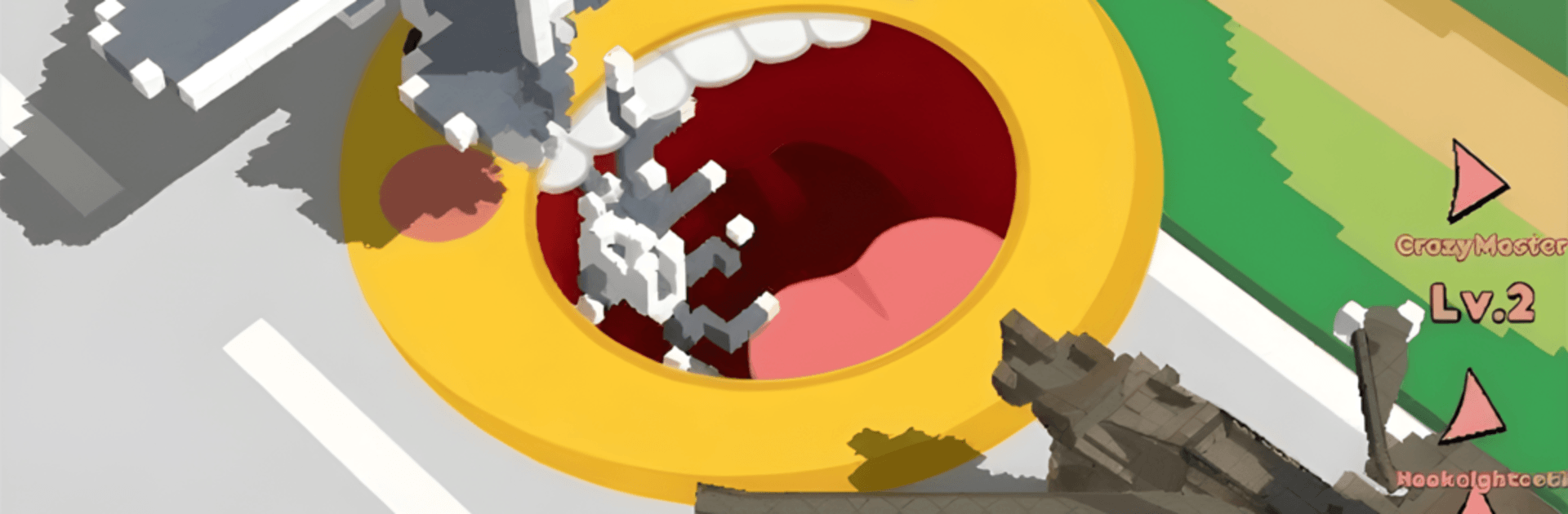
HoleCraft is an Action game where you steer a hungry black hole through a bright voxel city and watch everything crumble in the best possible way. You begin as a tiny speck, scooping up grass and small props, then snowball into a force that gulps cars, bridges, and entire towers. It’s quick to pick up, oddly calming, and a little chaotic—perfect for when you want instant, crunchy destruction without the fuss.

Game Features

  • Voxel Crunch, Everywhere: Buildings, vehicles, trees—everything shatters into chunky cubes that tumble straight into your void. It’s messy in all the right ways.
  • From Small Fry to City-Sized: Start nibbling on little things, then grow big enough to swallow skyscrapers and even aircraft once you’ve powered up.
  • Physics You Can Feel: Blocks collide, stack, and cascade with weighty reactions, turning each pass into a chain of satisfying collapses.
  • One-Finger Controls: Drag to move, target objects smaller than your current size, and keep feeding the hole to get massive. Easy to learn, sneaky to master.
  • Upgrades with Real Impact: Spend your points to boost size, speed, and suction. Build a speedy scout or a slow, unstoppable vacuum—it’s your call.
  • Timed Runs or Total Wipes: Chase high scores against the clock or methodically clean the entire map. Both scratch a different itch.
  • Smooth and Steady: Optimized for a slick 60 FPS feel on a wide range of devices, so the chaos never stutters.
  • Plays Great on PC: Prefer a bigger screen? HoleCraft runs nicely on BlueStacks, making those block avalanches look even more dramatic.

Start playing HoleCraft on BlueStacks and get a smoother, more comfortable PC or Mac setup.

Game Features

Enhancements

  • Macros
  • Multi Instance
  • Multi Instance Sync
  • Eco Mode
  • Enhancements
Macros

Macros

Skip the boring parts of a game. Play HoleCraft with Macros and get the edge. Simply record a sequence of commands and execute them at any moment.
Multi Instance

Multi Instance

Why limit to one game on your phone when you can play many on your PC? Open multiple instances of HoleCraft at once with Multi-Instance. Leverage the power of different accounts by doing more.
Multi Instance Sync

Multi Instance Sync

Get the best out of HoleCraft with Multi-Instance Sync. Play the game from different accounts and build your own empire. Use Multi-instance sync to repeat the action in the main BlueStacks instance on all other instances.
Eco Mode

Eco Mode

Find the rarest heroes by making multiple summons in HoleCraft. And while you are at it, reduce your PC’s resource consumption with the Eco Mode. Farm efficiently. Get the best results.
Read More

How to Download and Play HoleCraft on PC or Mac

  • Download and install BlueStacks on your PC or Mac

  • Complete Google sign-in to access the Play Store, or do it later

  • Look for HoleCraft in the search bar at the top right corner

  • Click to install HoleCraft from the search results

  • Complete Google sign-in (if you skipped step 2) to install HoleCraft

  • Click the HoleCraft icon on the home screen to start playing

video
Watch Video

Minimum System Requirements

With BlueStacks 5, you can get started on a PC that fulfills the following requirements.

  • Operating System

    Microsoft Windows 7 or above, macOS 11 (Big Sur) or above

  • Processor

    Intel, AMD or Apple Silicon Processor

  • RAM

    at least 4GB

  • HDD

    10GB Free Disk Space

Note:

* You must be an Administrator on your PC. Up to date graphics drivers from Microsoft or the chipset vendor.

HoleCraft - FAQs

  • How to play HoleCraft on Windows PC & Mac?

    Play HoleCraft on your PC or Mac by following these simple steps.

    • Click on 'Play HoleCraft on PC’ to download BlueStacks
    • Install it and log-in to Google Play Store
    • Launch and play the game.
  • Why is BlueStacks the fastest and safest platform to play games on PC?

    BlueStacks respects your privacy and is always safe and secure to use. It does not carry any malware, spyware, or any sort of additional software that could harm your PC.

    It is engineered to optimize speed and performance for a seamless gaming experience.

  • What are HoleCraft PC requirements?

    Minimum requirement to run HoleCraft on your PC

    • OS: Microsoft Windows 7 or above MacOS 11 (Big Sur) or above
    • Processor: Intel, AMD or Apple Silicon Processor
    • RAM: Your PC must have at least 4GB of RAM. (Note that having 4GB or more disk space is not a substitute for RAM)
    • HDD: 10GB Free Disk Space.
    • You must be an Administrator on your PC.