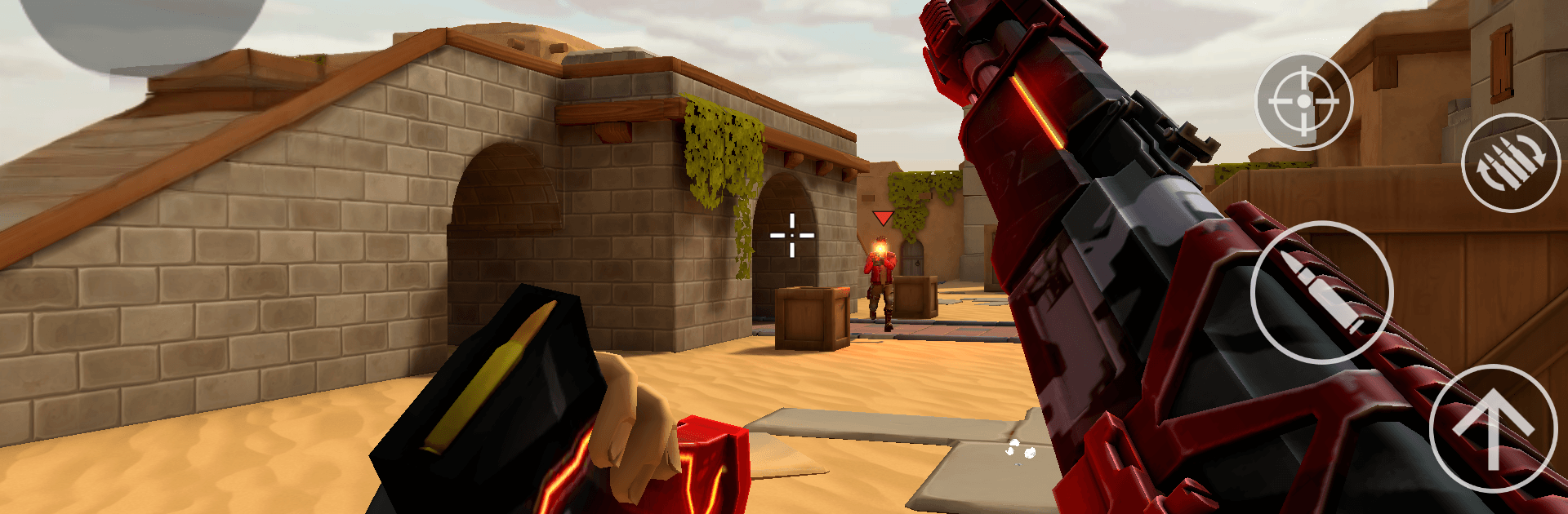
Hyper Strike PVP FPS

Hyper Strike PVP FPS

Action

| MAD PIXEL GAMES LTD

Play on PC with BlueStacks or from our cloud

  • Overview
  • Game Features
  • How to Play

Page Modified On: May 11, 2026

Play Hyper Strike PVP FPS on PC or Mac

Step into the World of Hyper Strike PVP FPS, a thrilling Action game from the house of MAD PIXEL GAMES LTD. Play this Android game on BlueStacks App Player and experience immersive gaming on PC or Mac.

About the Game

Hyper Strike PVP FPS is a sharp, competitive shooter where fast reflexes meet smart planning. Jump into tight matches that reward quick thinking, clean aim, and a little bit of nerve when the clock’s running down. It’s an Action title from MAD PIXEL GAMES LTD built for players who love fine-tuned gunplay and team-driven tactics. Prefer a larger display? It plays great on BlueStacks if you want that big-screen feel.

Game Features

  • Authentic gun feel: Every trigger pull matters. Recoil kicks, bullets travel and drop over distance, and different calibers handle in their own way—so your aim and timing truly count.
  • 50+ licensed weapons: From trusty rifles to punchy SMGs, there’s a deep armory to master. Each firearm has its own personality, and you can make it yours with tons of tweaks.
  • Deep Gunsmith system: Swap optics, grips, barrels, and stocks to shape your perfect setup. Build a fast-handling CQB beast or a long-range laser—your call.
  • Tactical 5v5 matches: Coordinate in real time with in-game voice chat. Use drones, breaching tools, and other gadgets to crack defenses, secure objectives, and outthink the other side.
  • Objective-focused modes: It’s not just about frags. Secure sites, hold zones, and make smart trades to swing the round in your favor.
  • Standout visuals: From rain-slick city blocks to sunbaked outposts, maps look detailed and atmospheric, helping you read angles and spot movement.
  • Ranked and seasonal play: Climb leaderboards, enter seasonal tournaments, and earn exclusive rewards that show you’ve put in the work.

Slay your opponents with your epic moves. Play it your way on BlueStacks and dominate the battlefield.


Game Features

Enhancements

  • Macros
  • Multi Instance
  • Multi Instance Sync
  • Eco Mode
  • Enhancements
Macros

Macros

Skip the boring parts of a game. Play Hyper Strike PVP FPS with Macros and get the edge. Simply record a sequence of commands and execute them at any moment.
Multi Instance

Multi Instance

Why limit to one game on your phone when you can play many on your PC? Open multiple instances of Hyper Strike PVP FPS at once with Multi-Instance. Leverage the power of different accounts by doing more.
Multi Instance Sync

Multi Instance Sync

Get the best out of Hyper Strike PVP FPS with Multi-Instance Sync. Play the game from different accounts and build your own empire. Use Multi-instance sync to repeat the action in the main BlueStacks instance on all other instances.
Eco Mode

Eco Mode

Find the rarest heroes by making multiple summons in Hyper Strike PVP FPS. And while you are at it, reduce your PC’s resource consumption with the Eco Mode. Farm efficiently. Get the best results.
Read More

How to Download and Play Hyper Strike PVP FPS on PC or Mac

  • Download and install BlueStacks on your PC or Mac

  • Complete Google sign-in to access the Play Store, or do it later

  • Look for Hyper Strike PVP FPS in the search bar at the top right corner

  • Click to install Hyper Strike PVP FPS from the search results

  • Complete Google sign-in (if you skipped step 2) to install Hyper Strike PVP FPS

  • Click the Hyper Strike PVP FPS icon on the home screen to start playing

video
Watch Video

Minimum System Requirements

With BlueStacks 5, you can get started on a PC that fulfills the following requirements.

  • Operating System

    Microsoft Windows 7 or above, macOS 11 (Big Sur) or above

  • Processor

    Intel, AMD or Apple Silicon Processor

  • RAM

    at least 4GB

  • HDD

    10GB Free Disk Space

Note:

* You must be an Administrator on your PC. Up to date graphics drivers from Microsoft or the chipset vendor.

Hyper Strike PVP FPS - FAQs

  • How to play Hyper Strike PVP FPS on Windows PC & Mac?

    Play Hyper Strike PVP FPS on your PC or Mac by following these simple steps.

    • Click on 'Play Hyper Strike PVP FPS on PC’ to download BlueStacks
    • Install it and log-in to Google Play Store
    • Launch and play the game.
  • Why is BlueStacks the fastest and safest platform to play games on PC?

    BlueStacks respects your privacy and is always safe and secure to use. It does not carry any malware, spyware, or any sort of additional software that could harm your PC.

    It is engineered to optimize speed and performance for a seamless gaming experience.

  • What are Hyper Strike PVP FPS PC requirements?

    Minimum requirement to run Hyper Strike PVP FPS on your PC

    • OS: Microsoft Windows 7 or above MacOS 11 (Big Sur) or above
    • Processor: Intel, AMD or Apple Silicon Processor
    • RAM: Your PC must have at least 4GB of RAM. (Note that having 4GB or more disk space is not a substitute for RAM)
    • HDD: 10GB Free Disk Space.
    • You must be an Administrator on your PC.