Misfitz
Misfitz

Misfitz

Action

| Antihero Studios Inc.

Play on PC with BlueStacks or from our cloud

  • Overview
  • Game Features
  • How to Play

Page Modified On: October 12, 2026

Play Misfitz on PC or Mac

Misfitz by Antihero Studios Inc. has plenty to keep you busy. BlueStacks lets you play it on PC or Mac with more screen space, better control, and fewer mobile limits.

About the Game

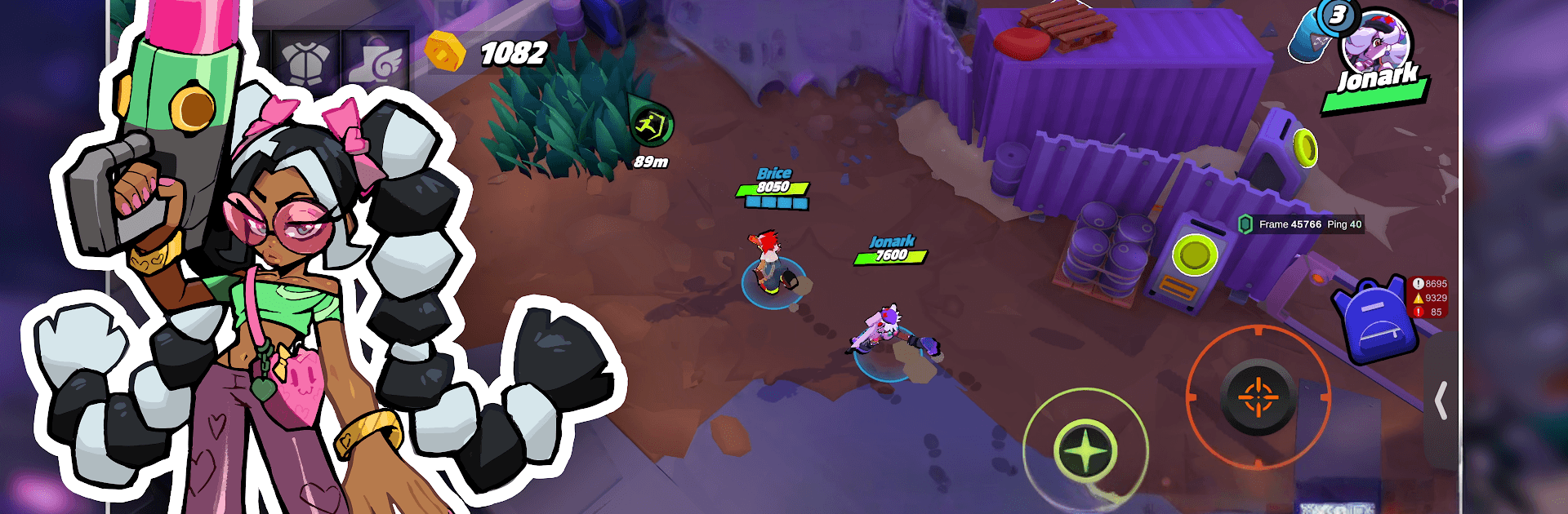
Misfitz throws you into a neon-drenched scrap for survival and bragging rights. It’s an Action extraction shooter that blends top-down, MOBA-style skirmishes with the relentless tension of staying alive long enough to cash out. In a city “optimized” by the entity called Zero, you sneak into machine-run zones to steal back pieces of human culture—Relics—then make it out before everything goes sideways. Prefer a bigger screen? It plays smoothly on PC with BlueStacks.

Game Features

  • PvPvE Showdowns: Battle ruthless bots while reading and outsmarting real squads in fast, tactical engagements.
  • Extraction Stakes: Reach the evac and bank your haul to upgrade gear; go down, and your entire loadout is gone.
  • Relic Heists: Hunt through neon-lit districts for weapons, rare resources, and priceless Relics packed with lost songs, art, and memories.
  • Distinct Misfitz Abilities: Choose characters with standout skills, then tailor builds and loadouts that match your playstyle.
  • Top-Down Precision: Snappy controls and clear sightlines make positioning, kiting, and ability timing feel crisp and satisfying.
  • Trust—or Treachery: Team up for coordinated pushes, then decide if you’ll split the spoils or keep everything the cutthroat way.
  • Machine-Controlled Zones: Navigate hostile, Zero-enforced areas that keep the pressure high and punish sloppy routes.
  • Loot, Adapt, Escape: Scavenge on the fly, pivot when plans break, and race for extraction before someone else claims your score.

Get ready for a buttery smooth, high-performance gaming action only on BlueStacks.

Game Features

Enhancements

  • Macros
  • Multi Instance
  • Multi Instance Sync
  • Eco Mode
  • Enhancements
Macros

Macros

Skip the boring parts of a game. Play Misfitz with Macros and get the edge. Simply record a sequence of commands and execute them at any moment.
Multi Instance

Multi Instance

Why limit to one game on your phone when you can play many on your PC? Open multiple instances of Misfitz at once with Multi-Instance. Leverage the power of different accounts by doing more.
Multi Instance Sync

Multi Instance Sync

Get the best out of Misfitz with Multi-Instance Sync. Play the game from different accounts and build your own empire. Use Multi-instance sync to repeat the action in the main BlueStacks instance on all other instances.
Eco Mode

Eco Mode

Find the rarest heroes by making multiple summons in Misfitz. And while you are at it, reduce your PC’s resource consumption with the Eco Mode. Farm efficiently. Get the best results.
Read More

How to Download and Play Misfitz on PC or Mac

  • Download and install BlueStacks on your PC or Mac

  • Complete Google sign-in to access the Play Store, or do it later

  • Look for Misfitz in the search bar at the top right corner

  • Click to install Misfitz from the search results

  • Complete Google sign-in (if you skipped step 2) to install Misfitz

  • Click the Misfitz icon on the home screen to start playing

video
Watch Video

Minimum System Requirements

With BlueStacks 5, you can get started on a PC that fulfills the following requirements.

  • Operating System

    Microsoft Windows 7 or above, macOS 11 (Big Sur) or above

  • Processor

    Intel, AMD or Apple Silicon Processor

  • RAM

    at least 4GB

  • HDD

    10GB Free Disk Space

Note:

* You must be an Administrator on your PC. Up to date graphics drivers from Microsoft or the chipset vendor.

Misfitz - FAQs

  • How to play Misfitz on Windows PC & Mac?

    Play Misfitz on your PC or Mac by following these simple steps.

    • Click on 'Play Misfitz on PC’ to download BlueStacks
    • Install it and log-in to Google Play Store
    • Launch and play the game.
  • Why is BlueStacks the fastest and safest platform to play games on PC?

    BlueStacks respects your privacy and is always safe and secure to use. It does not carry any malware, spyware, or any sort of additional software that could harm your PC.

    It is engineered to optimize speed and performance for a seamless gaming experience.

  • What are Misfitz PC requirements?

    Minimum requirement to run Misfitz on your PC

    • OS: Microsoft Windows 7 or above MacOS 11 (Big Sur) or above
    • Processor: Intel, AMD or Apple Silicon Processor
    • RAM: Your PC must have at least 4GB of RAM. (Note that having 4GB or more disk space is not a substitute for RAM)
    • HDD: 10GB Free Disk Space.
    • You must be an Administrator on your PC.