Monster Super Hero Fight

Monster Super Hero Fight

Action

| Gülşah Doğan

Play on PC with BlueStacks or from our cloud

  • Overview
  • Game Features
  • How to Play

Page Modified On: August 29, 2025

Play Monster Super Hero Fight on PC or Mac

Step into the World of Monster Super Hero Fight, a thrilling Action game from the house of Gülşah Doğan. Play this Android game on BlueStacks App Player and experience immersive gaming on PC or Mac.

About the Game

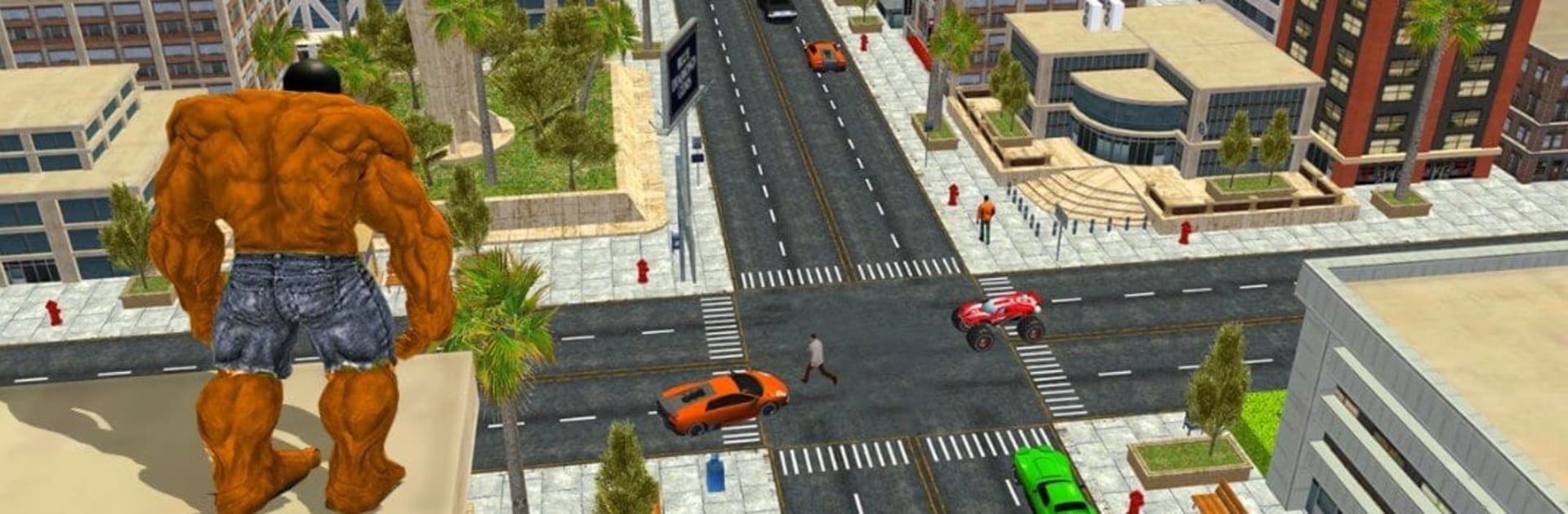
Monster Super Hero Fight from Gülşah Doğan is an Action brawler where you play as a towering, green-skinned powerhouse who treats cars like toys and villains like target practice. It blends quick, story-led rescue missions with street fighting and city-wide destruction, letting you smash through barriers, hurl heavy stuff, and protect civilians while a crime wave crashes over the map. Expect chunky hits, big jumps, and a satisfying sense of weight with every move.

Game Features

  • Play a colossal hero: Step into the boots of a muscle-bound superhuman built for raw strength, wide swings, and bone-rattling ground slams.
  • Story rescue missions: Tackle bite-sized objectives that send you to evacuate citizens, disrupt enemy plans, and hunt down bosses trying to wreck the city.
  • City-scale destruction: Toss cars, rip out street fixtures, break obstacles, and use the environment as your weapon when the fight gets crowded.
  • Beat ’em up combat: Melee-focused action with punchy combos, grabs, and area attacks that clear space fast when the pressure’s on.
  • Powers to unlock: Earn new active and passive abilities—bigger throws, stronger smashes, nastier finishers—and build your monster’s toolkit.
  • Multiple heroes and enemies: Try different monster superheroes and face varied gangsters, mutants, and hulking brutes with their own attack styles.
  • Day and night cycles: Fight across changing city conditions that shift the feel of missions and keep encounters fresh.
  • Timed challenges and practice: Train up, then take on missions with time limits that reward clean routes, good crowd control, and smart power use.
  • Smooth feel, big visuals: HD graphics, chunky animations, and responsive controls sell every impact and leap.
  • Play your way with BlueStacks: Prefer a larger screen and keyboard controls? You can run Monster Super Hero Fight on PC with BlueStacks without changing a thing about the gameplay.

Make your gaming sessions memorable with precise controls that give you an edge in close combats and visuals that pop up, bringing every character to life.


Game Features

Enhancements

  • Macros
  • Multi Instance
  • Multi Instance Sync
  • Eco Mode
  • Enhancements
Macros

Macros

Skip the boring parts of a game. Play Monster Super Hero Fight with Macros and get the edge. Simply record a sequence of commands and execute them at any moment.
Multi Instance

Multi Instance

Why limit to one game on your phone when you can play many on your PC? Open multiple instances of Monster Super Hero Fight at once with Multi-Instance. Leverage the power of different accounts by doing more.
Multi Instance Sync

Multi Instance Sync

Get the best out of Monster Super Hero Fight with Multi-Instance Sync. Play the game from different accounts and build your own empire. Use Multi-instance sync to repeat the action in the main BlueStacks instance on all other instances.
Eco Mode

Eco Mode

Find the rarest heroes by making multiple summons in Monster Super Hero Fight. And while you are at it, reduce your PC’s resource consumption with the Eco Mode. Farm efficiently. Get the best results.
Read More

How to Download and Play Monster Super Hero Fight on PC or Mac

  • Download and install BlueStacks on your PC or Mac

  • Complete Google sign-in to access the Play Store, or do it later

  • Look for Monster Super Hero Fight in the search bar at the top right corner

  • Click to install Monster Super Hero Fight from the search results

  • Complete Google sign-in (if you skipped step 2) to install Monster Super Hero Fight

  • Click the Monster Super Hero Fight icon on the home screen to start playing

video
Watch Video

Minimum System Requirements

With BlueStacks 5, you can get started on a PC that fulfills the following requirements.

  • Operating System

    Microsoft Windows 7 or above, macOS 11 (Big Sur) or above

  • Processor

    Intel, AMD or Apple Silicon Processor

  • RAM

    at least 4GB

  • HDD

    10GB Free Disk Space

Note:

* You must be an Administrator on your PC. Up to date graphics drivers from Microsoft or the chipset vendor.

Monster Super Hero Fight - FAQs

  • How to play Monster Super Hero Fight on Windows PC & Mac?

    Play Monster Super Hero Fight on your PC or Mac by following these simple steps.

    • Click on 'Play Monster Super Hero Fight on PC’ to download BlueStacks
    • Install it and log-in to Google Play Store
    • Launch and play the game.
  • Why is BlueStacks the fastest and safest platform to play games on PC?

    BlueStacks respects your privacy and is always safe and secure to use. It does not carry any malware, spyware, or any sort of additional software that could harm your PC.

    It is engineered to optimize speed and performance for a seamless gaming experience.

  • What are Monster Super Hero Fight PC requirements?

    Minimum requirement to run Monster Super Hero Fight on your PC

    • OS: Microsoft Windows 7 or above MacOS 11 (Big Sur) or above
    • Processor: Intel, AMD or Apple Silicon Processor
    • RAM: Your PC must have at least 4GB of RAM. (Note that having 4GB or more disk space is not a substitute for RAM)
    • HDD: 10GB Free Disk Space.
    • You must be an Administrator on your PC.