Plants vs Brainrots Zombies

Plants vs Brainrots Zombies

Action

| CAPITAL APPS & GAMES

Play on PC with BlueStacks or from our cloud

  • Overview
  • Game Features
  • How to Play

Page Modified On: November 20, 2025

Play Plants vs Brainrots Zombies on PC or Mac

Join millions to experience Plants vs Brainrots Zombies, an exciting Action game from CAPITAL APPS & GAMES. With BlueStacks App Player, you are always a step ahead of your opponent, ready to outplay them with faster gameplay and better control with the mouse and keyboard on your PC or Mac.

About the Game

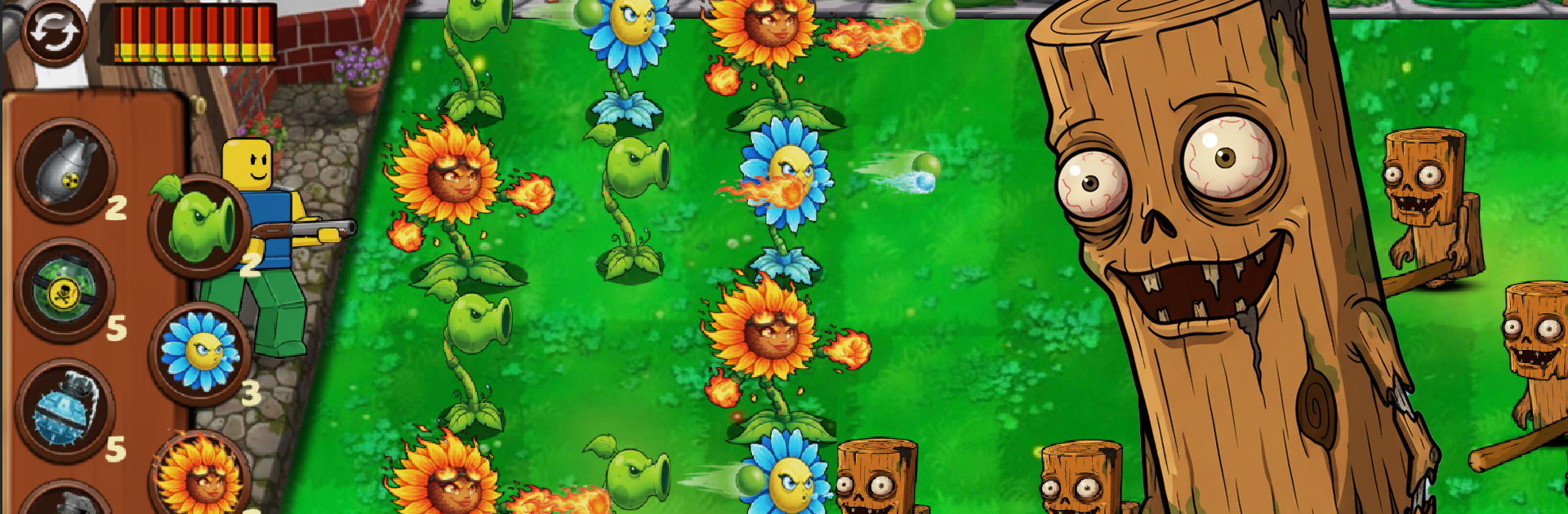
Plants vs Brainrots Zombies is a wild Action mashup from CAPITAL APPS & GAMES where tower defense meets third‑person blasting. You’re not just placing plants and watching—you’re jumping straight into the chaos, mowing down waves of Italian Brainrot-themed zombies while your garden holds the line. It’s fast, goofy, and surprisingly strategic, whether you’re playing in short bursts or getting lost for an hour.

Game Features

  • Hybrid combat
    Plant sturdy defenders to control the lanes, then switch to hands-on shooting to clean up anything that slips through.

  • A parade of Brainrot weirdos
    Face off against meme-fueled zombies like tralelero tralala, Bombardiro Crocodilo, Tung Tung Tung Sahur, Lirili Larila, Brr Brr Patapim, Chimpanzini Bananini, Cappuccino Assassino, La Vaca Saturno Saturnita, and Ballerina Cappuccina—each with their own tricks.

  • Simple controls, quick decisions
    Easy-to-learn inputs make planting and aiming feel snappy, so you can focus on timing, placement, and picking your shots.

  • Build your perfect loadout
    Unlock new weapons and discover fresh plants, then mix and match to create a setup that fits your style—rapid-fire mayhem, heavy hits, or slow-and-steady control.

  • Play anytime, anywhere
    No connection? No problem. The game runs offline and is free to play, so your garden war doesn’t have to stop.

  • Smooth on PC with BlueStacks
    Prefer a keyboard and mouse? You can play Plants vs Brainrots Zombies on your PC through BlueStacks without changing how the game feels.

Make your gaming sessions memorable with precise controls that give you an edge in close combats and visuals that pop up, bringing every character to life.


Game Features

Enhancements

  • Macros
  • Multi Instance
  • Multi Instance Sync
  • Eco Mode
  • Enhancements
Macros

Macros

Skip the boring parts of a game. Play Plants vs Brainrots Zombies with Macros and get the edge. Simply record a sequence of commands and execute them at any moment.
Multi Instance

Multi Instance

Why limit to one game on your phone when you can play many on your PC? Open multiple instances of Plants vs Brainrots Zombies at once with Multi-Instance. Leverage the power of different accounts by doing more.
Multi Instance Sync

Multi Instance Sync

Get the best out of Plants vs Brainrots Zombies with Multi-Instance Sync. Play the game from different accounts and build your own empire. Use Multi-instance sync to repeat the action in the main BlueStacks instance on all other instances.
Eco Mode

Eco Mode

Find the rarest heroes by making multiple summons in Plants vs Brainrots Zombies. And while you are at it, reduce your PC’s resource consumption with the Eco Mode. Farm efficiently. Get the best results.
Read More

How to Download and Play Plants vs Brainrots Zombies on PC or Mac

  • Download and install BlueStacks on your PC or Mac

  • Complete Google sign-in to access the Play Store, or do it later

  • Look for Plants vs Brainrots Zombies in the search bar at the top right corner

  • Click to install Plants vs Brainrots Zombies from the search results

  • Complete Google sign-in (if you skipped step 2) to install Plants vs Brainrots Zombies

  • Click the Plants vs Brainrots Zombies icon on the home screen to start playing

video
Watch Video

Minimum System Requirements

With BlueStacks 5, you can get started on a PC that fulfills the following requirements.

  • Operating System

    Microsoft Windows 7 or above, macOS 11 (Big Sur) or above

  • Processor

    Intel, AMD or Apple Silicon Processor

  • RAM

    at least 4GB

  • HDD

    10GB Free Disk Space

Note:

* You must be an Administrator on your PC. Up to date graphics drivers from Microsoft or the chipset vendor.

Plants vs Brainrots Zombies - FAQs

  • How to play Plants vs Brainrots Zombies on Windows PC & Mac?

    Play Plants vs Brainrots Zombies on your PC or Mac by following these simple steps.

    • Click on 'Play Plants vs Brainrots Zombies on PC’ to download BlueStacks
    • Install it and log-in to Google Play Store
    • Launch and play the game.
  • Why is BlueStacks the fastest and safest platform to play games on PC?

    BlueStacks respects your privacy and is always safe and secure to use. It does not carry any malware, spyware, or any sort of additional software that could harm your PC.

    It is engineered to optimize speed and performance for a seamless gaming experience.

  • What are Plants vs Brainrots Zombies PC requirements?

    Minimum requirement to run Plants vs Brainrots Zombies on your PC

    • OS: Microsoft Windows 7 or above MacOS 11 (Big Sur) or above
    • Processor: Intel, AMD or Apple Silicon Processor
    • RAM: Your PC must have at least 4GB of RAM. (Note that having 4GB or more disk space is not a substitute for RAM)
    • HDD: 10GB Free Disk Space.
    • You must be an Administrator on your PC.